CFEngine Tutorial - Draft
Learn How to Create a Reliable IT Infrastructure
Aleksey Tsalolikhin
Contents
- Acknowledgements
- Copyright and License
- Chapter 1 Orientation
- Chapter 2 Lab Setup
- Chapter 3 Basic Concepts and Terminology
- Chapter 4 Basic Promises
- Chapter 5 Classifying (Grouping) Hosts
- Chapter 6 Notes on Syntax and Internals
- 6.1 Basic Structure
- 6.2 Bundles and Files
- 6.3 Whitespace
- 6.4 Introduction to Syntax Pattern
- 6.5 Comments
- 6.6 Multiple Passes and Convergence
- 6.7 Ordering
- 6.8 Knowledge Management as a Challenge to Scalability
- 6.9 Promise Handles
- 6.10 Documenting Dependencies
- 6.11 Promisees
- 6.12 Comments
- 6.13 Debug Reports
- 6.14 Dunbar Numbers
- Chapter 7 Knowledge Management
- Chapter 8 Editing Files
- Chapter 9 Templating Files
- Chapter 10 Promise Body Parts
- Chapter 11 CFEngine Standard Library
- Chapter 12 Copying Files
- Chapter 13 Patterns
- Chapter 14 Functions
- Chapter 15 Special Variables
- Chapter 16 Selecting Files and Processes
- Chapter 17 Monitoring and Anomaly Detection
- Chapter 18 Conclusion
- Chapter 19 Appendix A - CFEngine Vocabulary Primer
- Chapter 20 Appendix B - Additional Exercises
- Chapter 21 Appendix C - Additional Examples
- 21.1 Security Examples
- 21.2 Security
- 21.3 More Examples
- 21.4 Amazon EC2 Examples
- 21.5 Amazon AWS EC2
- 21.6 Advanced Usage of Classes
- 21.7 Versioning Policy
- 21.8 Special Notes And Gotchas
- 21.9 Packages
- 21.10 Advanced Usage Of Classes
- 21.11 Advanced Usage Of Regular Expressions
- 21.12 Advanced Usage Of Commands
- 21.13 Advanced Usage Of Classes: Linking Promises
- 21.14 Dynamic Inputs And Bundlesequence
- 21.15 Promises Concerning Databases
- 21.16 Making Sure A Process Is Running
- 21.17 PXEboot Kickstart Server
- 21.18 CFEngine Monitor daemon
Acknowledgements
This work is based on the materials of Mark Burgess and Northern.tech.
Thank you, Mark, for encouraging me to write and to teach. I grow personally and professionally from every interaction with you.
My thanks to my fellow CFEngineers, I’ve learned a lot from you: Neil Watson, Diego Zamboni, Ted Zlatanov, Nick Anderson, Brian Bennett, Martin Simons, Danny Sauer, Marco Marongiu, Bas van der Vlies, Dan Klein, Mike Weilgart, the good folks at Northern.tech, the intrepid souls at Normation, and the denizens of help-cfengine.
Many of my professional course students have contributed bug reports and suggestions and I gratefully acknowledge their help in improving these materials.
Special thanks to Dan Barber for organizing my course materials into protobook form.
Copyright and License
This work is licensed under a Creative Commons Attribution-ShareAlike 3.0 Unported License.
“CFEngine” is a registered trademark of Northern.tech, Inc.. All rights reserved.
The bird on the cover is a New Zealand Tui, same bird as on the “Learning CFEngine 3” book. Photo by Matt Binns, reused under the Creative Commons Attribution 2.0 Generic license
1.1 About the CFEngine Examples Collection
1.1.1 About the Author
I’ve been working in IT Operations since the mid-nineties, mostly as a UNIX/Linux System Administrator of one kind or another, though now I’m called DevOps Engineer.
I’ve helped a number of organizations, large and small, adopt CFEngine, and have been recognized as a CFEngine Community Champion by Northern.tech, the company behind CFEngine.
I was trained on CFEngine by Mark Burgess, the author of CFEngine.
1.1.2 About the Course
Introduction to Automating System Administration with CFEngine 3 (5 days)
Requirements: No knowledge of CFEngine or configuration management is required, only basic knowledge of system administration.
Hardware requirements: Bring a laptop with wi-fi capability.
At the end of this course you will be able to:
Automate system administration (server setup, maintenance and compliance reporting),
Create a trustworthy and reliable computing services infrastructure.
1.1.3 Discussion Question
What problems would you like to solve with automation?
1.1.4 Training Examples
I’ve put together this collection of over 200 standalone working examples of CFEngine 3 code to help get infrastructure engineers up to speed with CFEngine 3.
These examples supplement the examples in the official documentation.
All examples are standalone and runnable.
If you have trouble with any of them, please let me know!
1.1.5 GitHub Repo
This collection grew to support my professional course “Introduction to Automating System Administration using CFEngine 3”.
I’ve put these materials online to make it easier for infrastructure engineers to learn CFEngine 3, to build a stable civilization.
1.1.6 Using the Examples
The materials are arranged in logical sequence for study.
You may also use them to find examples of a specific feature or promise attribute.
1.1.7 Run the Examples
Try out and run the examples. Modify them. Do the provided exercises to practice using this new tool and to get to know it.
Work your way through the materials until you understand them and have done the provided exercises. There are additional exercises at the end of the tutorial, or just start writing your own code!
1.1.8 Look Up Unfamiliar Terms
Look up unfamiliar terms in the CFEngine Reference Manual, or in a good English dictionary.
1.1.9 Feedback Wanted
If these examples are helpful to you, if you have any questions, or if you would like to contribute an example, please email me at aleksey (at) verticalsysadmin.com. I would love to hear from you!
1.2 Why Automation?
Every time someone logs onto a system by hand, they jeopardize everyone’s understanding of the system.
— Mark Burgess, author of CFEngine
Benefits of automation:
decreases labor costs
increases quality of IT services
frees humans from drudgery, to focus on more challenging work
See “Why Automation?” in the original CFEngine 3 Tutorial
1.3 What is CFEngine?
At this point a brief introductory lecture is given on what is CFEngine and desired state management, based on the presentation by Mark Burgess at USENIX Configuration Management summit 2010.
Link:
Reference:
Slides 1-6 from https://www.usenix.org/legacy/event/config10/burgess.pdf
1.3.1 Declarative/Imperative and Promise Theory
At this point we switch to Nick Anderson’s “CFEngine Zero to Hero Primer” slidedeck and go over the following sections:
Declarative/Imperative
Promise Theory
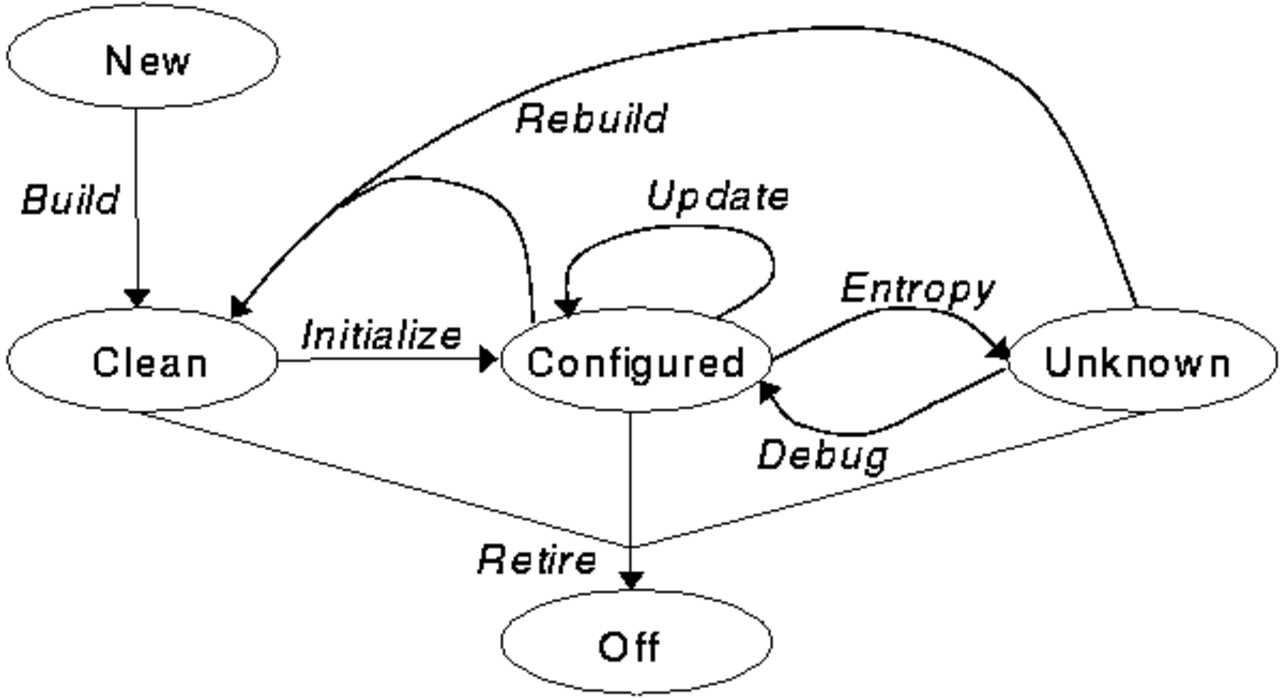
1.3.2 System Lifecycle and Automation
The following system lifecycle diagram is from Remy Evard, “An Analysis of UNIX System Configuration”, USENIX Proceedings: Eleventh Systems Administration Conference (LISA 1997), October 26-31, 1997
https://raw.githubusercontent.com/atsaloli/cf3-tutorial/master/images/figures/lifecycle.png
1.4 Why CFEngine?
Mature (since 1993, now in its third generation)
Small footprint (can run everywhere and run often)
Fast!!
Scalable (real-world deployments of hundreds of thousands of hosts or more)
Secure (check the US National Vulnerabilities Database, much less vulnerabilities due to a more secure design)
Portable (many systems and platforms supported)
The only configuration management tool based on science (author is a theoretical physicist turned Computer Science researcher)
To learn more, see 20 Years of CFEngine, by Mark Burgess.
1.4.1 Scalability
It takes the same amount of time to deploy and validate changes with CFEngine regardless of fleet size.
https://github.com/atsaloli/cf3-tutorial/raw/master/images/figures/AnsibleCFEngine_whitepaper_2.png
Graph from “Ansible and CFEngine Scalability” by Vratislav Podzimek, Northern.tech whitepaper, 12 January 2021.
1.5 CFEngine Packages
1.5.1 CFEngine Packages
CFEngine is available in two flavors.
Open Source Core
Open-source product, also known as CFEngine Core.
Enterprise
Core plus Enterprise extensions (reporting, native Windows build, etc.).
cfengine-nova plus the the Mission Portal (Web UI on an Apache/PHP/PostgreSQL stack; and inventory and compliance report collector).
A note on naming: The name for the first generation of the CFEngine Enterprise product was “Nova”, which is still reflected in the name of the Enterprise packages. The original plan was to have progressively larger star names like “Constellation” and “Galaxy”, that would each have progressively more features.
1.5.2 Inspect the CFEngine Core Package
Download Core package
wget https://cfengine-package-repos.s3.amazonaws.com/community_binaries/\
Community-3.12.6/agent_rhel8_x86_64/cfengine-community-3.12.6-1.el8.x86_64.rpm
or get it from CFEngine
Examine package
Let’s examine the package so you can see what gets installed on your system when you install Core.
rpm -q --filesbypkg cfengine-community-*.rpm | less
1.5.3 CFEngine Enterprise - Reporting
CFEngine Enterprise unlocks unparalleled insight into infrastructure:
promise compliance (including outliers)
changes (repairs)
inventory and compliance reports (at any level of abstraction – from enterprise-wide down to an individual host)
CFEngine Enterprise components:
Hub (report collection and admin UI)
Super-Hub (reporting UI, for large enterprises)
How reporting works:
Hubs pull policy from version control (e.g. Git)
Hosts pull policy from hubs and execute it and create inventory and compliance reports
Hubs download inventory/compliance reports from hosts and aggregate them
1.6 CFEngine Components
CFEngine 3 consists of a number of components.
1.6.1 Syntax Checker
Syntax checker.
cf-promises -f ./your_policy.cf
Every CFEngine component runs cf-promises on policy files before reading them in.
Syntax Description
You can also use cf-promises to dump a JSON document
describing the available syntax elements.
sudo cf-promises --syntax-description json --file /dev/null
Note: The syntax dump feature was “bolted on” to cf-promises,
so that’s why cf-promises requires the –file switch.
cf-syntax alias
alias cf-syntax='sudo cf-promises --syntax-description json --file /dev/null'
Parsing JSON with jq
You can use jq to parse/query JSON data such as that returned by
cf-promises.
On RHEL 7, use the latest Fedora EPEL repo to install jq.
References: * https://stedolan.github.io/jq/
Example of using jq – list all available promise types:
$ cf-syntax | jq '.promiseTypes | keys' | head
[
  "access",
  "build_xpath",
  "classes",
  "commands",
  "databases",
  "defaults",
  "delete_attribute",
  "delete_lines",
  "delete_text",
...
1.6.2 Agent
The CFEngine component that audits and makes any needed repairs to your system. Actually does the work, as far as configuration management is concerned. This is the workhorse.
cf-agent -f ./your_policy.cf
1.6.3 Executor
Runs cf-agent on a regular basis, and handles its output.
1.6.4 Network Communication
Has three functions: - file server, for distributing files - reports server (Enterprise only) - listens for network requests for additional runs of the local agent
Triggers cf-agent on a remote machine (connects to remote cf-serverd).
CFEngine Enterprise only, collects reports from hosts (connects to remote cf-serverd).
1.6.5 Monitoring
Passive monitoring agent, collects information about the status of the system (which can be reported or used to influence when promises are enforced).
1.6.6 Utilities
Utility for diagnosis and repair of local CFEngine databases. Intended to detect and repair a corrupt database.
Testing/debugging tool. cf-net connects to cf-serverd on a specified host and can issue arbitrary CFEngine protocol commands.
Generates the keypair used to secure network communications.
Helper tool used by CFEngine to upgrade itself (version update).
1.6.7 A Note on Size
The CFEngine agent is a small C binary. The other components are even smaller C binaries.
$ ls -lh /var/cfengine/bin/cf-* |
> awk '{print $NF, $5}' | sort | column -t
/var/cfengine/bin/cf-agent     1.8M
/var/cfengine/bin/cf-check     710K
/var/cfengine/bin/cf-execd     160K
/var/cfengine/bin/cf-key       84K
/var/cfengine/bin/cf-monitord  448K
/var/cfengine/bin/cf-net       73K
/var/cfengine/bin/cf-promises  53K
/var/cfengine/bin/cf-runagent  69K
/var/cfengine/bin/cf-serverd   472K
/var/cfengine/bin/cf-upgrade   68K
$
Because CFEngine is lightweight, it’s fast. It can be run frequently to monitor and maintain infrastructure health.
CFEngine 1 was intended to be run once a day.
CFEngine 2 was intended to be run once an hour.
CFEngine 3 default run frequency is every 5 minutes.
At 5 minutes, systems can self-heal faster than if they were repaired by human operators.
1.6.8 Add-ons
A number of add-on tools are available, thanks to community contributions. For example:
Diagnostic tool (checks the health of a CFEngine host).
Policy deployment tool - designed to run on the Policy Server and safely deploy policy from upstream locations to a directory on the Policy Server for distribution to clients.
Measures how long your code takes to run so you can keep CFEngine agent runs blazing fast.
Tooling to deploy CFEngine on remote hosts.
And more! Check out https://github.com/cfengine/core/blob/master/contrib/
CFEngine daemons
Here is what you typically see between cf-agent runs:
$ ps -ef |grep [c]f-
root     807   1  0 Jan26 ?    00:00:34 /var/cfengine/bin/cf-monitord --no-fork
root     833   1  0 Jan26 ?    00:00:13 /var/cfengine/bin/cf-execd --no-fork
root    1367   1  0 Jan26 ?    00:00:08 /var/cfengine/bin/cf-serverd --no-fork
$
2.2 Installing CFEngine
2.2.1 Lab Infrastructure
Two VMs
To do the exercises, each student should have two VMs:
one to play the role of the Hub (policy distribution point),
another to play the role of a managed Host.
Normally, you would have multiple hosts managed from a single hub. Two VMs gives us a CFEngine-managed system in miniature.
Vagrant
CFEngine provides a turnkey solution with Vagrant.
You can follow CFEngine’s Vagrant guide to create your lab environment complete with two VMs and the latest version of CFEngine Enterprise.
Otherwise the following details the lab requirements (if you want to put together your own lab instead of using the CFEngine Vagrant lab).
Roll Your Own Lab
CFEngine is multiplatform.
If you’re not sure what OS to install on your VMs, we recommend you install the same OS as you use in production and let us know if you have any trouble.
The examples in this collection have been tested on RHEL 8.
The VMs need to be able to get out to the Internet to install packages.
Ensure your VMs have Internet access:
ping google.com
Some companies allow Internet access only through proxies in Web browser. You will need access from the command line.
Your systems also need to be able to reach each other on tcp/5308 (CFEngine).
2.2.2 First VM – the Hub
TODO - this needs to be updated for 3.12 or newer
Ensure your Hub VM has an FQDN hostname (required by Hub package). Add line for FQDN hostname, e.g. “1.2.3.4 alpha.example.com”
vi /etc/hosts
Set hostname to FQDN:
/bin/hostname alpha.example.com
Get hub package URL from CFEngine.com/download/
Download hub package
wget ...
Install the hub package.
rpm -ihv ./cfengine-nova-hub-*.rpm
Bootstrap the hub to itself:
cf-agent -B <hostname>
Run the agent once to finish setup:
cf-agent
NOTE: Bootstrapping performs a key exchange to establish a trust relationship so that the host can download policy updates from the hub, and the hub can download inventory and compliance reports from the host.
Login to hub admin UI over HTTPS (admin/admin)
Change the admin UI password so the VM doesn’t get compromised (Admin -> Settings -> User Management -> Change password)
2.2.3 Second VM - a Managed Host
TODO – this needs to be updated for 3.12 or newer
Install CFEngine on your 2nd VM (the managed host).
Download host package.
wget \
https://cfengine-package-repos.s3.amazonaws.com/\
enterprise/Enterprise-3.7.1/\
agent/agent_rhel6_x86_64/cfengine-nova-3.7.1-1.x86_64.rpm
Install host package.
rpm -ihv ./cfengine-nova-3.7.1-1.x86_64.rpm
Bootstrap the host to the hub:
cf-agent -B <hub IP address>
Go to hub admin UI and within 5-10 minutes the hosts indicator at the top should go from 1 to 2.
2.3 Policy Flows
2.3.1 Policy Flow Diagram
Definitions
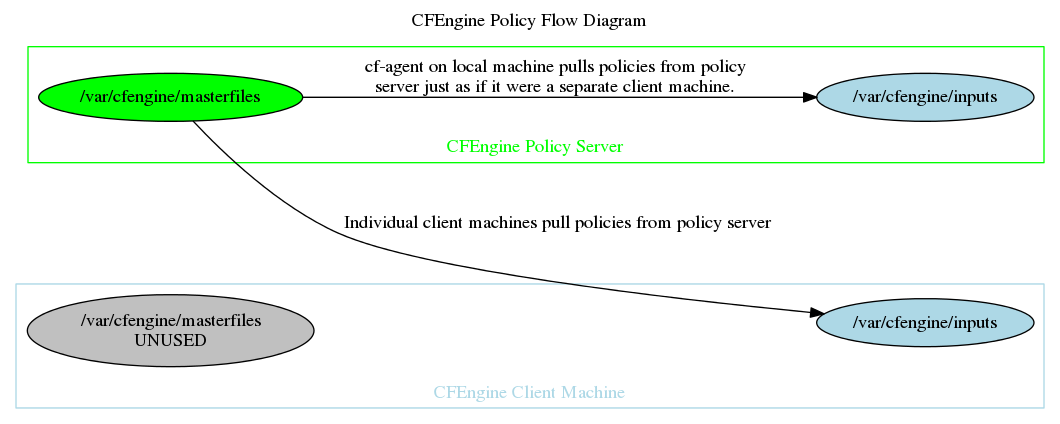
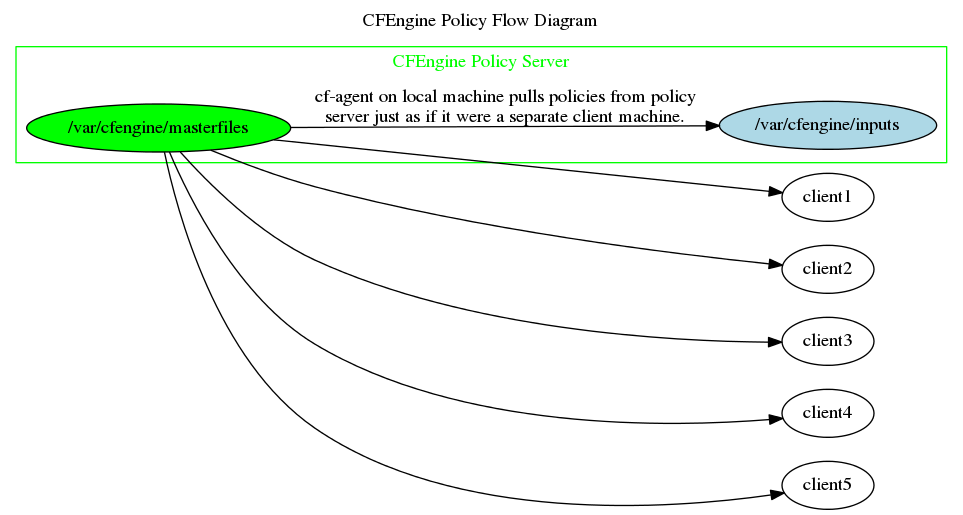
A server that shares CFEngine files (policy, data, templates, scripts, binaries) with the rest of the infrastructure using cf-serverd. Also called the hub.
The default policy distribution point is /var/cfengine/masterfiles on the policy server. Policy comes from here; in other words, the managed hosts get their policy from /var/cfengine/masterfiles on the policy server (also called the hub).
The inputs directory is where CFEngine looks for its policy files (defaults to /var/cfengine/inputs).
Policy Distribution Flow
The CFEngine agent runs twice in each cycle: - Checks for policy updates (and copies them from /var/cfengine/masterfiles/ on the hub to the local /var/cfengine/inputs/) - Runs the policy in /var/cfengine/inputs/
This “caching” of policy makes CFEngine resilient to network outages. CFEngine uses the network opportunistically.
The default schedule is the agent runs every 5 minutes.
So you can update hundreds of thousands of servers within minutes. Very powerful!
TIP: Keep your policy in a version control system, such as git.
Policy Server
Here is the policy distribution flow on the the policy server itself:

The policy server itself runs the agent, to manage itself. The above diagram shows how that agent gets updates.
2.4 Installing the Collection
This chapter takes us through installing everything needed to use the collection and do the exercises.
2.4.1 Using git
We keep these examples on GitHub and may update them during or after class.
With git, you can download the updates during or after class.
Exercise 2.1. Install git
On RHEL/Centos:
yum install -y git
On Debian/Ubuntu:
apt-get install -y git
2.4.2 Downloading examples
Download Aleksey’s CFEngine Tutorial repository from GitHub:
git clone git://github.com/atsaloli/cf3-tutorial.git
Go to the Training Examples directory:
cd cf3-tutorial/source
2.4.3 Updating Examples
If the instructor updates the examples during class and pushes the updates to GitHub, run the following to pull in the updates:
git pull
2.5 Installing Syntax Highlighter
Use a syntax highlighter to catch errors early. This will save you time and trouble.
2.5.1 Syntax Highlighting in vim
You can install the CFEngine 3 syntax highlighter for vim using the following shell script, or visit Code Editors on cfengine.com.
Exercise 2.2. Install CFEngine syntax highlighter for the vim editor
We provide a shell script that will install the vim syntax highlighter:
sh 150-180-Installing_Syntax_Highlighter-0265-Install_Vim_Plugin.sh
#!/bin/sh
#
# Run this shell script on your Hub VM to add Neil Watson's
# CFEngine 3 syntax highlighter (minus folding and keyword
# abbreviations) to your .vimrc


cat <<EOF >> $HOME/.vimrc

" -------- start of .vimrc settings from Vertical Sysadmin
" training examples collection
"
" Neil Watson recommends installing functions Getchar and Eatchar


" function Getchar
fun! Getchar()
  let c = getchar()
  if c != 0
    let c = nr2char(c)
  endif
  return c
endfun

" function Eatchar
fun! Eatchar(pat)
  let c = Getchar()
  return (c =~ a:pat) ? '' : c
endfun

" Turn on syntax highlighting for CFEngine 3 files
filetype plugin on
syntax enable
au BufRead,BufNewFile *.cf set ft=cf3

" Disable folding so it does not confuse students not familiar with it
if exists("&foldenable")
	set nofoldenable
endif

" disable abbreviations so it does not confuse students not familiar with it
let g:DisableCFE3KeywordAbbreviations=0

" -------- end of .vimrc settings from Vertical Sysadmin training examples
" collection
EOF

echo Installing vim plugin for CFEngine syntax highlighting

mkdir -p ~/.vim/ftplugin  ~/.vim/syntax

wget -O ~/.vim/syntax/cf3.vim \
      --no-check-certificate \
      https://github.com/neilhwatson/vim_cf3/raw/master/syntax/cf3.vim

wget -O ~/.vim/ftplugin/cf3.vim \
      --no-check-certificate \
      https://github.com/neilhwatson/vim_cf3/raw/master/ftplugin/cf3.vim
2.5.2 Emacs
See “Learning CFEngine” book or the Code Editors page on cfengine.com
Exercise 2.3. Install Syntax Highlighter
Install CFEngine 3 syntax highlighter for your favorite editor
Open “hello_world.cf” in your editor and ensure you see the pretty colors of syntax highlighting. E.g.:
vim hello_world.cf
2.6 Using the Collection
2.6.1 Running the examples
All of the examples are shipped as standalone CFEngine 3 files which you can run on the command-line by specifying the path to the input file with the -f switch:
cf-agent -f ./create_file.cf
If you don’t specify the path to your file, CFEngine will look for
it in the default policy directory which is /var/cfengine/inputs/
if you are running cf-agent as “root”, and $HOME/.cfagent/inputs/
if you are running it as a regular user.
We assume you will be running all examples and doing all exercises as “root”.
Note: CFEngine normally runs as “root” but it can be run as non-root, and some large organizations even run it as both root and non-root on the same system (running off different policies from different divisions of the organization, e.g. base config versus application-specific config).
Exercise 2.4. Run an example CFEngine file
cf-agent -f ./create_file.cf
2.6.2 Running the Examples: Inform Mode
By default, CFEngine doesn’t inform you of changes it makes as reports at scale (e.g. tens of thousands of systems) can be overwhelming.
However, while learning, it’s educational to know when CFEngine makes changes and what those changes are.
You can turn on Inform mode with cf-agent -I so that CFEngine informs
you of any changes it makes to your system.
Exercise 2.5. Run the "Create File" example with "Inform" mode enabled:
rm /tmp/test
cf-agent -I -f ./create_file.cf
What do you see?
Why?
Exercise 2.6. List collection contents using "l.sh"
I’ve created a shell script to list the collection contents. It indents the part and chapter headings to provide a sort of Table of Contents.
Try running it:
./l.sh
Notice the content is structured (the files are numbered). The materials proceed in sequence from basic to advanced.
If the l.sh script does not work on your system
(or you don’t like it), you can just run:
ls *.cf
Exercise 2.7. To find something, the quickest way may be to grep for it.
E.g. to find an example of process_stop:
grep -l process_stop *.cf
3.1 Promises
3.1.1 Promise
A promise is a statement of intention.
Trust is an economic time-saver. If you can’t trust you have to verify, and that is expensive.
To improve trust we make promises. A promise is the documentation of an intention to act or behave in some manner. This is what we need to learn to trust systems.
Everything is a promise
CFEngine works on a simple notion of promises. Everything in CFEngine can be thought of as a promise to be kept by different resources in the system.
CFEngine manages every intended system outcome as “promises” to be kept.
Promises are always things that can be kept and repaired continuously, on a real time basis, not just once at install-time.
Every promise in CFEngine can have one of three outcomes
No repairs needed, system matches spec (is already converged).
system did not match spec, and CFEngine repaired it (converged it).
system did not match spec, and CFEngine could not repair (converge) it.
Handling Promise Outcomes
NOTKEPT outcomes likely require attention!
REPAIRED outcomes may require attention (especially if they keep recurring).
3.1.2 Promises + Patterns = Configuration
Combining promises with patterns to describe where and when promises should apply is how CFEngine works.
It can be represented by this formula:
For example, you may want all hosts at your primary site to have home directories mounted over autofs but not at your DR site; or you may want to run extra file-integrity checking on hosts in your DMZ. In both examples, you have a promise and a pattern as to when and where it applies.
3.1.3 Policy
A policy is a set of intentions about the system, coded as a list of promises. A policy is not a standard, but the result of specific organizational management decisions.
3.1.4 Example simple promise - create a file
files:

    "/etc/nologin"

        create  => "true",
        comment => "Prevent regular users from logging in
                    during maintenance";
3.1.5 The Basic Form of a Promise
promise_type:

       "promiser"

            promise details;
3.1.6 Some Basic Promise Types
Here are some basic promise types:
A promise about a file, including its existence, attributes and contents.
A promise to install (or remove or update or verify) a package.
A promise concerning items in the system process table.
A promise to be a variable, representing a value.
A promise to report a message.
A promise to execute a command.
The promise type is always followed by a single colon.
files:

    "/etc/nologin"

        create  => "true",
        comment => "Prevent non-root users from logging in";
3.1.7 Promiser
The promiser is the part of the system that will be affected by the promise. (We are affected by the promises we make.)
The promiser follows the promise type, and is in double quotes.
files:

    "/etc/nologin"

        create  => "true",
        comment => "Prevent non-root users from logging in";
What is the => symbol in the promise details?
It is used to specify key/value relationships.
files:

    "/etc/nologin"

        create  => "true",
        comment => "Prevent non-root users from logging in";
It is called “hashrocket” in Ruby (because it is used in Ruby hashes), “fat comma” in Perl, and “double arrow” in PHP.
You can call it whatever you like. :)
Reference: * https://en.wikipedia.org/wiki/Fat_comma
3.2 Bodies and Bundles
The basic building blocks of the CFEngine languages are bodies and bundles.
That is to say, all CFEngine policy source code consists from bundles and bodies.
Let’s define these two terms and really understand the difference between them.
3.2.1 Definition: “Body”
Body - The main part of a book or document, not including the introduction, notes, or appendices (parts added at the end).
— Macmillan Dictionary
Examples of bodies: body of a letter, body of a contract.
The body is where the details are.
3.2.2 Definition: “Attribute”
Attribute - a quality or feature of someone or something
Quality - a feature of a thing, substance, place etc. “the addictive qualities of tobacco”
Feature - an important part or aspect of something “Each room has its own distinctive features.”
— Macmillan Dictionary
3.2.3 Promise Body
A promise body is a collection of promise attributes that details and constrains the nature of the promise.
Example of Promise Body
The last three lines constitute the promise body.
files:

    "/var/cfengine/i_am_alive"

        create  => "true",
        touch   => "true",
        comment => "Prove CFEngine is running.";
3.2.4 Promise Bundle
A promise bundle is a group of one or more logically related promises.
The bundle allows us to group related promises, and to refer to such groups by name.
You can group promises into bundles in the way that makes the most sense for your environment and team.
For example:
base_os_configbundle contains promises to configure the base OS,httpdbundle contains promises to install and configure Apache httpd,inventory_java_memcontains promises to collect information about Java memory settings (starting and max memory size) used to ensure legacy hosts for the same applications have the same settings (actual example).
Bundle Type
Bundles always have a type which must be specified when you declare a bundle.
The type corresponds to a specific CFEngine component which handles those promises.
| Bundle Type | Contains promises for |
agent |
cf-agent, the part of CFEngine that checks and repairs system state |
edit_xml |
cf-agent, promises about file contents when they are structured data (XML) |
edit_line |
cf-agent, promises about file contents when they are unstructured data (not XML) |
monitor |
cf-monitord, the system monitoring component installed on every host |
server |
cf-serverd, the policy/file server component - usually ACL promises |
common |
Any CFEngine component - usually used to define variables and to classify hosts |
Declaring a Bundle; Bundle Syntax
Bundles consist of the keyword bundle followed by bundle type and name, followed by curly braces that enclose the promises, e.g.:
bundle agent my_example {

...  # your promises code goes here

}
3.3 CFEngine Language is Declarative
3.3.1 “Declarative” vs. “Imperative” Programming
A declarative programming style … is often unfamiliar to newcomers, even if they are experienced programmers in other domains. Most commonly-used programming languages are examples of imperative programming, in which the programmer must describe a specific algorithm or process. Declarative programming instead focuses on describing the particular state or goal to be achieved. — Mike English
3.3.2 Examples
Imperative - Make me a Sandwich!
Spread peanut butter on one slice of bread. Set this slice of bread on a plate, face-up. Spread jelly on another slice of bread. Place this second slice of bread on top of the first, face-down. Bring me the sandwich. — Mike English
Declarative - The Sandwich I Desire.
There should be a sandwich on a plate in front of me… It should have only peanut butter and jelly between the two slices of bread. — Mike English
3.3.3 Declarative Programming for System Administration
Declarative programming is a more natural fit for managing system configuration. We want to be talking about whether or not MySQL is installed on this machine or Apache on that machine, not whether yum install mysql-server has been run here or apt-get install apache2 there. It allows us to express intent more clearly in the code. It is also less tedious to write and can even be more portable to different platforms. — Mike English
3.3.4 Declarative has a higher Signal to Syntax Ratio
A declarative language allows us to express intent more clearly, to let the intent shine through the syntax of the code. It allows us to have a higher Signal to Syntax ratio.
Convergence
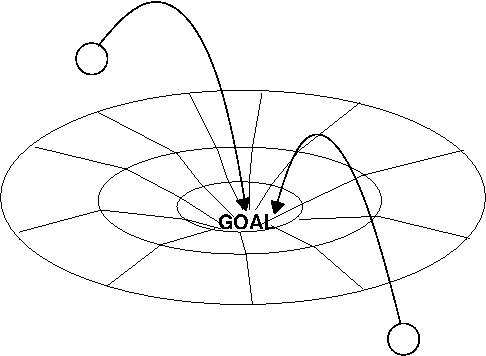
Convergence - coming to a desired end state
— Mark Burgess, http://markburgess.org/blog_cd.html
converge
come from different directions and meet at (a place). “half a million sports fans will converge on the capital”
(of a number of things) gradually change so as to become similar or develop something in common.
— OxfordDictionaries.com
3.3.5 Writing CFEngine policies
State the sysadmin problem.
Envision the desired end state.
Translate the desired end state into CFEngine Policy Language.
Exercise 3.1. Learning to Think Declaratively
State an actual sysadmin problem you need to solve
Envision the desired end state; state what the desired end result is, in a declarative (not procedural) fashion.
In other words, focus on the WHAT and let CFEngine handle the HOW (which may vary from OS to OS anyway).
4.1 Files
File operations fall basically into three categories: create, delete and edit.
Set the create attribute to true and CFEngine will create the file if it does not exist.
bundle agent main
{
  files:
      "/etc/nologin"
        handle => "touch_etc_nologin",
        comment => "Quiesce the system for maintenance",
        create  => "true";
}
The touch attribute tells CFEngine to touch (update) the timestamp on the file.
bundle agent main
{
  files:

      "/var/cfengine/i_am_alive"

        comment => "Update heartbeat timestamp (mtime)
                          to confirm CFEngine is running",
        create  => "true",
        touch   => "true";
}
Exercise 4.1. Create a file
Write and run a policy promising that /etc/ftp.deny is present to
stop FTP users from logging in.
4.2 Processes
Processes promises refer to items in the system process table.
CFEngine uses the output from the ps command to inspect running
processes.
In processes: promises, the promiser objects are patterns that are
unanchored, meaning that they match parts of command lines in the
system process table.
CEFngine uses libpcre to handle pattern-matching (regular expressions).
Reference: - PCRE - Perl Compatible Regular Expressions
4.2.1 What processes promises can do
You can promise that a pattern be present to ensure a process is running, such as
snmpdfor monitoring oradclientfor using Active Directory;to be absent (you can run a command to stop a process or you can signal it, e.g.,
TERMorKILL);or you can make decisions based on your findings (such as restarting a process when memory size grows past a limit).
Recap: You can use processes: promises to manage system processes.
4.2.2 “/bin/ps” options
My students sometimes ask what options CFEngine uses when it runs
/bin/ps, since /bin/ps can be different based on UNIX/Linux system
flavor.
CFEngine encapsulates the knowledge of how to administer various types
of UNIX-like systems, including the various /bin/ps options (of even if
ps is in another path); see
https://github.com/cfengine/core/blob/0e5e8c52ba2779db3b8b9573c2b6abb807528df7/libpromises/systype.c#L95-L124
You can also run CFEngine agent in verbose mode and it’ll tell you how it’s observing the process table.
#!/bin/bash

# Install and start CUPS (print service), so we can
# practice using CFEngine to ensure a process ("cupsd")
# is absent.

sudo yum install -y cups
sudo service cups start
ps -ef | grep cupsd | grep -v grep
4.2.3 signals
Description: A list of menu options representing signals to be sent to a process.
Signals are presented as an ordered list to the process. On Windows, only the kill signal is supported, which terminates the process.
Type: (option list)
Allowed input range:
hup
int
trap
kill
pipe
cont
abrt
stop
quit
term
child
usr1
usr2
bus
segv
Reference: https://docs.cfengine.com/latest/reference-promise-types-processes.html#process_stop
bundle agent main
{
  processes:
      "cupsd"
        signals => { "term", "kill" };
}
4.2.4 process_stop
Description: A command used to stop a running process
As an alternative to sending a termination or kill signal to a process, one may call a ‘stop script’ to perform a graceful shutdown.
Type: string
Allowed input range: “?(/.*)
Example:
  processes:

      "cupsd"

        process_stop => "/sbin/service cups stop";
Reference: https://docs.cfengine.com/docs/3.17/reference-promise-types-processes.html#process_stop
#!/bin/bash

# Check if print services daemon is running

ps -ef | grep cupsd | grep -v grep
bundle agent main
{
  processes:
      "cupsd"
        comment => "Shutdown print service",
        process_stop => "/sbin/service cups stop";
}
4.2.5 Note on Syntax: Single Values vs Lists
Definitions
(programming) Any data type that stores a single value (e.g. a number or Boolean), as opposed to an aggregate data type that has many elements. A string is regarded as a scalar in some languages (e.g. Perl) — Free On-Line Dictionary of Computing
In CFEngine syntax, scalar values are enclosed in double quotes (or single quotes or backticks):
process_stop => "/etc/init.d/cups stop",
Would you like to know more? See Quoting
Exercise 4.2. Point out the scalar values in the following CFEngine policy.
bundle agent main
{
  processes:

      "cupsd"

        comment => "Shutdown print service",
        process_stop => "/sbin/service cups stop";

}
A data structure holding many values — Free On-Line Dictionary of Computing
In CFEngine syntax, lists are in curly braces and are a collection of comma-separated scalar values. For example:
processes:
    "cupsd"
        signals => { "term", "kill" };
Exercise 4.3. Kill a process
Start print services manually (e.g., yum install -y cups; service cups
start) and then write and run a promise to signal the cupsd process
TERM and KILL
Don’t copy and paste, type it yourself.
And try to do it from memory. (Okay to look back if you need to.)
Note: signal name values in CFEngine are in lower-case and CFEngine is case-sensitive.
Reference: https://docs.cfengine.com/docs/3.12/reference-promise-types-processes.html#signals
What happens if you give CFEngine a right-hand side value (signal name) that it doesn’t recognize? What error message do you get? What does it mean?
4.3 Commands
Commands promises are promises to execute a command.
bundle agent main
{
  commands:
      "/bin/date"
        comment => "Demonstrate a simple commands promise";
}
bundle agent main
{
  commands:
      "/bin/echo Hello, World!"
        comment => "Demonstrate a command with arguments (in promiser)";
}
bundle agent main
{
  commands:
      "/bin/echo"
        comment => "Sometimes it is convenient to separate command
                    and arguments.",
        args => "Hello, World!";
}

# Reference:
# https://docs.cfengine.com/latest/reference-promise-types-commands.html#args
bundle agent main
{
  commands:
      "echo"
        args => "Hello world",
        comment => "Relative path does not work.";
}
#!/bin/sh

# Demonstrate how CFEngine truncates names of long
# commands.
#
# Create an executable with a long path name - we'll need
# it for the next example.

LONG_PATH=/usr/local/sbin/a/really/long/path/to
sudo /bin/mkdir  -p ${LONG_PATH}
sudo /bin/cp -p /bin/echo ${LONG_PATH} >/dev/null
sudo ls -l /bin/echo ${LONG_PATH}/echo
# demonstrate handling of long command names in agent output

bundle agent main
{
  commands:
      "/usr/local/sbin/a/really/long/path/to/echo"
        args => "Hello, World!";
}
# demonstrate handling of multi-line output

bundle agent main
{
  commands:
      "/usr/bin/printf"
        args => "%s\n%s\n%s\n One Two Three",
        comment => "Produce a multi-line command output";
}
4.4 Reports
A reports: promise is a promise to output a report.
Reports output is prefixed with “R:” to indicate it is a report.
bundle agent main
{
  reports:

      "Hello, World!";
}
4.4.1 Handling of the output from reports promises
Where does the output from reports promises go?
When you run cf-agent on the command line, any reports or output
generated by your promises go to STDOUT.
When the executor daemon cf-execd runs cf-agent, a copy of all output
from cf-agent is saved to “/var/cfengine/outputs/” with a timestamp in
the filename. Additionally, a symlink “previous” is updated to point at
the most recent outputs file.
cf-execd may additionally forward output to syslog and/or email it. This is all configurable.
Demonstration of handling reports: promises output
Let’s demonstrate handling of agent outputs by editing /var/cfengine/masterfiles/services/main.cf (the default entry-point to our policy code base) to add promises which generate output:
###############################################################################
#
# bundle agent main
#  - User/Site policy entry
#
###############################################################################

bundle agent main
# User Defined Service Catalogue
{
  reports:
    "hello world";

  commands:
    "/bin/date";

  methods:
    # Activate your custom policies here
}
Now let’s run the “update” policy to update our /var/cfengine/inputs/ directory from /var/cfengine/masterfiles/ :
# cf-agent -IC -f update.cf
    info: Updated '/var/cfengine/inputs/services/main.cf' from source
'/var/cfengine/masterfiles/services/main.cf' on 'localhost'
#
Verify that our promises generate output as expected by running cf-agent on the command line:
# cf-agent
  notice: Q: ".../bin/date": Sat Nov  7 21:18:41 PST 2015
R: hello world
#
Wait 5-10 minutes for cf-execd to run cf-agent during the next scheduled run. We know when it’s done that by watching the promise summary log on the command line:
tail -f /var/cfengine/promise_summary.log
The promise summary log contains outcomes for each run of cf-agent.
We expect to see two entries appear, as
cf-execd will run cf-agent twice: first to update policy (update.cf)
and then to evaluate the policy (promises.cf):
(I’ve inserted whitespace for readability, on the console you’d see two lines only):
1610932105,1610932105: Outcome of version update.cf 3.12.6 (agent-0):
  Promises observed to be kept 100.00%,
  Promises repaired 0.00%,
  Promises not repaired 0.00%
1610932105,1610932106: Outcome of version CFEngine Promises.cf 3.12.6 (agent-0):
  Promises observed to be kept 97.30%,
  Promises repaired 2.70%,
  Promises not repaired 0.00%
There are two comma-delimited timestamps (in UNIX epoch format) at the start of each line,
showing start and end of the cf-agent run.
You can convert the timestamps to human-readable with date -d @<timestamp>.
Subtract the start time from the end time to get how long the agent was running (in seconds).
Let’s check the output from the previous run of cf-agent
in “/var/cfengine/outputs”:
# cat /var/cfengine/outputs/previous
  notice: Q: ".../bin/date": Sat Nov  7 21:21:26 PST 2015
R: hello world
#
The output from each agent run is in /var/cfengine/outputs/.
CFEngine updates the previous symlink to point at the most recent run.
/var/cfengine/promise_summary.log records when the agent ran and and the outcome summary for each run.
Now let’s check syslog log file:
# grep cf-agent /var/log/syslog | tail
Nov  7 21:36:32 ubuntu [96961]: CFEngine(agent)
  Q: ".../bin/date": Sat Nov  7 21:36:32 PST 2015

Nov  7 21:36:32 ubuntu [96961]: CFEngine(agent)
  R: hello world

Nov  7 21:41:35 ubuntu [97148]: CFEngine(agent)
  Q: ".../bin/date": Sat Nov  7 21:41:35 PST 2015

Nov  7 21:41:35 ubuntu [97148]: CFEngine(agent)
  R: hello world

Nov  7 21:46:37 ubuntu [109436]: CFEngine(agent)
  Q: ".../bin/date": Sat Nov  7 21:46:37 PST 2015

Nov  7 21:46:37 ubuntu [109436]: CFEngine(agent)
  R: hello world
Note: On Red Hat systems, check /var/log/messages.
Notice that “reports” outputs are tagged with “R” and quoted “commands” outputs are tagged with “Q”.
We are deluged with information in today’s modern world; indicating what type of data is being thrown at us helps us to orient to what’s happening and makes it easier to assimilate the data. This is a knowledge management feature.
4.5 Methods
Methods are compound promises that refer to whole bundles of promises.
You can use them to group together related promises.
Example:
bundle agent main
{
  methods:
      "base_os_config";  # configure the OS
      "application_config"; # and the application
}

bundle agent base_os_config { ... }

bundle agent application_config { ... }
We will learn more about methods: promises later.
4.6 Variables
CFEngine variables can contain single values or collections of single values (lists, arrays and data containers).
4.6.1 Scalars
Scalars
A scalar is a single value.
Each scalar may have one of three types: string, int or real.
4.6.2 Identifying scalar variables
A scalar variable is represented as
$(identifier)
Example:
reports:
  "Hello, $(name)";
The braces are mandatory. Braces help the parser know for sure when a variable name ends so it doesn’t have to guess if the variable name is embedded in text:
reports:
  "The product number is: $(machine_type)$(model)";
CFEngine doesn’t like to guess about infrastructure.
Infrastructure is too important; we shouldn’t be guessing about it.
You can also use curly braces around scalar variables:
  reports:
      "Hello, ${name}";
Round braces are Make-style; curly braces are UNIX shell style.
Either one will work.
# Here is an example of declaring and using a scalar variable
# of type string

bundle agent main
{
  vars:
      "name"
        string => "Inigo Montoya";

  reports:
      "Hello. My name is $(name).";
}
# Examples of scalar variables.  One of each type:
# - string
# - integer
# - real number

bundle agent main
{
  vars:
      "my_string"      string  => "String contents...";
      "my_int" int => "42";
      "my_real" real    => "3.141592654";

  reports:
      "My string is: $(my_string)";
      "My integer is: $(my_int)";
      "My real number is: $(my_real)";
}
bundle agent main
{
  vars:
      "my_int"
        comment => "Try to assign a real number to an integer",
        int => "1.5";

}
bundle agent main
{
  vars:
      "my_int"
        comment => "Try to assign a string to an integer variable.",
        int => "hello world";

  reports:
      "my int is $(my_int)";
}
Exercise 4.4.
Make and use a variable.
Write a policy to set a variable called “first_name” and set the value to your first name (whatever your name is)..
Then create a reports: promise to have CFEngine say hello using this
variable.
For example, the output for a student named John would be:
“R: Hello, John”
4.6.3 Scope of variables
There is no scope.
All variables in CFEngine are globally accessible.
However, if you refer to a variable by $(unqualified), then it is
assumed to belong to the current bundle. To access any other scalar
variable, you must qualify the name, using the name of the bundle in
which it is defined, $(bundle_name.qualified).
Example
Let’s say the variable first_name is defined in the bundle names:
bundle agent names
{
  vars:
      "first_name"
        string => "John";
}
Unqualified reference:
reports: "Hello, $(first_name)";
Qualified reference:
reports: "Hello, $(names.first_name)";
bundle agent main
{

  methods:
      "bundle_1";
      "bundle_2";
      "bundle_3";
}

bundle agent bundle_1 {
  vars: "first_name" string => "John";
  reports: "This works: Hello, $(first_name)";
}

bundle agent bundle_2 {
  reports: "But this doesn't: Hello, $(first_name)";
}

bundle agent bundle_3 {
  reports: "Qualified works: Hello, $(bundle_1.first_name)";
}
Exercise 4.5. Declare a variable in one bundle and then use it from another bundle.
4.6.4 Namespaces
To take this concept a step further, bundle and body names can be placed in a namespace, allowing multiple files to define the bundles and bodies with the same name in different namespaces without conflict. They are key to writing self-contained, reusable, sharable policies.
Everything in CFEngine lives in a namespace (it’s the default namespace
if not set).
Reference: https://docs.cfengine.com/latest/reference-language-concepts-namespaces.html#top
4.6.5 A Note on Integer Variables: Integer-only Suffixes
Integer values may use suffixes to represent large numbers.
Which is easier to read?
200000
200k
Table of Integer Suffixes
| Suffix | Meaning |
k |
value times \( 1000 \) |
m |
value times \( 1000^2 \) |
g |
value times \( 1000^3 \) |
K |
value times \( 1024 \) |
M |
value times \( 1024^2 \) |
G |
value times \( 1024^3 \) |
% |
meaning percent, in limited contexts |
inf |
a constant representing an unlimited value |
bundle agent main
{
  vars:
      "fourty_two_KILObytes" int => "42k";  # 42 x 1000
      "fourty_two_KIBIbytes" int => "42K";  # 42 x 1024

  reports:
      "42k (kilobytes) = $(fourty_two_KILObytes)";
      "42K (kibibytes) = $(fourty_two_KIBIbytes)";
}
bundle agent main
{
  vars:
      "infinity" int => "inf";  # infinity

  reports:
      "infinity = $(infinity)";
}
4.6.6 Review - Scalars
What are the three different types of scalar values in CFEngine?
4.6.7 List Variables
A list is a collection of scalars (single values).
A list variable is represented as @(identifier) or
@(bundlename.identifier).
(Or using curly braces, UNIX shell-style, as with scalars.)
List Types
Lists are typed:
lists of strings,
lists of integers,
lists of reals.
The CFEngine language is typed because we don’t like to guess about infrastructure. Typing gives extra protection.
Implicit Looping
If you refer to a list variable in scalar context by using $(identifier),
CFEngine will implicitly loop over the values of @(list).
# Example of implicit looping

bundle agent main
{
  vars:
      "shopping_list"
        slist   => {
                     "apples",
                     "bananas",
                     "grapes",
                     "coconuts",
                     "hamburgers",
                   };

  reports:
      "Buy $(shopping_list)";
}

# Same as:
#
# #!/bin/sh
# for shopping_list in apples bananas grapes coconuts hamburgers
# do
#     echo Buy $shopping_list
# done
# Notice how the parser handles @(my_slist) in scalar context -- not
# special!

bundle agent main
{
  vars:
      "shopping_list"
        slist   => {
                     "apples",
                     "bananas",
                     "grapes",
                     "coconuts",
                     "hamburgers",
                   };

  reports:
      "Iterating over @(shopping_list): Buy $(shopping_list)";
}
# However, if you refer to a @(list_variable) in _list_ context,
# it'll be treated as a variable (and expanded).

bundle agent main
{
  vars:
      "preface"
        string => "Now hear this: ";

      "main_body"
        slist => { "String contents...", "...are great!" };

      "the_sum_of_all_parts"
        slist => { $(preface), @(main_body) };
        # Demonstrate referring to a list as a complete collection
        # (without implicit looping)

  reports:
      "Iterating over list @(the_sum_of_all_parts): $(the_sum_of_all_parts)";
}
# Demonstrate a list of integers (ilist)

bundle agent main
{
  vars:
      "my_list"
        ilist => { "1", "2", "3" };

  reports:
      "Iterating over the values in @(my_list):  $(my_list)";
      # Implicit looping works the same
}
# Demonstrate an rlist (list of real numbers)

bundle agent main
{
  vars:
      "my_list"
        rlist => { "1.5", "3.0", "4.5" };

  reports:
      "Iterating over list: $(my_list)";
}
Exercise 4.6. Create a list variable containing names of five files to create.
For example:
  /tmp/file1
  /tmp/file2
  /tmp/file3
  /tmp/file4
  /tmp/file5
Then use a single “files” promise to ensure all five files exist.
This is an example of Patterns + Promises = Configuration.
The list is a pattern (which parts of the infrastructure are affected).
The promise is to create a file.
# Referring to an slist in scalar context implies looping.
#
# Set up a _nested_ implicit loop by referring to TWO
# slists in scalar context

bundle agent main
{
  vars:
      "fruit"
        slist => { "apples", "pears", "peaches" };

      "ways_to_prepare"
        slist => { "sliced", "boiled", "preserved" };

  reports:
      "I like to eat $(ways_to_prepare) $(fruit)";
}
4.6.8 Arrays
CFEngine arrays are associative (hashes).
They may contain scalars or lists as their elements.
Array variables are written with ‘[’ and ‘]’ brackets:
$(array_name[key_name])
or
$(bundle_name.array_name[key_name])
Example:
| Food | Price |
| Apple | 59c |
| Banana | 30c |
| Oranges | 35c |
Variable assignment:
vars:
    "food_prices[Apple]"
      string =>  "59c";
Now we can use this variable:
reports:
    "An apple costs $(food_prices[Apple])";
You can use curly braces, too:
reports:
    "An apple costs ${food_prices[Apple]}";
# Example of creating an array and then pulling values out of it

bundle agent main
{
  vars:
      "food_prices[Apple]"
        string =>  "58c";

      "food_prices[Banana]"
        string =>  "30c";

  reports:
      "Apple costs $(food_prices[Apple])";
      "Banana costs $(food_prices[Banana])";
}
# The function getindices() returns an slist
# with the keys of an array
#
# Reference:
# https://docs.cfengine.com/latest/reference-functions-getindices.html

bundle agent main
{
  vars:
      "food_prices[Apple]"
        string =>  "58c";

      "food_prices[Banana]"
        string =>  "30c";

      "foods"
        slist => getindices("food_prices");

  reports:
      "Keys of 'food_prices' array: $(foods)";
}
# Use the keys to retrieve the values

bundle agent main
{
  vars:
      "food_prices[Apple]"
        string => "58c";
      "food_prices[Banana]"
        string => "30c";
      "foods"
        slist => getindices("food_prices");

  reports:
      "Keys of 'food_prices' array: $(foods)";
      "Value of 'food_prices' array element with key '$(foods)' is: $(food_prices[$(foods)])";
}
Exercise 4.7. Summary: Print array contents using getindices()
Create an array with two things and their values.
e.g.
| Car | Cost |
| BMW | 120K |
| Audi | 150K |
Report the contents of this array by using the
getindices()function to get a list of keys, and then iterate over the keys to output the values.
# Note: Variable names, including array keys, are case-sensitive.

bundle agent main
{
  vars:
      "cfengine_components[cf-execd]"
        string => "The executor";

  reports:
      "$(cfengine_components[CF-exEcD])";
}
Exercise 4.8. Make an array, ‘student_grades‘.
Populate it with the following data:
| Key | Value |
| Joe | A |
| Mary | A |
| Bob | B |
| Sue | B |
Display the contents of the array.
# An array can have elements of different types
#
# Reminder: If you refer to an slist in scalar context,
# CFEngine will loop over every element in the slist

bundle agent main
{
  vars:
      "config[my_string]"
        string =>  "hello world";

      "config[my_slist]"
        slist => { "one", "two" , "three" };

      "keys"
        slist => getindices("config");

  reports:
      "The value of 'config[$(keys)]' is: $(config[$(keys)])";
}
4.6.9 Data Containers
A data container is a lot like a JSON document, it can be a key-value map or an array or anything else allowed by the JSON standard with unlimited nesting.
Example:
{
  "Pizza": "Pepperoni",
  "Cities": [
    "London",
    "Paris",
    "Rome"
  ],
  "Games": {
    "Nintendo": [
      "Mario Bros",
      "Contra",
      "Zelda"
    ],
  }
}
bundle agent main
{
  vars:
      "food"
        data => '{
                   "Lunch"   : "Pizza",
                   "Dinner" : "Roast Beef"
                 }'; # JSON
      "keys"
        slist => getindices("food");

  reports:
      "$(keys) : $(food[$(keys)])";
}
# You can represent data containers as YAML documents

bundle agent main
{
  vars:
      "food"
        data => '---
Lunch: Pizza
Dinner: Roast Beef'; # YAML

      "keys"
        slist => getindices("food");

  reports:
      "$(keys) : $(food[$(keys)])";
}
# The format() function, when used with a special format specifier %S,
# will pack the data container contents into a one-line string you can
# put into a log message, for example
#
# %S stands for "string"

bundle agent main
{
  vars:
      "food"
        data => '---
Lunch: Pizza
Dinner: Roast Beef';

      "data_contents"
        string => format("%S", "food");

  reports:
      "$(data_contents)";
}
You can read in a JSON file with the CFEngine readjson() function:
    vars:

     "loaded_data"
       data => readjson("/tmp/myfile.json", 40K);
The first argument is the filename.
The second argument is optional, maxbytes to read in.
Reference: - readjson - readyaml
Exercise 4.9. Data containers - readjson
Manually create a JSON file, e.g., phones.json, with some phones/prices:
{
  "iPhone"  : "$500",
  "Samsung" : "$450"
}
Read it into a data container with the readjson() function and report
the contents of the data container.
4.7 Methods (with Parameters)
As we mentioned earlier, methods: promises are promises to take
on a whole other bundle of promises.
They may be parameterized.
bundle agent main {

  methods:
      "any"
         usebundle => say_hello;

}

bundle agent say_hello {

reports:  "hello!";

}
Up until CFEngine 3.7, methods promises had the standard promise form, complete with promiser, but the promiser didn’t do anything:
methods:

  "any"

    usebundle => my_bundle_name;
The author of CFEngine said to put “any” for the promiser for now, and that the promiser was reserved for future development.
The community started to use the promiser field of methods promises
to summarize/document what the called bundle was doing in human-readable
format, e.g.:
methods:

  "Configure NTPD"

    usebundle => ntpd;
As of CFEngine 3.7, the promiser can be used to provide the name
of the bundle to take on and the usebundle attribute can be
omitted, e.g.:
methods:

  "ntpd";
However, you do need the usebundle if you want to parameterize the methods call:
  methods:
      "Remove Users"
        usebundle => remove_user("bob");
#!/bin/sh

set -x  # show us each command after expanding it,
        # so we can see what commands are being run

# Add a couple of users and a crontab to set up for the next example

sudo useradd alex
sudo useradd rob

# Create a crontab for user "alex"
EDITOR="/bin/echo @daily /bin/echo hello world > " sudo crontab -e -u alex

sudo crontab -l -u alex
# Example of parameterizing a methods promise
# pass a list, not a scalar
bundle agent main
{
  vars:
      "userlist" slist => { "alex", "ben", "charlie", "diana", "rob" };

  methods:
      "Remove Users"
        usebundle => remove_users(@(userlist));
}

bundle agent remove_users(users_to_remove)
{
  reports:
      "Checking $(users_to_remove)";

  commands:

    linux::
      "/bin/crontab -r -u $(users_to_remove)"
        if => fileexists("/var/spool/cron/$(users_to_remove)");
      "/usr/sbin/userdel -r $(users_to_remove)"
        if => userexists("$(users_to_remove)");
}
# Example of parameterizing a methods promise
# pass a list, not a scalar
bundle agent main
{
  vars:
      "userlist" slist => { "alex", "ben", "charlie", "diana", "rob" };

  methods:
      "Remove Users"
        usebundle => remove_users(@(userlist));
}

bundle agent remove_users(userlist)
{
  commands:
    linux::
      "/bin/crontab -r -u $(userlist)"
        if => fileexists("/var/spool/cron/$(userlist)");
      "/usr/sbin/userdel -r $(userlist)"
        if => userexists("$(userlist)");
}
# Example of parameterizing a methods promise

bundle agent main
{
  vars:
      "userlist" slist => { "alex", "ben", "charlie", "diana", "rob" };

  methods:
      "Remove Users"
        usebundle => remove_user("$(userlist)");
}

bundle agent remove_user(user)
{
  commands:
      "/bin/crontab -r -u $(user)"
        if => fileexists("/var/spool/cron/$(user)");
      "/usr/sbin/userdel -r $(user)"
        if => userexists("$(user)");
}
5.1 Hard classes
A group of things, animals, or people with similar features or qualities. —Macmillan Dictionary
Classes are the if ( test ) then of CFEngine language. Tests are built-in or user defined. Hosts that pass the test are members of the class. —Neil Watson, CFEngine Consultant
5.1.1 Hard and soft classes defined
There are two types of classes in CFEngine:
Hard classes are inherent, or built-in. The first thing that cf-agent
does when it starts is to classify its environment (e.g. OS type = linux,
OS version = redhat 6.5, date = Sun Nov 8 17:09:57 PST 2015, CFEngine
version = 3.7, hostname = alpha.example.com, domain = example.com, CPU
architecture = 64 bit, etc.) This data can be used to control promise
execution (e.g. kick off backups at 2 AM on Sunday on Linux hosts)
Soft classes are user-defined through promises, and provide additional flexibility in classifying hosts (e.g. by application, or primary vs DR) and controlling promise execution (e.g. only evaluate promise2 if promise1 was repaired).
Note on Syntax: CFEngine Identifiers
Note on syntax: CFEngine identifiers (class names, variable names, bundle names, etc.) may only contain alphanumeric and underscore characters (a-zA-Z0-9_).
5.1.2 Hard classes
Let’s see some examples of hard classes.
# Operating System

bundle agent main
{
  commands:
    linux::
      "/bin/date";

    windows::
      "C:\Windows\System32\cmd.exe /c date /t";
}
# IPv4 network blocks

bundle agent main
{
  reports:
    ipv4_205_186_156::
      "I am on our public net. I am a Web server.";

    ipv4_10::
      "I am on our private net. I am a database server.";
}
# OS flavor (e.g. Windows XP or Red Hat)

bundle agent main
{
  reports:
    WinXP:: "Hello world! I am running on a Windows system.";
    linux:: "Hello world! I am running on a Linux system.";
    redhat:: "Hello world! I am running on a redhat Linux system.";
}
# CFEngine automatically canonifies classes (converts any
# character that is not alphanum/underscore to underscore)
#
# To setup for this example, run "hostname my-hostname-has-dashes"

bundle agent main
{
  reports:
    any::
      "hello world";
    my-hostname-has-dashes::
      "One";
    my_hostname_has_dashes::
      "Two";

}
Exercise 5.1. Examine hard classes
Run CFEngine in verbose mode:
cf-agent -v -f ./hello_world.cf | less
Examine what CFEngine discovered about your system and what classes it set.
Give an example of a class that CFEngine has set.
Exercise 5.2. Using classes
Print a report if you’re running on a CentOS 7 system.
5.2 Class Expressions
Class expressions are logical expressions that evaluate to true (this promise applies here) or false (the promise does not apply, skip it).
Class expressions are composed of classes and logical operators.
5.2.1 Logical operators
In programming, a symbol used to perform an arithmetic or logical operation.
— http://encyclopedia2.thefreedictionary.com/operator
Logical operators (in order of precedence of operation)
| ( ) | Groupers |
| ! | NOT |
| & or . | AND |
| | or || | OR |
5.2.2 Truth tables
If necessary, review truth tables for logical operations AND, OR, and NOT.
5.2.3 Examples of class expressions
bundle agent main
{
  reports:
    !WinXP:: "This isn't Windows XP";
    windows|linux::  "Am I laughing or crying?";
    windows&linux::  "We should never see this report.";

}
# This bundle does not use class expressions.

bundle agent main
{
  reports:

    Monday::    "Hello world! I love Mondays!";
    Tuesday::   "Hello world! I love Tuesdays!";
    Wednesday:: "Hello world! I love Wednesdays!";
    Thursday::  "Hello world! I love Thursdays!";
    Friday::    "Hello world! I love Fridays!";

    Saturday::  "Hello world! I love weekends!";
    Sunday::    "Hello world! I love weekends!";
}
# This bundle uses class expressions.

bundle agent main
{
  reports:
    Monday|Tuesday|Wednesday|Thursday|Friday::
      "I get to work today";

    Saturday|Sunday::
      "I get to rest today.";
}
# Another example of a class expression

bundle agent main
{
  reports:
      linux&Hr22::
        "Linux system AND we are in the 22nd hour.";
}
# Example of using ( ) for grouping

bundle agent main
{
  reports:
    (redhat&Monday)|(windows&Wednesday)::
      "This report will show on Redhat servers on Mondays;
       or on Windows servers on Wednesdays";
}
5.3 Soft classes
You can define a soft class using a classes: promise.
bundle agent main
{
  classes:
      "weekend"
        expression => "Saturday|Sunday";
      "weekday"
        expression => "Monday|Tuesday|Wednesday|Thursday|Friday";

  reports:
    weekend::
      "Yay! I get to rest today.";
    weekday::
      "Yay! I get to work today.";
}
# Example of "negative knowledge" -- not recommended!
# Better to be certain (rely on the presence of something,
# not its absence).

bundle agent main
{
  classes:
      "weekend"
        expression => "Saturday|Sunday";
      "weekday"
        not => "weekend";

  reports:
    weekend::
      "Yay! I get to rest today.";
    weekday::
      "Yay! I get to work today.";
}

# Knowing that something is not the case is not the same as not knowing
# whether something is the case. That a class is not set could mean
# either.
#
# Reference:  <https://docs.cfengine.com/docs/3.17/reference-language-concepts-classes.html#negative-knowledge>
# You can set a soft class based on the outcome
# of a function that returns true/false, such as
# `regline()` which checks if there is a line in a
# file matching a regular expression.

bundle agent main
{
  classes:
      "i_am_virtual"
        comment => "Check if we are running inside a VM",
        expression => regline(".*(VMware|VBOX|QEMU).*",
                              "/proc/scsi/scsi");

# E.g., on a VMware guest, we have:
#
# $ grep -i vmware /proc/scsi/scsi
# Vendor: VMware,  Model: VMware Virtual S Rev: 1.0
# Vendor: NECVMWar Model: VMware SATA CD01 Rev: 1.00
# $

  reports:
    i_am_virtual::
      "Running inside a VM";
}

# See also the "virt-what" utility
5.3.1 Creating soft classes depending on promise outcome
Some promise attributes can create Classes depending on the outcome of the promise.
# restart_class will set the class if the process is ABSENT
# <https://docs.cfengine.com/latest/reference-promise-types-processes.html#restart_class>

bundle agent main
{
  processes:
    print_servers::
      "cupsd"
        restart_class => "cups_needs_to_be_started",
        comment => "We want print services";

  commands:
    cups_needs_to_be_started::
      "/sbin/service cups start";
}
bundle agent main
{
  processes:
      "httpd"
        restart_class => "start_httpd";

  commands:
    start_httpd::
      "/sbin/service httpd start";
}
6.1 Basic Structure
A promise is a statement of intention.
A bundle is a group of one or more promises.
# Example of multiple promises in one bundle

bundle agent main
{
  files:
      "/tmp/hello"
        create  => "true";

  files:
      "/tmp/world"
        create  => "true";
}
6.2 Bundles and Files
You can have multiple bundles in one file. Or you can have one bundle per file. Whatever makes the most sense for organizing your policy set.
# Example of two bundles in one file
#
# $(this.bundle) is a special variable that contains the name of the
# current bundle.
#
# A `methods:` promise is a promise to take on a whole another bundle of
# promises.

bundle agent main
{
  methods:
      "bundle_2";

  reports:
      "I am in the $(this.bundle) bundle";
}

bundle agent bundle_2
{
  reports:
      "I am in the $(this.bundle) bundle";
}
6.3 Whitespace
Whitespace and indentation do not matter.
# Whitespace/indentation does not matter, these bundles will both work

bundle agent with_whitespace
{
  files:
      "/etc/nologin"
        create => "true";
}

bundle agent no_whitespace { files: "/etc/nologin" create => "true"; }
6.4 Introduction to Syntax Pattern
The CFEngine 2 language grew organically, as many features were added.
It developed some internal inconsistency as a result.
CFEngine 3 greatly streamlines the CFEngine language, and makes it more regular.
The CFEngine 3 language is flexible and powerful; and also very regular.
The basic pattern is: CFEngine reserved word on the left, user-defined choice on the right.
The following illustrates the pattern of the CFEngine 3 language.
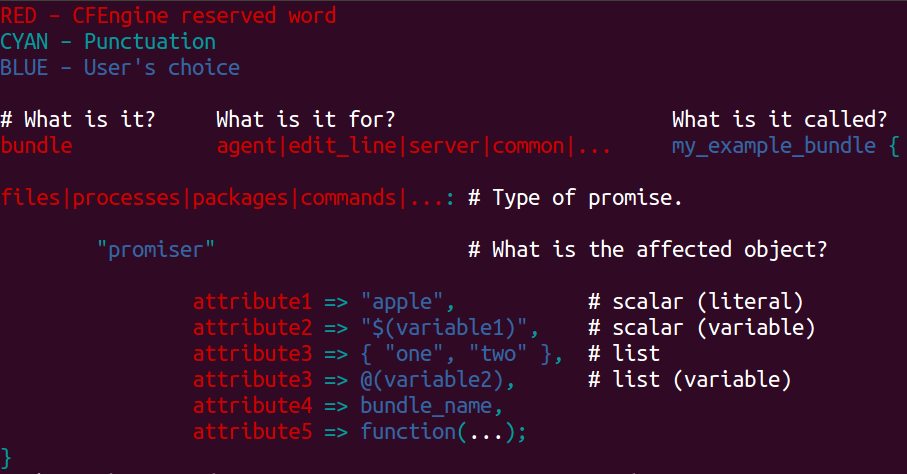
CFEngine allows you to write shorter code without loss of meaning: don’t specify the promise type, and CFEngine will re-use the promise type of the preceding promise.
bundle agent main
{
  files:

      "/tmp/hello"
        create  => "true";

      "/tmp/world"
        create  => "true";
}
6.5 Comments
Comments can be part of the CFEngine promise code (inline), or hash-comments, which are thrown away by the parser.
bundle agent main
{
  files:
      "/tmp/hello"
        create  => "true",
        comment => "inline-comments show up in verbose mode";
      # hash-comments are thrown away by parser
}
CFEngine will make up to three passes through each bundle to speed convergence to desired state.
Sometimes a promise cannot be repaired because there is a broken dependency.
CFEngine will make multiple passes in auditing/repairing a system. After dependencies are repaired, repairs of dependent promises can now succeed.
Run cf-agent with the -v switch (verbose) and look for “pass 1”, “pass
2”, and “pass 3” to observe the three passes.
# Demonstrate three passes through a bundle by using verbose mode

bundle agent main
{
  files:
      "/tmp/example"
        handle => "create_a_file",
        create  => "true";
}
Exercise 6.1. Observe three passes
Run one of your previous exercise files in verbose mode and observe what happens in which pass, and how the passes are labeled.
6.7 Ordering
There is an order to promise evaluation.
Promises are evaluated in order by promise type.
For example, for the promise types we’ve covered, the order is:
vars
files
methods
processes
commands
reports
Why is this?
This order is very intentional and is not configurable.
Variables are evaluated first as they may be used in other promises.
Files are handled before Processes as one may want to configure a service and then launch the daemon.
Processes come before Commands as one may want to run a command to start or stop a service depending on whether the process is running.
Reports come last so that the reports are not immediately made out of date (in other words, reports are last so that CFEngine doesn’t report something and then changes it).
This is called Normal Ordering.
Reference: Normal Ordering
Recap
To facilitate convergence, CFEngine evaluates and repairs promises according to CFEngine “normal ordering”.
Promises of different types are evaluated according to “normal ordering”.
Promises of the same type are evaluated in the order they appear in the file.
# Promises of the same type are evaluated in the order they appear in
# the file.

bundle agent main
{
  reports:
      "Two";
      "Three";
      "One";
}
# Promises of different types are evaluated according to "normal
# ordering".
#
# What are we going to see? What will be the order of the output statements?

bundle agent main
{
  reports:
      "Hello world!";

  commands:
      "/bin/echo Good morning!";

  reports:
      "I love tomatoes";
}
# This example introduces the fileexists() function.
#
# We will use fileexists() in an upcoming example

bundle agent main
{
  classes:
      "motd_present"
        expression => fileexists("/etc/motd");

      "motd_absent"
        not => fileexists("/etc/motd");

  reports:
      motd_present::  "OK - found motd: /etc/motd";
      motd_absent::   "FAIL - motd not found: /etc/motd";
}
#!/bin/sh

# Set up for the next example by ensuring we do not have /tmp/newfile

sudo rm -f /tmp/newfile
# Run "/bin/rm /tmp/newfile" to setup for this example

bundle agent main
{
  classes:
      "file_exists"
        expression => fileexists("/tmp/newfile");

      "file_absent"
        not => fileexists("/tmp/newfile");

  files:
      "/tmp/newfile"
        create => "true";

  reports:
    file_exists::
      "file /tmp/newfile exists";

    file_absent::
      "file /tmp/newfile does not exist";
}

# Why does CFEngine print both reports when /tmp/newfile is absent?
Exercise 6.2. Run the previous example in verbose mode so you can see
what happens during which pass.
Exercise 6.3. Ordering of promises
Create two bundles and make each bundle report its name.
Additionally, have bundle #1 call bundle #2 (via a
methods:promise).
What is the order of the bundle names in the reports and why?
6.8 Knowledge Management as a Challenge to Scalability
Knowledge Management is one of the key challenges of scale today.
Not lack of CPU, memory or storage - but having sufficient understanding.
How does CFEngine help us address this?
6.9 Promise Handles
A promise handle is a short name for a promise – it’s the unique id of a promise.
Handles are essential for mapping dependencies and performing impact analyses.
Promise handles have to follow the rule for CFEngine identifiers: characters allowed are alphanumerics and underscores only (no spaces).
Reference: https://docs.cfengine.com/docs/3.12/reference-promise-types.html#handle
# Example of a promise handle

bundle agent main
{
  files:
      "/tmp/testfile"
        handle => "create_testfile", # <-- promise handle
        create => "true";
}
# Promise handles MUST be unique.
#
# The following is NOT valid CFEngine.

bundle agent main
{
  files:
      "/tmp/testfile"
        handle => "create_testfile",
        create  => "true";

  reports:
     "hello world"
       handle => "create_testfile";
}
6.10 Documenting Dependencies
You can use the depends_on attribute to document dependencies
and control process flow.
The depends_on attribute takes a list of promise handles on the right-hand side.
bundle agent main
{
  reports:

      "Launch!!"
        depends_on => { "fuel" },  # <-- dependencies
        handle => "launch";

      "Fueling"
        handle => "fuel";
}
6.11 Promisees
In CFEngine, you can document not only the promiser (what makes the promise) but also the promisee (to whom the promise is made, or what depends on that promise).
The following example demostrates that ‘fuel’ has a documented impact on ‘launch’; and that ‘launch’ depends on ‘fuel’.
# Documenting the Stakeholders

bundle agent main
{

  files:
      "/etc/httpd/conf/httpd.conf" -> { "Web Services team", "NOC" }
        create  => "true";
}
# Documenting what depends on this promise

bundle agent main
{
  reports:

      "Launch!!"
        depends_on => { "fuel" },
        handle => "launch";

      "Fueling" -> { "launch" }   # <-- promisee
        handle => "fuel";
}
# You can have multiple dependencies

bundle agent main
{
  reports:

      "Launch!!"
        depends_on => { "systems_check", "fuel" },
        handle => "ignition";

      "Systems Check"
        handle => "systems_check";

      "Fueling..."
        handle => "fuel";

}
# You can have multiple promisees

bundle agent main
{
  reports:

      "Systems Check" -> { "fuel", "launch" }
        handle => "systems_check";
}
Promisees don’t control flow.
Only depends_on does.
TIP: Try to think declaratively (not imperatively), and use depends_on
only when needed.
Exercise 6.4. Run 310-050-KnowledgeManagement-0060-dependson.cf in verbose mode.
How many passes through the bundle does it take to report both promises?
On which pass is the “Fueling” report made?
On which pass is the “Launch!!” report made? Why?
bundle agent main
{
  reports:

      "Launch!!"
        depends_on => { "fuel" },
        handle => "launch";

      "Fueling"
        handle => "fuel";
}
6.12 Comments
Comments written in code follow the program, they are not merely discarded; they appear in verbose logs and error messages.
# run this in verbose mode and notice the comment

bundle agent main
{
  files:
      "/tmp/testfile"
        comment => "Create a vital file, needed for XYZ.",
        create  => "true";
}
6.13 Debug Reports
Debug reports can be convenient for debugging all or part of a policy.
# Demonstrate by running this with DEBUG and then with DEBUG_main and
# DEBUG_prep classes to control debug reporting
#
# cf-agent -D DEBUG -f <thisfile>
# cf-agent -K -D DEBUG_main -f <thisfile>
# cf-agent -K -D DEBUG_prep -f <thisfile>

bundle agent main {

  vars:
    "name"
      string => "George";

  methods:
    "prep";

  reports:
    DEBUG|DEBUG_main::
      "DEBUG $(this.bundle)";
      "$(const.t)DEBUG $(this.bundle): name = '$(name)'";
}

bundle agent prep {

reports:
  DEBUG|DEBUG_prep::
      "DEBUG $(this.bundle)";
      "$(const.t)DEBUG $(this.bundle): foo = 'bar'";
}
6.14 Dunbar Numbers
Robin Dunbar pointed out that there are limits to human cognition:
We can only have a close relationship to about 5 things.
We can have a working relationship with about 30 things or people.
We can only be acquainted with about 150.
The ‘Dunbar numbers’ are cognitive limits that we have to work around.
See Mark Burgess’s “Notes from the USENIX/LISA Knowledge Management Workshop”
You can use this to structure CFEngine policy.
8.1 Editing Files: Line-based
# Create a file and populate its content

bundle agent main
{
  files:
      "/etc/motd"
        create  => "true",
        edit_line => greet_users;
}

bundle edit_line greet_users
{
  insert_lines:
      "Good morning!";
}
# You can parameterize bundles -- let's try that with
# the edit_line bundle

bundle agent main
{
  files:
      "/etc/motd"
        create  => "true",
        edit_line => say_something("Good morning");
}

bundle edit_line say_something(what_we_say)
{
  insert_lines:
      "$(what_we_say)";
}
Exercise 8.1. Editing /etc/motd
Write a policy that will ensure /etc/motd always has the line:
Unauthorized use forbidden.
# Change "good morning" to "good afternoon".
# What will the file contain after we run cf-agent?

bundle agent main
{
  files:
      "/etc/motd"
        create  => "true",
        edit_line => greet_users;
}

bundle edit_line greet_users
{
  insert_lines:
      "Good afternoon!";
}
# You can control the entire file content by adding
# the edit_line promise `delete_lines: "*";`

bundle agent main
{
  files:
      "/etc/motd"
        create => "true",
        edit_line => my_motd;
}

bundle edit_line my_motd
{
  insert_lines:
      "Good afternoon!";

  delete_lines:
      ".*";
}

# Why doesn't this just leave the file empty?
Exercise 8.2. Making "delete_lines" promises
Write a policy to ensure the /etc/motd file (a) exists, and (b) contains only the line “Unauthorized use forbidden”.
# You can insert a file using the `insert_type`
# attribute of `insert_lines` promises.

bundle agent main
{
  files:
      "/tmp/test.txt"
        create => "true",
        edit_line => mytext;
}

bundle edit_line mytext
{
  insert_lines:
      "Here are our OS details";
      "/etc/os-release"
        insert_type => "file";
}
8.1.1 More edit_line promise types
There are two other promise types you can make in edit_line bundles:
search and replace
columnar editing
We will look at them later.
8.2 Editing Files: XML
bundle agent main
{
  files:
      "/tmp/test.xml"
        comment => "Create XML file",
        create => "true",
        edit_xml => build_xpath;
}

bundle edit_xml build_xpath
{
   build_xpath:
      "/Server/Service/Engine";

}
bundle agent main
{
  files:
      "/tmp/test.xml"
        edit_xml => my_xml_example;
}

bundle edit_xml my_xml_example
{
  insert_tree:
      '<Host name="a014848585.example.com">
             <Alias>mail.example.com</Alias>
       </Host>'
        select_xpath => "/Server/Service/Engine";
}
bundle agent main
{
  files:
      "/tmp/test.xml"
        edit_xml => set_value;
}

bundle edit_xml set_value
{
  set_text:
      "nancy.example.com"
        select_xpath => "/Server/Service/Engine/Host/Alias";

}
Exercise 8.3. Editing an XML config file
Use CFEngine’s XML editing features to create an XML file with the following structure and content:
<?xml version="1.0"?>
<book><title>Learning CFEngine 3</title><author>Diego Zamboni</author></book>
9.1 Introduction to Templates
9.1.1 Introducing templates
What are templates? Why would we use templates?
(In class, a brief introductory talk is given for sysadmins that haven’t worked with templates.)
In the following templates, we use an uncommon text string (double underscore) to set out our tokens from the rest of the text. This will make it easy to find and replace the tokens with their values (to fill in the template with values) without accidentally replacing actual text.
9.1.2 Example Template
Here is an example template, for a promotional email message:
Hello __NAME__,

  Please buy our product.

Love,
Company
Notice the __NAME as the placeholder for the person’s name.
9.1.3 Expanding the Template
You “expand” the template by populating it with data:
$ cat /tmp/letter.template
Hello __NAME__,

  Please buy our product.

Love,
Company

$ NAME=John
$ sed -e "s:__NAME__:${NAME}:" < letter.template >  letter.txt
$ cat letter.txt
Hello John,

  Please buy our product.

Love,
Company

$
9.2 Mustache Templates
See Mustache website for documentation of the popular Mustache templating system created by the CTO of GitHub and now available as a library for many languages.
9.2.1 With an Inline Data Container
                 Unauthorized use forbidden

              Property of {{organization}}
                   {{organizational_unit}}
# Inline template data

bundle agent main
{
  files:
      "/etc/motd"
        create => "true",
        template_method => "mustache",
        edit_template   => "$(this.promise_dirname)/templates/motd.mustache",
        template_data => '{
                                        "organization" : "ACME, Inc.",
                                 "organizational_unit" : "Roadrunner Division",
                          }';
}
9.2.2 With an External Data Container
# Template data from standalone data container

bundle agent main
{
  vars:
      "my_template_data"
        data => '{
                   "organization" : "ACME, Inc.",
                   "organizational_unit" : "Roadrunner Division",
                 }';

  files:
      "/etc/motd"
        create => "true",
        template_method => "mustache",
        edit_template   => "$(this.promise_dirname)/templates/motd.mustache",
        template_data => @(my_template_data);
}
Exercise 9.1. Render a JSON-backed Mustache template
Make a JSON file:
echo '{ "food" : "pizza" }' > food.json
Make a Mustache template:
echo "Waiter, I'd like to order {{food}}" > order.mustache
Write CFEngine policy that will render the Mustache template using the data in the JSON file.
Hint: see the readjson() function in the reference manual.
9.2.3 With Datastate
Function datastate() returns a data container with the current evaluation data state (all the classes and variables in cf-agent memory).
The returned data container will have the keys classes and vars.
Under classes you’ll find a map with the class name as the key and true as the value.
Under vars you’ll find a map with the bundle name as the key. Under the bundle name you’ll find another map with the variable name as the key.
Definition:
An abstract data type storing items, or values. A value is accessed by an associated key.
https://xlinux.nist.gov/dads/HTML/dictionary.html
# Show datastate
#
# This policy will dump the first 4k of the datastate
# (4096 bytes due to internal limits in CFEngine)
#
# Note: the datastate report will show a copy of the
# datastate in vars.main.datastate (vars.main.datastate.vars
# and vars.main.datastate.classes)

bundle agent main
{
  vars:
    "datastate"
      data => datastate();

    "formatted_datastate"
      string => storejson("datastate");

  reports:
    "Datastate =
$(formatted_datastate)
";

}
bundle common g
# global settings
{
  vars:
      "organization"
        string => "Acme Inc.";

  classes:
    "snow_day"
       expression => "any",
       comment => "set a class so we can then pull it out, for the demo";
}

bundle agent main
{
  vars:
      "foo"
        string => "bar";

  files:
      "/etc/motd"
        create => "true",
        template_method => "mustache",
        edit_template   => "$(this.promise_dirname)/templates/datastate-example.mustache";
}
Unauthorized use forbidden

Property of {{vars.g.organization}}

{{#classes.snow_day}}
The office is closed today.
{{/classes.snow_day}}

{{#classes.dev}}
DEVELOPMENT
{{/classes.dev}}

{{#classes.ops}}
OPS ROCKS
{{/classes.ops}}

This system is managed by CFEngine
my hostname is {{vars.sys.fqhost}}

The value of foo is {{vars.main.foo}}

Have a nice day.
Exercise 9.2. Make a Mustache template that accesses CFEngine datastate
Create /etc/motd from a Mustache template that includes the host name, time of last run, and time of last policy update.
E.g.:
$ cat /etc/motd
*** Unauthorized Use Forbidden ***

Welcome to apple.example.com

This system is managed by CFEngine.
Last CFEngine policy update: Thu Nov  5 19:22:02 GMT 2015
Last CFEngine run: Thu Nov  5 19:22:03 GMT 2015
$
Then, make a mustache template that accesses classes from CFEngine datastate
Make /etc/motd say “Welcome to a Linux system” if the CFEngine linux “class” is set.
10.1 Body Parts
A promise body is the description of exactly what is promised (as opposed to what/who is making the promise). The term body (or body part) is used in the CFEngine syntax to mean a small template that can be used to contribute as part of a larger promise body.
A body part is a collection of promise attributes.
body <type> name
{
  attribute1 => value1;
  attribute2 => value2;
  ...
  attributeN => valueN;
}
# run "groupadd project_team" to create the group
# "project_team" for this example

bundle agent main
{
  files:

      "/tmp/file1"
        create => "true",
        perms   => project_files;

      "/tmp/file2"
        create => "true",
        perms   => project_files;
}

body perms project_files
{
        mode   => "770";
        owners => { "root" };
        groups => { "project_team" };
}
# You can use class expressions in body parts

bundle agent main
{
  files:
    any::
      "/tmp/testfile"
        comment  => "Set appropriate file attributes for Admin group
                     on every type of OS",
        create  => "true",
        perms   => admin_group;
}

body perms admin_group
{
  linux::  groups => { "wheel" };
  darwin:: groups => { "admin" };
  sunos::  groups => { "sys" };

}
# You can parameterize body parts

bundle agent main
{
  files:

      "/tmp/testfile"
        create  => "true",
        perms   => set_mode_700_admin_group_and_specified_user("sam");
}

body perms set_mode_700_admin_group_and_specified_user(user)
{
        mode   => "0700";
        owners => { "$(user)" };

      linux::  groups => { "wheel" };
      darwin:: groups => { "admin" };
      sunos::  groups => { "sys" };
}
# Run "echo I am going to walk my dog > /tmp/data.txt" to set up for
# this example

# Demonstrate search-and-replace in a file

bundle agent main
{
  files:
    any::
      "/tmp/data.txt"
        edit_line => transform_dogs_to_cats;
}

bundle edit_line transform_dogs_to_cats
{
  replace_patterns:
      "[Dd]og"
        replace_with => value("cat");
}

body replace_with value(x)
{
        replace_value => "$(x)";
        occurrences => "all";
}
# files: perms takes a list of okay groups
# Change to first entry if not matching any of the groups in the list
#
# Run "sudo touch /tmp/testfile; sudo chmod 777 /tmp/testfile; sudo chgrp nobody /tmp/testfile"
# to set up for this example.

bundle agent main
{
  files:
      "/tmp/testfile"
        perms => not_world_writable_and_right_group;
}

body perms not_world_writable_and_right_group
{
        groups => {"root", "games", "mail" };
        mode   => "o-w";
}
# A body part can be re-used across promises
#
# run "useradd bob; useradd susan" to set up for this example

bundle agent main
{
  files:
      "/tmp/bobsfile"
        create  => "true",
        perms   => mog("777", "bob", "mail");

      "/tmp/susansfile"
        create  => "true",
        perms   => mog("000", "susan", "games");
}

body perms mog(mode,owner,group)
{
  mode    => "$(mode)";
  owners  =>  {"$(owner)"};
  groups  =>  {"$(group)"};
}
Exercise 10.1. Create executable shell script
Write a CFEngine policy to ensure ‘/usr/local/bin/hello.sh’ exists, has permissions 0755, owner root, group root, and contents:
#!/bin/sh
/bin/echo hello world
10.2 Left Hand Side, Right Hand Side
# Example of
#     cfengine_word => builtin_function()

bundle agent main
{
  vars:
      "formatted"
        string => format("%04d", 1);

  reports:
      "$(formatted)";
}
# Example of
#
#      cfengine_word => { list }    #  (directly and via list variable)

bundle agent main
{
  vars:
      "my_slist_0"
        slist  => {
                    "String contents...",
                    "... are beauutifuuul this time of year"
                  };

      "my_slist_1"
        slist  => { @(my_slist_0), "apple", "orange" };
}
10.3 LHS/RHS (Continued)
10.3.1 Promise attributes
CFEngine uses many “constraint expressions” as part of the body of a promise. These are attributes of a promise, they detail and constrain the promise.
These take the form:
left-hand-side (cfengine word) => right-hand-side (user defined data).
This can take several forms:
 cfengine_word => user_defined_body or user_defined_body(parameters)

                  builtin_function()

                  "scalar_value" or "$(scalar_variable_name)"

                  { "list_element", "list_element2" }

                  { @(list_variable_name) }

                  boolean
In each of these cases, the right hand side is a user choice.
# Example of:
#    cfengine_word => user_defined_body(param)

bundle agent main
{
  storage:
      "/" volume  => my_check_volume("30%", "100K");
      "/var" volume  => my_check_volume("20%", "500K");
}

body volume my_check_volume(min_free_space,size)
{
        freespace      => "$(min_free_space)";
        # Min disk space that should be available

        sensible_size  => "$(size)";
        # Minimum size in bytes that should be used
}
# Example of
#      cfengine_word => "scalar"

bundle agent main
{
  vars:

      "variable_0"
        comment => "RHS is a literal string",
        string  => "String contents...";  # a scalar value

      "variable_1"
        comment => "RHS uses a variable but it's still a scalar",
        string  => "$(variable_0)";       # a scalar variable

  reports:
      "variable_0: $(variable_0)";
      "variable_1: $(variable_1)";
}
# Example of
#
#      cfengine_word => { list }    #  (directly and via variable)

body common control
# "body common control" contains attributes that control the behavior
# of CFEngine
{

  bundlesequence => { "example_1", "example_2" };

}

bundle agent example_2
{
  reports:
      "Second things second";
}

bundle agent example_1
{
  reports:
      "First things first";
}
11.1 CFEngine Standard Library
Community Open Promise Body Library (aka CFEngine Standard Library)
CFEngine ships with a standard library of promise bodies and bundles dealing with common aspects of system administration.
The CFEngine Standard Library is growing to include all common aspects of system administration.
| CFEngine version | Promise bodies | Promise bundles |
| 3.1.5 | 88 | ? |
| 3.2.1 | 99 | 19 |
| 3.3.5 | 114 | 29 |
| 3.3.8 | 113 | 26 |
| 3.4.4 | 124 | 32 |
| 3.10.3 | 189 | 127 |
| 3.12.6 | 193 | 134 |
bundle agent main {

  files:

      "/tmp/testfile"
        comment => "Demonstrate setting file attributes",
        create  => "true",
        perms   => mog("612","aleksey","cfengine");

}

############################################################

body perms mog(mode,owner,group)
{
        owners => { "$(owner)", "john", "brian" };
        mode   => "$(mode)";
        groups => { "$(group)" };
}
body file control
{
  inputs => { "$(sys.libdir)/stdlib.cf" };  # <-- read in the library
}

bundle agent main
{
  reports:
      "CFEngine StdLib is here: $(sys.libdir)/stdlib.cf" ;

  files:
      "/tmp/testfile"
        create  => "true",
        perms   => mog("612","root","nobody");
}
bundle agent main
{
  files:
      "/etc/shadow"
        handle => "context_sensitive_file_editing_demo",
        comment => "demonstrate context-sensitive file editing capability",
        edit_line => set_user_field("rob",
                                    "2",
                                    "$1$stIAaUZw$ptP75nVkz/EapeuvdWLNC0");
}

body file control { inputs => { "$(sys.libdir)/stdlib.cf" }; }
bundle agent main
{
  files:
      "/tmp/testfile.*"
        handle => "demo_removing_files",
        comment => "Demonstrate removing files using body delete tidy",
        delete => tidy;

      # shell equivalent:  rm -r /tmp/testfile*

}

body file control { inputs => { "$(sys.libdir)/stdlib.cf" }; }
Exercise 11.1. Run the following command to generate some content:
date > /tmp/date.txt
Write a CFEngine policy that will comment out (using #) all lines that start with a day of the week:
edit_line => comment_lines_matching("(Mon|Tue|Wed|Thur|Fri|Sat|Sun).*" ,
                                    "#")
The edit_line bundle comment_lines_matching is in the standard
library.
bundle agent main
{
  files:
      "/etc/httpd/conf.d/maintenance.conf"
        handle    => "take_website_out_of_maintenance",
        comment   => "Disable maintenance-mode config block",
        edit_line => comment_out_everything;
}

bundle edit_line comment_out_everything
{
  replace_patterns:
      "^([^#].*)"
        replace_with => comment("# ");
}

body replace_with comment(c)
{
        replace_value => "$(c) $(match.1)";
        occurrences => "all";
}
bundle agent main
{
  files:
      "/etc/httpd/conf.d/maintenance.conf"
        handle    => "put_website_into_maintenance",
        comment   => "Enable maintenance-mode config block",
        edit_line => uncomment_everything;
}

bundle edit_line uncomment_everything {
  replace_patterns:
      "^#(.*)"
        handle => "uncomment_everything_replace_pattern",
        comment => "If it starts with a hash mark, grab everything
                          after the hash mark, and uncomment it.",
        replace_with => uncomment;
}


body replace_with uncomment
{
        replace_value => "$(match.1)";
        occurrences => "all";
}
bundle agent main
{
  files:
      "/etc/httpd/conf.d/welcome.conf"
        handle => "nuke_welcome_conf",
        comment => "Let's keep a low profile and not advertise
                          what software we are running - remove the
                          Welcome page that says we are running Apache
                          on CentOS",
        delete => tidy;
}

body file control { inputs => { "$(sys.libdir)/stdlib.cf" }; }
# welcome.conf is part of the Apache RPM
# to preserve package integrity, comment out this file's contents
# instead of deleting the file

bundle agent main
{
  files:
      "/etc/httpd/conf.d/welcome.conf"
        handle => "comment_out_welcome_dot_conf",
        comment => "Let's not ask for trouble by advertising
                          what software we are running",
        edit_line => comment_out_everything,
        classes => if_repaired("reload_httpd");

  commands:
    reload_httpd::
      "/etc/init.d/httpd"
        handle => "cmd_reload_httpd",
        comment => "Reload httpd configuration",
        args => "reload";
}

bundle edit_line comment_out_everything
{
  replace_patterns:
      "^([^#].*)"
        handle => "comment_out_everything_replace_patterns_promise",
        comment => "If it doesn't start with #, comment it out",
        replace_with => comment("#disabled-by-cfengine# ");
}

body file control { inputs => { "$(sys.libdir)/stdlib.cf" }; }
bundle agent main
{
  files:
      "/dev/null/motd"
        handle => "touch_file",
        comment => "Demonstrate body classes if_else",
        create => "true",
        classes => if_else("file_exists","file_missing");

  reports:
    file_exists::
      "All OK"
        handle => "report_OK";

  reports:
    file_missing::
      "WARNING! Unable to create vital file!"
        handle => "report_WARN";
}

body file control { inputs => { "$(sys.libdir)/stdlib.cf" }; }
# "body classes state_repaired" is in StdLib

bundle agent main
{
  files:
    !file_fixed::
      "/tmp/file.txt"
        handle => "persistent_class_demo",
        comment => "Set a persistent class",
        create => "true",
        classes  => state_repaired("file_fixed");

  reports:
    file_fixed::
      "Persistent class set.  Run in verbose mode to see TTL"
        handle => "report_success",
        comment => "Report if our persistent class persistent_class
                          has been set as expected.";
}

body classes state_repaired(x)
{
        promise_repaired => { "$(x)" };
        persist_time => "10";
}
bundle agent main
{
  files:
      "/tmp/scratch"
        handle => "selective_commenting",
        comment => "Remove specific lines",
        edit_line => comment_lines_matching("hello world", "#");
}


body file control { inputs => { "$(sys.libdir)/stdlib.cf" }; }
bundle agent main
{
  commands:
      "/bin/date"
        handle => "run_date_cmd",
        comment => "Demonstrate 'body contain silent'",
        contain => silent;
}

body file control { inputs => { "$(sys.libdir)/stdlib.cf" }; }
bundle agent main
{
  files:
      "/etc/profile"
        handle => "edit_etc_profile",
        create => "true",
        edit_line => insert_lines("export ORGANIZATION=ACME");
}

body file control { inputs => { "$(sys.libdir)/stdlib.cf" }; }
bundle agent main
{
  vars:
      "search_suffix"  string =>  "example.com example2.com";
      "nameservers"    slist  =>  { "8.8.4.4", "8.8.8.8" };

  files:
      "/tmp/resolv.conf"
        handle =>  "edit_resolv_conf",
        comment => "Setup up DNS resolver",
        edit_line =>  resolvconf("$(search_suffix)",
                                 "@($(this.bundle).nameservers)" );
}

body file control { inputs => { "$(sys.libdir)/stdlib.cf" }; }
bundle agent main
{
  files:
      "/tmp/scratch"
        handle => "files_multi_line_insert",
        comment => "Insert multi-line content",
        create => "true",
        edit_line => insert_lines("
hello world
this is line 2
line 3 is great
line 4 is awesome
");
}


body file control { inputs => { "$(sys.libdir)/stdlib.cf" }; }
bundle common g
{
  vars:

      "stuff[location]"     string => "New York";
      "stuff[time]"         string => "May-2027";
      "stuff[students]"     string => "11";
      "stuff[lab]"          string => "true";
}

bundle agent main {

  files:

      "/etc/example.conf"
        handle => "populate_config_file_from_array",
        comment => "Demonstrate 'bundle edit_line set_variable_values'",
        create => "true",
        edit_line => set_variable_values("g.stuff");
}


body file control { inputs => { "$(sys.libdir)/stdlib.cf" }; }
bundle agent main
{
  packages:
      "php-mysql"
        policy => "present";
}

body common control {
# the following promise attributes support the 3.7 packages promises

  debian|redhat::
    package_inventory => { $(package_module_knowledge.platform_default) };
    package_module => $(package_module_knowledge.platform_default);
}

body file control { inputs => { "$(sys.libdir)/stdlib.cf" }; }

# Example run:
# root@localhost# cf-agent -f ~/p.cf -IC
# Warning: RPMDB altered outside of yum.
# ** Found 1 pre-existing rpmdb problem(s), 'yum check' output follows:
# 1:gdm-plugin-fingerprint-2.30.4-64.el6.x86_64 has missing requires of fprintd-pam
#     info: Successfully installed package 'php-mysql'
# root@localhost#
12.1 File Copying
bundle agent main
{
  files:
      "/root/etc_group.bak"
        copy_from    => local_cp("/etc/group"),
        comment      => "Demonstrate local file copy";
}

body file control { inputs => { "$(sys.libdir)/stdlib.cf" }; }
Exercise 12.1. Create /root/etcpasswd.bak as a backup copy of /etc/passwd
body file control { inputs => { "$(sys.libdir)/stdlib.cf" }; }

bundle agent main
{
  vars:
      "master_location"
        string       => "/var/cfengine/masterfiles";

  files:
      "/var/cfengine/inputs/."
        comment      => "Update policy files cache from master",
        copy_from    => local_cp("$(master_location)"),
        depth_search => recurse("inf");
}
Exercise 12.2. Copy /usr/local/sbin/ to /tmp/mirror/
Use CFEngine to make ‘/tmp/mirror/’ contain a copy of ‘/usr/local/sbin/’ (Hint: use a files promise with a copy_from attribute.)
Now create a new file in ‘/usr/local/sbin/’ and confirm CFEngine will copy it over.
Work out how to mirror file removals. (When a file is removed in ‘/usr/local/sbin/’, it should disappear in ‘/tmp/mirror/’.) (Hint: find the appropriate promise attribute in our Agent Promise Attributes summary or in the CFEngine Reference Manual.)
Remote copy exercise
Purpose: practice writing a “remote copy” promise.
Manually create a master for the MOTD: /var/cfengine/masterfiles/motd.txt on your hub
Add a promise to your masterfiles framework to make /etc/motd a remote copy from the master on the hub.
Note: The special variable $(sys.policy_hub) contains the address of the Hub. CFEngine records the address of the hub in /var/cfengine/policy_server.dat after a successful bootstrap
Exercise
/tmp/cfe/ should be a copy of /var/cfengine/masterfiles/ from $(sys.policy_hub)
(Hint: you can use “body copy_from remote_cp” or “body copy_from secure_cp”)
vars: “myvar” data => readjson (“/tmp/stuff.json”, “100k”), if => fileexists (“/tmp/stuff.json”);
# This is an example "policy update" policy that promises that
# /var/cfengine/inputs will be a copy of the hub's
# /var/cfengine/masterfiles
#
# The following is what the update policy looked like early on,
# near CFEngine 3.0.
#
# Now the update policy is more sophisticated, with
# tricks to improve performance, although fundamentally,
# what the update policy does is still: ensure that local directory
# /var/cfengine/inputs is a copy of the hub's /var/cfengine/masterfiles

bundle agent main
{

  vars:

      "remote_path" string => "/var/cfengine/masterfiles";
      "remote_server" string => "$(sys.policy_hub)";

  files:
      "/var/cfengine/inputs"
        handle => "update_inputs_dir",
        comment => "Pull down latest policy set",
        perms => m("600"),
        copy_from => remote_cp("$(remote_path)","$(remote_server)"),
        depth_search => recurse("inf"),
        action => immediate;
}

# Self-contained bodies from the Standard Library to avoid dependencies
# and to show clearly what is happening

body perms m(mode)
{
        mode  => "$(mode)";
}

body copy_from remote_cp(from,server)
{
        servers     => { "$(server)" };
        source      => "$(from)";
        compare     => "mtime";
        trustkey    => "true";  # trust the server's public key
}

body depth_search recurse(d)
{
        depth => "$(d)";
        xdev  => "true";
}

body action immediate
{
        ifelapsed => "0";
}
# Use two remote servers, and round-robin between them.
#
# In practice, large sites run policy servers behind load
# balancers. But you could also do a software load-balance,
# client-side, with CFEngine alone, as this policy illustrates.

bundle agent main
{
  classes:
      "heads"
        handle => "flip_a_coin",
        comment => "Generate a class with a 50% probability",
        expression => isgreaterthan(randomint(1,100), 50);

  files:
      "/tmp/test1copy"
        copy_from => round_robin_cp("/var/cfengine/masterfiles/testfile1",
                                    "10.1.1.10",
                                    "10.1.1.12");
}

body copy_from round_robin_cp(from,server1, server2)
{
        source => "$(from)";

    heads::
        servers => { "$(server1)", "$(server2)" };

    !heads::
        servers => { "$(server2)", "$(server1)" };

}
Chapter 13 Patterns
Patterns are a way of compressing information.
The CFEngine 3 language is made of promises and patterns; it’s about using patterns to create concise but powerful promises.
This can be summarized by the following formula:
13.1 Lists
An example of a pattern in CFEngine is a list. You can have a list of things you want, or do not want: for example, a list of packages that should be installed, or processes that should NOT be running.
Implicit looping creates multiple promises that follow the promise pattern.
body file control { inputs => { "$(sys.libdir)/stdlib.cf" }; }

bundle agent main
{

      ######################################################
      # This is the data section, which describes the desired pattern
      #
      # All you do is add to or edit the list...
      #
      # This is *data-driven* configuration.
      ######################################################
  vars:

      "desired_package"

        handle => "good_packages",
        comment => "list the packages we want",
        slist => {
                   "httpd",
                   "php",
                   "php-mysql",
                   "mysql-server",
        };


      "unwanted_package"

        handle => "bad_packages",
        comment => "list the packages we do not want",
        slist => {
                   "java",
                   "ruby",
        };

      ######################################################
      # Below is the code that implements the above.
      # Forget this part... The above is what's important.
      ######################################################

  packages:
      "$(desired_package)"
        handle => "add_package",
        comment => "Ensure package is present",
        package_policy => "add",
        package_architectures => { "x86_64" },
        package_method => yum;


  packages:
      "$(unwanted_package)"
        handle => "remove_package",
        comment => "Ensure package is absent",
        package_policy => "delete",
        package_architectures => { "x86_64" },
        package_method => yum;

}
body file control { inputs => { "$(sys.libdir)/stdlib.cf" }; }

bundle agent main
{
  vars:

      "list_of_files"
        handle => "file_list",
        comment => "Just a file list",
        slist => {
                   "/etc/passwd",
                   "/etc/group",
        };

  files:
      "$(list_of_files)"
        handle => "set_mode_and_ownership",
        comment => "Ensure a list of files is owned by root
and mode 644",
        perms => mo("644","root");
}
13.2 Regular Expressions
Regular Expressions is another way of writing patterns.
CFEngine supports POSIX and PCRE regular expressions. (PCRE by default.)
bundle agent main
{
  files:

      "/etc/pass.*"

        handle => "set_file_perms_on_regex_list_of_files",
        comment => "Files matching /etc/pass.* need to be owned
                          by root and mode 644",
        perms => mo("644","root");

}


body file control { inputs => { "$(sys.libdir)/stdlib.cf" }; }
13.3 External Body Parts
A pattern is just a repeated structure. The benefit of seeing patterns is economy: if you can see a pattern, you can take out the commonality, abstract it, and talk about the pattern instead of all the individual cases. This is a Knowledge Management step.
— cfengine.org
External body parts are intended to aid in such abstraction.
13.4 Classes
Classes describe patterns in space and time.
Examples:
hosts in the London data center,
Solaris hosts in Texas,
Linux hosts between 2:00 and 4:00 A.M. on Sunday
# Demonstrate using classes to link promises
# also demonstrates action logme

bundle agent main
{
  files:
      "/etc/ssh/sshd_config"
        handle => "sshd_must_use_protocol_2_only",
        comment => "Make sure SSHD does not use protocol v1;
                          make sure it only uses protocol v2,
                          to increase security",
        edit_line => permit_protocol_2_only,
        classes => if_repaired("sshd_config_file_was_repaired"),
        action => logme("promise $(this.handle)");

  commands:
    sshd_config_file_was_repaired::
      "/etc/init.d/sshd reload"
        handle => "reload_sshd",
        comment => "run sshd init script to reload sshd
                          to pick up new config",
        action => logme("promise $(this.handle)");

}


body action logme(x)
{
        log_string => "$(sys.date) $(x)";

        log_kept => "/var/log/cfengine_keptlog.log";
        log_repaired => "/var/log/cfengine_replog.log";
        log_failed => "/var/log/cfengine_faillog.log";

}


bundle edit_line permit_protocol_2_only
{
      delete_lines: ".*Protocol.*1.*";
      insert_lines: "Protocol 2";
}

body file control { inputs => { "$(sys.libdir)/stdlib.cf" }; }
bundle agent main
{
  classes:
      # List form of class expression useful for including functions
      "my_new_class"
        handle => "or_list",
        comment => "Demonstrate list form of class expression
                          useful for including functions",
        or   => { "linux",
                  "solaris",
                  fileexists("/etc/fstab")
        };

  reports:
    my_new_class::

      # This will only report Boo! on linux, solaris, or any system
      # on which the file /etc/fstab exists

      "Boo!";
}
bundle agent main
{
  classes:
      "good_technology"
        handle => "good_technology_class",
        comment => "Set a custom class based on built-in classes",
        expression => "linux|solaris";

  reports:
    good_technology::
      "I love good technology";

}
# - demonstrate setting a custom class using a function

bundle agent main
{
  classes:
      "islink"
        handle => "class_islink",
        comment => "Test if /tmp/a is a symbolic link",
        expression => islink("/tmp/a");

  reports:
    islink::
      "/tmp/a is a link";

    !islink::
      "/tmp/a is not a link";
}
bundle agent main
{
  classes:
      "weekday"
        expression => "Monday|Tuesday|Wednesday|Thursday|Friday";

      "weekend"
        expression => "Saturday|Sunday";

  reports:
    weekday::
      "Today is a weekday.";
}
bundle agent main
{
  vars:
      "days"
        handle => "days",
        comment => "Build a list of days to report day of the week",
        slist => { "Monday",
                   "Tuesday",
                   "Wednesday",
                   "Thursday",
                   "Friday",
                   "Saturday",
                   "Sunday",
        };

  reports:
      "Hello world!  I love $(days)s!"
        comment => "Report day of the week",
        ifvarclass => "$(days)";

# The above promise creates 7 promises:
#      "Hello world!  I love Mondays!"
#        comment => "Report day of the week",
#        ifvarclass => "Monday";
#
#       ...
#
#      "Hello world!  I love Sundays!"
#        comment => "Report day of the week",
#        ifvarclass => "Sunday";

}
bundle agent main
{
  commands:
    linux&Hr08::
      "/bin/echo Linux system AND we are in the 8th hour.";
      "/bin/echo hello world";   # this promise is NOT in the class "any" !!!
    any::
      "/bin/date";
}
Exercise 13.1. Practice using classes
Use a custom class to report if the file ‘/tmp/testme’ exists
13.4.1 Note: Classes have Scope
# soft classes set in agent bundle have bundle scope by default

bundle agent main
{
  classes:
    any::
      "myclass";

  methods:
    "bundle_2";
}

bundle agent bundle_2
{
  reports:
    myclass::
      "Yay!  myclass is set";
}
# soft classes set in agent bundle have bundle scope by default

bundle agent main
{
  classes:
    any::
      "myclass"
        scope => "namespace";

  methods:
    "bundle_2";
}

bundle agent bundle_2
{
  reports:
    myclass::
      "Yay!  myclass is set";
}
# Classes set in "common" bundles have global scope by default

bundle common global_definitions
{
  classes:
    any::
      "myclass";
}

bundle agent main
{
  reports:
    myclass::
      "Yay!  myclass is set";
}
body common control
{
  inputs => { "$(sys.libdir)/stdlib.cf" };
  bundlesequence => { "example_1", "example_2" };
}

bundle agent example_1
{
  files:
      "/tmp/myfile"
        create => "true",
        classes => if_repaired("fixed_something"),
        comment => "Demonstrate that classes created by if_repaired
                    are global and therefore visible to other bundles";
}


bundle agent example_2
{
  reports:
    fixed_something::
      "Detected global class 'fixed_something'.";
}
# Classes defined in common bundles are global.
#
# They appear in the Defined Classes section at the start of
# verbose output.
#
# Classes defined in all other bundles are local. You will see
# them defined in verbose mode as well (the "C" stands for classes):
#
# verbose: C: BEGIN classes / conditions (pass 1)
# verbose: C: .........................................................
# verbose: C:     +  Private class: local_class

body common control
{
  bundlesequence => {
                      "g",
                      "example_1",
                      "example_2",
                    };
}


bundle common g {
  classes:
    any::
      "global_class";
}


bundle agent example_1
{
  classes:
    any::
      "local_class";

  reports:
    global_class:: "Bundle $(this.bundle): global class 'global_class' detected";
    local_class::  "Bundle $(this.bundle): local class 'local_class' detected";
}


bundle agent example_2
{
  reports:
    global_class:: "Bundle $(this.bundle): global class 'global_class' detected";
    local_class::  "Bundle $(this.bundle): local class 'local_class' detected";
}

# Output:
#
# R: Bundle example_1: global class 'global_class' detected
# R: Bundle example_1: local class 'local_class' detected
# R: Bundle example_2: global class 'global_class' detected
body common control
{
        bundlesequence => { "example_1", "example_2" };
}


bundle agent example_1
{
      # Classes defined in common bundles are global.
      #
      # They appear in the Defined Classes section at the start of
      # verbose output.
      #
      # Classes defined in agent bundles are local

  classes:
    any::
      "webserver";

      # Because this is an "agent" bundle, other bundles won't
      # see this class.
}


bundle agent example_2
{
  reports:
    webserver::
      "Bundle example_1: I am a Web server";
}
body common control
{
        bundlesequence => { "example_1", "example_2" };
}

bundle common example_1
{
  classes:
    any::
      "webserver";
      # Because this is now a "common" bundle, other bundles WILL
      # see this class.
}

bundle agent example_2
{
  reports:
    webserver::
      "Bundle $(this.bundle): I am a Web server";
}
# "common" bundles will be evaluated even if not listed in bundlesequence

body common control
{
        bundlesequence => { "example_2" };
}


bundle common example_1
{
  classes:
    any::
      "webserver";
}

bundle agent example_2
{
  reports:
    webserver::
      "Bundle $(this.bundle): I am a Web server";
}
13.5 Methods
There is a special promise type in CFEngine 3 called “methods” that promises to call another promise bundle.
 methods:

        "any"

           usebundle => bundle_name;
The promiser can be any word, right now it does not matter; the promiser is reserved for future development.
Parameters are optional:
 methods:

        "any"

           usebundle => bundle_name("arg1", "arg2");
bundle agent main
{
  vars:
      "userlist" slist => { "alex", "ben", "charlie", "diana", "rob" };

  methods:
      "any" usebundle => remove_user("$(userlist)");
}


bundle agent remove_user(user)
{
  commands:
      "/usr/sbin/userdel $(user)"
        contain => silent;
}

body file control { inputs => { "$(sys.libdir)/stdlib.cf" }; }
body file control { inputs => { "$(sys.libdir)/stdlib.cf" }; }

bundle agent main
{
  vars:

      "badusers" slist => {
                            "alex",
                            "ben",
                            "charlie",
                            "diana",
                            "joe"
      };

  methods:

      "any" usebundle => lock_user(@(badusers));

}

bundle agent lock_user(user)
{

  files:
      "/etc/shadow"
        edit_line => set_user_field("$(user)",2,"!LOCKED");

      "/etc/passwd"
        edit_line => set_user_field("$(user)",7,"/sbin/nologin");

      "/etc/sudoers"
        edit_line => delete_lines_matching("^$(user)");
}
13.5.1 Methods provide encapsulation of multiple issues
Methods offer powerful ways to encapsulate multiple issues pertaining to a set of parameters.
For example:
13.5.2 Removing a user:
userdel
sudoers
mail spool
# Make sure /etc/group contains a "cfengine" group

bundle agent main
{
  methods:
      "any"
        handle => "group_exists",
        comment => "make sure the specified group is always present",
        usebundle => groupadd("cfengine");
}

bundle agent groupadd(groupname)
{
  commands:
      linux:: "/usr/sbin/groupadd" args => "$(groupname)";
      aix::   "/sbin/addgroup"     args => "$(groupname)";
      hpux::  "/usr/sbin/addgroup" args => "$(groupname)";
}
Exercise 13.2. Practice using "methods" type promises
Write a policy that has two bundles.
The first bundle does something visible (such as a reports type promise that says “bundle1”) AND calls the second bundle.
The second bundle reports “bundle2”.
What output will you see and in what order? Why? Now run your policy and check.
Exercise 13.3. Now parameterize the 2nd bundle – have the first bundle feed it an argument, and have the 2nd bundle display that argument.
Exercise 13.4. Sysadmin Problem:
‘/etc/profile’ should set the ORGANIZATION environment variable when users log in:
export ORGANIZATION=MyOrg
Policy Writing Exercise:
Write a bundle “etc_profile_contains” that would take an argument and ensure ‘/etc/profile’ contains the text string specified in the argument.
Demonstrate its use by calling it from another bundle:
    bundle agent example {
       methods:
         "any"
             usebundle => etc_profile_contains("export ORGANIZATION=MyOrg");
    }
Exercise 13.5. Make a bundle called filecontains that takes two arguments: a filename, and a text string. The bundle should ensure that the file specified in the first argument contains the text string specified in the second argument.
Example:
    methods:
     "any" usebundle => file_contains("/etc/profile", "export ORGANIZATION=MyOrg");
     "any" usebundle => file_contains("/etc/motd", "Unauth. use forbidden");
Exercise 13.6. Configuring a web server.
install “httpd” package
e.g.
 packages:
    "php-mysql"
      policy => "present";
start “httpd” service
e.g.
services:

    "httpd"
      service_policy => "start";
add parsing of argument to the bundle (if “on”, then do the above; if “off”, then stop the service)
TIP: The CFEngine function strcmp() can compare two strings.
Write a bundle “webserver” that will ensure an Apache httpd package is installed and the service is up and running when the argument is “on”:
     methods:

        "any"

             usebundle => webserver("on");
Make sure the service is off when the argument is “off”.
Chapter 14 Functions
See Functions in the CFEngine Reference for explanation of the following functions.
14.1 CFEngine Functions
bundle agent main
{
  vars:
      "my_result"
        string => execresult("/bin/ls /etc/motd /nosuchfile",
                             "noshell");

  reports:
      "Variable is $(my_result)";
}
bundle agent main
{
  vars:
      "my_result"
        string => execresult("/bin/ls /etc/motd /nosuchfile 2>/dev/null",
                             "useshell");

  reports:
      "Variable is $(my_result)";
}
bundle agent main
{
  vars:
      "no"
        int => countlinesmatching("^cfengine:.*",
                                  "/etc/group");

  reports:
      "Found $(no) lines matching";
}
bundle agent main
{
vars:
"canonified_text"
string => canonify("hello!@#$%world");
reports:
"$(canonified_text)";
}
bundle agent main
{
vars:
"myvar" string => getenv("USER","20");
reports:
"I am running as user $(myvar)"
if => isvariable("myvar");
}
Functions exercise
Print a report if /etc/motd is newer than /etc/passwd
How to convert epoch time to human-readable:
vars: “human_ctime” string => execresult(“/bin/date -d @ $(ctime)”, “noshell”);
reports: “$(human_ctime)”;
15.1 CFEngine Special Variables
15.1.1 Introduction
CFEngine has some special variables.
You can see the whole list in the Special Variables section of the reference manual, but here is a taste of them.
15.1.2 Constants
bundle agent main
{
vars:
"name"
string => "Inigo Montoya";
reports:
"A carriage return character is $(const.r)The carriage has returned.";
"A report with a$(const.t)tab in it";
"Backslash does not work to stop variable interpolation:";
"The value of variable named \$(const.dollar) is $(const.dollar)";
"Therefore:";
"value of \$(name) is $(name)";
"value of $(const.dollar)(name) is $(name)";
"A newline with either $(const.n) or with $(const.endl) is ok";
"But a string with \n in it does not have a newline!";
}
15.1.3 Edit
Special variables with scope “edit” allow you to access information about editing promises during their execution.
Example:
Points to the filename of the file currently making an edit promise.
# Put a few text files in /tmp (ending in .txt), and put
# the line "hello world" in one of them.
#
# CFEngine will report which file contains the line "hello world".
bundle agent main
{
files:
"/tmp/.*.txt"
handle => "cfengine_grep_dash_l",
comment => "Return files matching given string",
edit_line => grep_dash_l("hello world");
}
bundle edit_line grep_dash_l(regex)
{
classes:
"ok" expression => regline("$(regex)","$(edit.filename)");
reports:
ok::
"File $(edit.filename) has a line with \"$(regex)\" in it";
}
15.1.4 Match
# Create the following files before running this example:
# /bin/touch /tmp/cf1_test1 /tmp/cf3_test2
bundle agent main
{
files:
"/tmp/(cf[^_]*)_(.*)"
edit_line => show_match("$(match.0) $(match.1) $(match.2)");
}
bundle edit_line show_match(data)
{
reports:
"$(data)";
# OUTPUT
# You should see:
# R: /tmp/cf2_test1 cf2 test1
# R: /tmp/cf3_test2 cf3 test2
}
# INPUT
#
# File /tmp/cf3_test containing a Unix shell style comment:
#
# one
# two
# three
# # four
# five
# six
########################################################
bundle agent main
{
files:
"/tmp/cf3_test"
create => "true",
edit_line => replace_shell_comments_with_C_comments;
}
bundle edit_line replace_shell_comments_with_C_comments
{
replace_patterns:
"^#(.*)"
replace_with => C_comment;
}
body replace_with C_comment
{
replace_value => "/* $(match.1) */"; # backreference 0
occurrences => "all"; # first, last all
}
########################################################
#
# OUTPUT
#
# File /tmp/cf3_test should now have a C style comment:
#
# one
# two
# three
# /* four */
# five
# six
15.1.5 Monitoring
# report environmental conditions
# Current value: value_<name> e.g. value_diskfree
# Average: av_<name> e.g. av_diskfree
# Standard Deviation: dev_<name> e.g. dev_diskfree
bundle agent main
{
reports:
"
Metric Current Value
cfengine_in ${mon.value_cfengine_in}
cfengine_out ${mon.value_cfengine_out}
cpu ${mon.value_cpu}
cpu0 ${mon.value_cpu0}
cpu1 ${mon.value_cpu1}
cpu2 ${mon.value_cpu2}
cpu3 ${mon.value_cpu3}
diskfree ${mon.value_diskfree}
dns_in ${mon.value_dns_in}
dns_out ${mon.value_dns_out}
ftp_in ${mon.value_ftp_in}
ftp_out ${mon.value_ftp_out}
icmp_in ${mon.value_icmp_in}
icmp_out ${mon.value_icmp_out}
irc_in ${mon.value_irc_in}
irc_out ${mon.value_irc_out}
loadavg ${mon.value_loadavg}
messages ${mon.value_messages}
netbiosdgm_in ${mon.value_netbiosdgm_in}
netbiosdgm_out ${mon.value_netbiosdgm_out}
netbiosns_in ${mon.value_netbiosns_in}
netbiosns_out ${mon.value_netbiosns_out}
netbiosssn_in ${mon.value_netbiosssn_in}
netbiosssn_out ${mon.value_netbiosssn_out}
nfsd_in ${mon.value_nfsd_in}
nfsd_out ${mon.value_nfsd_out}
otherprocs ${mon.value_otherprocs}
rootprocs ${mon.value_rootprocs}
smtp_in ${mon.value_smtp_in}
smtp_out ${mon.value_smtp_out}
ssh_in $(mon.value_ssh_in)
ssh_out ${mon.value_ssh_out}
syslog ${mon.value_syslog}
tcpack_in ${mon.value_tcpack_in}
tcpack_out ${mon.value_tcpack_out}
tcpfin_in ${mon.value_tcpfin_in}
tcpfin_out ${mon.value_tcpfin_out}
tcpmisc_in ${mon.value_tcpmisc_in}
tcpmisc_out ${mon.value_tcpmisc_out}
tcpsyn_in ${mon.value_tcpsyn_in}
tcpsyn_out ${mon.value_tcpsyn_out}
temp0 ${mon.value_temp0}
temp1 ${mon.value_temp1}
temp2 ${mon.value_temp2}
temp3 ${mon.value_temp3}
udp_in ${mon.value_udp_in}
udp_out ${mon.value_udp_out}
users ${mon.value_users}
webaccess ${mon.value_webaccess}
weberrors ${mon.value_weberrors}
www_in ${mon.value_www_in}
www_out ${mon.value_www_out}
wwws_in ${mon.value_wwws_in}
wwws_out ${mon.value_wwws_out}
";
}
# report environmental conditions
bundle agent main
{
reports:
"Percent CPU utilization ${mon.value_cpu}";
"Percent CPU0 utilization ${mon.value_cpu0}";
"Percent CPU1 utilization ${mon.value_cpu1}";
classes:
"CPUoverload"
expression => isgreaterthan("$(mon.value_cpu)","80");
reports:
CPUoverload::
"CPU utilization is over threshold!!!";
}
OUTPUT on my system, myhost.example.com
R: sys.arch: x86_64
sys.cdate: Sun_May_15_11_25_03_2011
sys.cf_agent: "/var/cfengine/bin/cf-agent"
sys.cf_execd: "/var/cfengine/bin/cf-execd"
sys.cf_hub: "/var/cfengine/bin/cf-hub"
sys.cf_key: "/var/cfengine/bin/cf-key"
sys.cf_know: "/var/cfengine/bin/cf-know"
sys.cf_monitord: "/var/cfengine/bin/cf-monitord"
sys.cf_promises: "/var/cfengine/bin/cf-promises"
sys.cf_report: "/var/cfengine/bin/cf-report"
sys.cf_runagent: "/var/cfengine/bin/cf-runagent"
sys.cf_serverd: "/var/cfengine/bin/cf-serverd"
sys.cf_twin: "/var/cfengine/bin/cf-agent"
sys.cf_version: 3.1.5
sys.class: linux
sys.date: Sun May 15 11:25:03 2011
sys.domain: example.com
sys.expires:
sys.exports: /etc/exports
sys.fqhost: myhost.example.com
sys.fstab: /etc/fstab
sys.host: myhost.example.com
sys.interface: venet0
sys.ipv4: 127.0.0.1
sys.ipv4[interface_name]: $(sys.ipv4[interface_name])
sys.ipv4_1[interface_name]: $(sys.ipv4_1[interface_name])
sys.ipv4_2[interface_name]: $(sys.ipv4_2[interface_name])
sys.ipv4_3[interface_name]: $(sys.ipv4_3[interface_name])
sys.key_digest: MD5=c4348f13c55363743ba5544a7808dff5
sys.license_owner: $(sys.license_owner)
sys.licenses_granted: $(sys.licenses_granted)
sys.licenses_installtime: $(sys.licenses_installtime)
sys.long_arch:
linux_x86_64_2_6_18_028stab070_4__1_SMP_Tue_Aug_17_18_32_47_MSD_2010
sys.maildir: /var/spool/mail
sys.nova_version: $(sys.nova_version)
sys.os: linux
sys.ostype: linux_x86_64
sys.policy_hub: $(sys.policy_hub)
sys.release: 2.6.18-028stab070.4
sys.resolv: /etc/resolv.conf
sys.uqhost: myhost
sys.version: #1 SMP Tue Aug 17 18:32:47 MSD 2010
sys.windir: /dev/null
sys.winprogdir: /dev/null
sys.winprogdir86: /dev/null
sys.winsysdir: /dev/null
sys.workdir: /var/cfengine
Output on my system myhost.example.com:
R: sys.arch: x86_64
sys.cdate: Sun_May_15_11_25_03_2011
sys.cf_agent: "/var/cfengine/bin/cf-agent"
sys.cf_execd: "/var/cfengine/bin/cf-execd"
sys.cf_hub: "/var/cfengine/bin/cf-hub"
sys.cf_key: "/var/cfengine/bin/cf-key"
sys.cf_know: "/var/cfengine/bin/cf-know"
sys.cf_monitord: "/var/cfengine/bin/cf-monitord"
sys.cf_promises: "/var/cfengine/bin/cf-promises"
sys.cf_report: "/var/cfengine/bin/cf-report"
sys.cf_runagent: "/var/cfengine/bin/cf-runagent"
sys.cf_serverd: "/var/cfengine/bin/cf-serverd"
sys.cf_twin: "/var/cfengine/bin/cf-agent"
sys.cf_version: 3.1.5
sys.class: linux
sys.date: Sun May 15 11:25:03 2011
sys.domain: example.com
sys.expires:
sys.exports: /etc/exports
sys.fqhost: myhost.example.com
sys.fstab: /etc/fstab
sys.host: myhost.example.com
sys.interface: venet0
sys.ipv4: 127.0.0.1
sys.ipv4[interface_name]: $(sys.ipv4[interface_name])
sys.ipv4_1[interface_name]: $(sys.ipv4_1[interface_name])
sys.ipv4_2[interface_name]: $(sys.ipv4_2[interface_name])
sys.ipv4_3[interface_name]: $(sys.ipv4_3[interface_name])
sys.key_digest: MD5#c4348f13c55363743ba5544a7808dff5
sys.license_owner: $(sys.license_owner)
sys.licenses_granted: $(sys.licenses_granted)
sys.licenses_installtime: $(sys.licenses_installtime)
sys.long_arch: linux_x86_64_2_6_18_028stab070_4__1_SMP_Tue_Aug_17_18_32_47_MSD_2010
sys.maildir: /var/spool/mail
sys.nova_version: $(sys.nova_version)
sys.os: linux
sys.ostype: linux_x86_64
sys.policy_hub: $(sys.policy_hub)
sys.release: 2.6.18-028stab070.4
sys.resolv: /etc/resolv.conf
sys.uqhost: myhost
sys.version: #1 SMP Tue Aug 17 18:32:47 MSD 2010
sys.windir: /dev/null
sys.winprogdir: /dev/null
sys.winprogdir86: /dev/null
sys.winsysdir: /dev/null
sys.workdir: /var/cfengine
15.1.6 This
bundle agent main
{
reports:
"$(this.promise_filename)";
}
# Let's say this file is called
# 00181_Special_Variables__this_promise_filename.cf
#
# Here is what cf-agent would output if we ran it with
# cf-agent -b example -f \
# ./00181_Special_Variables__this_promise_filename.cf -KI
#
# OUTPUT:
# R: hello world
# R: ./00181_Special_Variables__this_promise_filename.cf
# myhost#
# let's say this file is called
# 00182_Special_Variables__this_promise_linenumber.cf
bundle agent main
{
reports:
"$(this.promise_linenumber)";
"$(this.promise_linenumber)";
}
# Here is what you'd see running cf-agent:
#
# myhost# cf-agent -b example \
# -f ./00182_Special_Variables__this_promise_linenumber.cf -KI
# >> Using command line specified bundlesequence
# R: 7
# R: 8
# myhost#
# To setup for this example, run:
# sudo /bin/touch /var/log/one.txt
# sudo /bin/touch /var/log/two.txt
bundle agent main
{
files:
"/var/log/.*\.txt"
comment => "Compress files matching pattern",
transformer => "/bin/gzip $(this.promiser)";
}
# You should see:
# info: Transforming '/bin/gzip /var/log/one.txt'
# info: Transformer '/var/log/one.txt' =>
# '/bin/gzip /var/log/one.txt' seemed to work ok
# info: Transforming '/bin/gzip /var/log/two.txt'
# info: Transformer '/var/log/two.txt' =>
# '/bin/gzip /var/log/two.txt' seemed to work ok
bundle agent main
{
files:
"/etc/.*"
file_select => world_writeable_but_not_a_symlink,
transformer => "/bin/echo FOUND: $(this.promiser)";
}
body file_select world_writeable_but_not_a_symlink
{
search_mode => { "o+w" };
file_types => { "symlink" };
file_result => "mode.!file_types";
}
16.1 Selecting Files
bundle agent main
{
files:
"/tmp/test_from/."
file_select => mode_777,
transformer => "/bin/gzip $(this.promiser)",
depth_search => recurse("inf");
}
body file_select mode_777
{
search_mode => { "777" };
file_result => "mode";
}
body depth_search recurse(d)
{
depth => "$(d)";
}
# The following policy selects files modified over a year ago
#
# It works by selecting files whose mtime is between 1 year old
# and 100 years old. Next we will show you a more elegant way
# to do it.
bundle agent main
{
files:
"/tmp/test_from"
file_select => modified_over_a_year_ago,
transformer => "/bin/echo FOUND $(this.promiser)",
depth_search => recurse("inf");
}
body file_select modified_over_a_year_ago
{
mtime => irange(ago(100,0,0,0,0,0),ago(1,0,0,0,0,0));
# modified between 1-100 years ago
# Reminder: ago(Years, Months, Days, Hours, Minutes, Seconds)
file_result => "mtime";
}
body depth_search recurse(d)
{
depth => "$(d)";
}
body file control { inputs => { "$(sys.libdir)/stdlib.cf" }; }
bundle agent main
{
files:
"/tmp/."
file_select => compound_filter,
depth_search => recurse("inf"),
delete => tidy;
}
body file_select compound_filter
{
search_mode => { "777" };
leaf_name => { ".*\.pdf" }; # leaf_name = regex to match
file_result => "leaf_name&mode"; # this is a class expression
}
# Exercise: delete world-writable PDF files owned by root from /tmp
# The following policy selects files modified over a year ago
#
# More elegant version, courtesy of Dan Klein.
bundle agent main
{
files:
"/tmp/test_from"
file_select => modified_over_a_year_ago,
transformer => "/bin/echo FOUND: $(this.promiser)",
depth_search => recurse("inf");
}
body file_select modified_over_a_year_ago
{
mtime => irange(ago(1,0,0,0,0,0),now);
# will select files modified between a year ago
# and now
file_result => "!mtime";
# will select files modified over a year ago
# (inverts the above selection)
}
body depth_search recurse(d)
{
depth => "$(d)";
}
# Searching for permissions
bundle agent main
{
files:
"/tmp/test_from"
file_select => days_old("1"),
transformer => "/bin/gzip $(this.promiser)",
depth_search => recurse("inf");
}
body depth_search recurse(d)
{
depth => "$(d)";
}
body file_select days_old(days)
{
mtime => irange(0,ago(0,0,"$(days)",0,0,0));
file_result => "mtime";
}
# GZIP pdf files over a year old
bundle agent main
{
files:
"/tmp/test_from"
file_select => compound_filter,
transformer => "/bin/gzip $(this.promiser)",
depth_search => recurse("inf");
}
body file_select compound_filter
{
leaf_name => { ".*\.pdf" };
# leaf_name = regex to match
mtime => irange(ago(1,0,0,0,0,0),now);
# modified within 1 year
# the above automatically define classes
# only if the right hand side matches
# file being examined
file_result => "leaf_name.(!mtime)";
# this is a class expression using classes
# defined by the above filters
}
body depth_search recurse(d)
{
depth => "$(d)";
}
16.2 Selecting Processes
# Kill all processes belonging to user "victim".
# For the demonstration, in another window, run:
# useradd victim && su - victim
# You will see cf-agent kill victim's session.
#
# You can dry-run this with cf-agent --dry-run.
bundle agent main
{
processes:
".*"
process_select => by_process_owner("victim"),
signals => { "term", "kill" };
}
body process_select by_process_owner(username)
{
process_owner => { "$(username)" };
process_result => "process_owner";
}
# kill all processes over a certain vsize (total Virtual Memory size in kb)
bundle agent main
{
processes:
".*"
process_select => vsize_exceeds("30000"),
signals => { "term", "kill" };
}
body process_select vsize_exceeds(vsize_limit)
{
vsize => irange("$(vsize_limit)","inf"); # vsize is over
# $(vsize_limit)
process_result => "vsize";
}
# Scenario: you have a memory leak in your Web app
# that causes "bloat" in httpd processes.
#
# kill all apache httpd processes over a certain vsize
# (vsize = total Virtual Memory size in kb)
bundle agent main
{
processes:
".*"
process_select => vsize_exceeds("apache",
"/usr/sbin/httpd.*",
"30000"),
signals => { "term", "kill" };
}
body process_select vsize_exceeds(process_owner,
process_command,
vsize_limit)
{
process_owner => { "$(process_owner)" };
command => "$(process_command)";
vsize => irange("$(vsize_limit)","inf");
process_result => "process_owner&command&vsize";
}
# Scenario: you have a memory leak in your Web app
# that causes "bloat" in httpd processes.
#
# Issue a graceful restart command to the httpd
# if any apache httpd processes exceed vsize limit
# (vsize = total Virtual Memory size in kb).
#
# To demonstrate, move the vsize value below current vsize
# so it will match, and above the current vsize to show
# no-match
bundle agent main
{
processes:
".*"
process_select => vsize_exceeds("cfapache", ".*httpd.*", "300000"),
process_count => set_class("restart_apache");
commands:
restart_apache::
"/var/cfengine/httpd/bin/httpd -k graceful";
reports:
restart_apache::
"Detected big apache httpd";
}
body process_select vsize_exceeds(process_owner, command, vsize_limit)
{
process_owner => { "$(process_owner)" };
command => "$(command)";
vsize => irange("$(vsize_limit)","inf");
process_result => "process_owner&command&vsize";
}
body process_count set_class(classname)
{
match_range => "1,inf";
# Integer range for acceptable number of matches for this process
# (In this case, one or more processes
in_range_define => { "$(classname)" };
# List of classes to define if the matches are in range.
}
# Simple test processes
bundle agent main
{
processes:
".*"
process_count => anyprocs,
process_select => proc_finder;
reports:
any_procs::
"Found processes in range";
in_range::
"Found no processes in range";
}
body process_select proc_finder
{
command => "vim .*";
# (Anchored) regular expression matching the CMD field
stime_range => irange(ago(1,0,0,0,0,0),ago(0,0,0,0,0,10));
# Processes started between 1 year and 10 seconds ago
process_owner => { "root" };
# List of regexes matching the user of a process
process_result => "stime&command&process_owner";
}
body process_count anyprocs
{
match_range => "0,0";
# Integer range for acceptable number of matches for this process
# (In this case, one or more processes
out_of_range_define => { "any_procs" };
# List of classes to define if the matches are out of range
in_range_define => { "in_range" };
# List of classes to define if the matches are in range.
# We should never have a process that has a count of 0.
}
# Start a backgrounded sleep process: "nohup sleep 1000 &"
#
# CFEngine will kill it if it is less than an hour old
bundle agent main
{
processes:
".*sleep.*"
process_select => less_than_an_hour_old,
signals => { "term" };
}
body process_select less_than_an_hour_old
{
stime_range => irange(ago(0,0,0,1,0,0), now);
# Processes started less than 1 hour ago
process_result => "stime";
}
Chapter 17 Monitoring and Anomaly Detection
If you are running cf-monitord, you may also see anomaly detection and entropy classes.
Cfengine expects systems to change dynamically, so it allows users to define a policy for allowed change.
– Mark Burgess
CFEngine comes with an anomaly detection engine, cf-monitord.
Although it is not a compulsory part of cfengine, it is highly recommended to run this daemon. It requires few resources and poses no vulnerability to the system. It will play an increasingly important role in future developments.
– Mark Burgess
In CFEngine, additional classes are automatically evaluated by cf-monitord based on the state of the host, in relation to earlier times.
cf-monitord continually updates a database of system averages and variances, which characterize “normal” behaviour. The state of the system is examined and compared to the database, and the state is classified in terms of the current level of activity, as compared to an average of equivalent earlier times.
17.1 Anomaly Detection
cf-monitord estimates the level of normality.
When cf-monitord has accurate knowledge of statistics, it classifies the current state into 4 levels:
means that the current level is less than one standard deviation above normal.
means that the current level is at least one standard deviation about the average.
means that the current level is at least two standard deviations about the average.
means that the current level is more than 3 standard deviations above average.
The cf-monitord evaluates its data and decides whether or not the data are too noisy to be really useful. If the data are too noisy but the level appears to be more than two standard deviations above aaverage, then the category microanomaly is used.
Examples:
smtp_high_dev1 - the current value of the metric is more than 1 standard deviation above the average.
loadavg_high_ldt - load average higher than usual (based on Leap-Detection Test)
17.2 Entropy classes
To provide additional information, cf-monitord sets entropy classes.
A low entropy value means that most of the events came from only a few (or one) IP addresses. A high entropy value implies that the events were spread over many IP sources.
Examples (from an idle system):
entropy_cfengine_in_low
entropy_cfengine_out_low
entropy_dns_in_low
entropy_dns_out_low
entropy_ftp_in_low
entropy_ftp_out_low
entropy_irc_in_low
entropy_irc_out_low
entropy_nfsd_in_low
entropy_nfsd_out_low
entropy_smtp_in_low
entropy_smtp_out_low
entropy_tcpack_in_low
entropy_tcpack_out_low
entropy_tcpfin_in_low
entropy_tcpfin_out_low
entropy_tcpsyn_in_low
entropy_tcpsyn_out_low
entropy_udp_in_low
entropy_udp_out_low
To learn more, see “Anomaly detection with cfenvd” (“cfenvd” was the original name of the CFEngine environmental monitoring daemon in CFEngine 2) and “Monitoring with CFEngine” (a CFEngine 3.0 document).
18.1 Survey
Your opinion is important to me. Please help us improve the quality of the training materials (and promote them) by letting me know:
What did you get out of this CFEngine tutorial?
What did you like best about it?
What should be improved?
18.2 Online References and Tutorials
Aleksey Tsalolikhin’s Reference Supplements - “CFEngine 3 Vocabulary Primer”, “Agent Attributes Summary” and “Functions Summary”.
Brian Bennett’s cf-primer
Chapter 19 Appendix A - CFEngine Vocabulary Primer
Based on the works of Mark Burgess and CFEngine AS.
19.1 Preface
CFEngine is designed to be comprehensive and to let you model nearly any aspect of system configuration using promises (statements of intention).
There are over 500 promise attributes in CFEngine 3. They enable you to detail the desired system state.
This document presents a “starting set” of commonly used ones. We suggest you learn them first.
For more detail on the below, use the “Search CFEngine docs” search box (on the bottom right), or see the CFEngine docs
For professional CFEngine training, visit Vertical Sysadmin
19.2 Promise Types
Arranged in the order CFEngine checks them (see “Normal Ordering” in the Reference Manual):
| vars | A promise to be a variable, representing a value. |
| classes | A promise to be a boolean variable representing true/on/1. |
| files | A promise about a file, including its existence, attributes and contents. |
| delete_lines | A promise about file contents (that specified content is absent). |
| field_edits | A promise about file contents (concerning values in text fields) |
| insert_lines | A promise about file contents (that specified content is present). |
| replace_patterns | A promise about file contents (that specified content is absent, replaced by another). |
| packages | A promise concerning a package, including its presence (or absence) and version. |
| processes | A promise concerning items in the system process table. |
| services | A promise concerning the state (on/off) of a service (a group of one or more processes that runs in the background). |
| commands | A promise to execute a command. |
| reports | A promise to report a message. |
19.3 Promise Attributes
What follows is a listing of promise attributes by promise type.
19.3.1 Any
These promise attributes can be used in any promise.
| comment | A comment about this promise’s intention that follows through the program |
| depends_on | A list of promise handles that this promise depends on somehow. |
| handle | A unique id-tag string for referring to this as a promisee elsewhere |
19.3.2 classes
| expression | Evaluate string expression of classes |
| and | Combine class sources with AND - useful for including functions |
| or | Combine class sources with inclusive OR - useful for including functions |
19.3.3 reports
| report_to_file | The path and filename to which output should be appended |
19.3.4 vars
| string | A string |
| int | An integer |
| real | A real number (an integer with a fractional component) |
| slist | A list of strings |
| ilist | A list of integers |
| rlist | A list of real numbers |
19.3.5 commands
| args | String of arguments for the command |
19.3.6 files
| copy_from | (external body) Used to copy files - see Standard Library section. |
| create | true/false whether to create non-existing file |
| edit_line | Specifies name of edit_line bundle |
| edit_template | The name of a special CFEngine template file to expand |
| perms | (external body) Used to set file attributes like permissions, ownership, etc. See Standard Library section. |
| touch | true/false whether to touch time stamps on file |
| transformer | Command (with full path) used to transform current file (no shell wrapper used) |
19.3.7 packages
| package_architectures | Select architecture for package selection |
| package_policy | Criteria for package installation/upgrade on the current system (e.g. “add”, “delete”) |
19.3.8 processes
| process_stop | A command used to stop a running process gracefully |
| restart_class | A class to be defined globally if the process is not running, so that a commands: rule can be referred to restart the process |
| signals | Signals to be sent to a process |
19.3.9 services
| service_policy | Policy for service (start/stop) |
19.3.10 Attributes in CFEngine Standard Library
| Type | Attribute | Value | Description |
| action | immediate | Do it, do it nowww! | |
| action | log_repaired | Log a repair | |
| classes | if_repaired | Set class(es) if a promise was repaired | |
| files | replace_with | value | Search and replace |
| files | copy_from | local_cp | Copy files locally |
| files | copy_from | remote_cp | Copy files from remote server |
| files | changes | detect_all_change | File integrity check |
| files | delete | tidy | Delete files, including symlinks to directories and empty directories. |
| files | perms | mog | Set mode, owner, group attributes on a file |
| files | edit_line | insert_lines | Make sure file contains lines |
| files | edit_line | expand_template | Make sure file contains content expanded from a template |
| files | edit_line | set_config_values | Set config values in a file |
| files | depth_search | depth | Maximum depth level for search (use with depth(“inf”) to turn on unbounded recursion) |
| files | file_select | days_old(days) | Select files by age |
| files | file_select | name_age(name,days) | Select files by name and age |
| files | location | before | Insert text before specified location |
| files | location | after | Insert text after specified location |
| packages | package_method | yum | Interface with YUM package manager |
| packages | package_method | apt | Interface with APT package manager |
| commands | contain | useshell | Run the command in a shell to use I/O redirection or pipelining |
19.4 Functions
| fileexists() | Returns “true” if the named file can be accessed |
| classmatch() | Returns “true” if the regular expression matches any currently defined class |
19.5 Special Variables
| $(sys.date) | Current time and date |
| $(sys.host) | Hostname |
| $(sys.policy_hub) | Address of our policy server. |
Chapter 20 Appendix B - Additional Exercises
Exercise 20.1. Report the current time
Report the current time using:
Output from /bin/date (captured using execresult() function)
Built-in special variable $(sys.date)
Exercise 20.2. Create (manually) a data file:
‘/tmp/data.txt’
line 1
line 2
line 3
Use cf-agent to replace “line 2” with “line two”.
Exercise 20.3. CFEngine template
Manually create a template ‘/var/cfengine/masterfiles/templates/motd.dat’:
This system is property of __ORGANIZATION__.
Unauthorized use forbidden.
CFEngine maintains this system.
CFEngine last ran on $(sys.date).
Write a CFEngine policy to generate ‘/etc/motd’ from ‘/var/cfengine/inputs/templates/motd.dat’ as follows:
Replace ORGANIZATION with the name of your organization.
Expand the special variable $(sys.date).
Use all of the following promise types:
delete_lines
insert_lines
replace_patterns
Exercise 20.4. Distribute policy
Integrate your motd policy into the default cfengine policy in masterfiles so that it propagates to all servers.
Exercise 20.5. Log repairs
With CFEngine Enterprise, we see all repairs through the Mission Portal.
With the Community Edition, it is helpful to log when a promise is repaired, so we can see what changes CFEngine is making where.
Write a promise that logs when it is repaired to ‘/var/log/cfengine/repairs.log’
Reference: CFEngine Special Topics Guide on Reporting.
Exercise 20.6. File editing: preserving a block while inserting it
Insert the following three lines (and you can keep them in order, as a single block, using insert_lines attribute insert_type => “preserve_block”;) into /etc/profile BEFORE the HOSTNAME=… line. (Hint: look at the “location” attribute of insert_lines)
if [ -x /bin/custom ]
then /bin/custom
fi
Exercise 20.7. Shutdown your VM at the end of the day
Problem: All practice machines should be shutdown at end of class at 17:00
Desired state: The command ‘/sbin/shutdown -h now’ is running when we are in the 17th hour of the day, so the system shuts down cleanly and on time.
Exercise 20.8. File editing: replacing text
Given a file ‘/tmp/file.txt’:
apples
oranges
Use the CFEngine Standard Library to comment out “oranges” and append “bananas”, resulting in:
apples
# oranges
bananas
Hint: use the following: * bundle edit_line insert_lines * bundle edit_line comment_lines_matching
Exercise 20.9. Containing commands
Run the command ‘/usr/bin/id’ as user “nobody”.
Hint: use “body contain setuid”.
Exercise 20.10. Configure sshd
How does the system look like in the correct configuration:
Make sure ‘/etc/ssh/sshd_config’ contains the line “PermitRootLogin no”
Make sure sshd is running using this configuration
How to code it in CFEngine:
a files promise to edit sshd_config
a commands promise to restart sshd to reload the new config
Exercise: use “body classes if_repaired” to link 1 and 2 above to make sure 2 happens.
Exercise 20.11. Reload sshd if config file was updated
Restart sshd if process start time of sshd predates the modification timestamp of ‘/etc/ssh/sshd_config’ (Process selection is demonstrated in Process_Selection in verticalsysadmin_training_examples)
Send the solution to the author for a special prize.
Exercise 20.12. Install a wiki
Write a CFEngine policy to install and configure a Wiki web service.
Exercise 20.13. Put your name into a text file
Write a policy to create /tmp/myname.txt and put your name in it.
Exercise 20.14. Use a CFEngine template
Create a template by running the following shell command:
echo 'Hello, $(mybundle.myname). The time is $(sys.date).' > /tmp/file.dat
Note: a fully qualified variable consists of the bundle name wherein the variable is defined plus the variable name.
Example:
bundle agent mybundle { vars: "myvar" string => "myvalue"; }
The fully qualified variable name is $(mybundle.myvar).
Now write a policy to populate contents of /tmp/file.txt using this template file, /tmp/file.dat.
Make sure your bundle defines the variable embedded in the template, and that your bundle name matches the bundle name embedded in the template.
Your policy should use an edit_lines bundle containing an insert_lines promise with the following attributes:
insert_type => "file",
expand_scalars => "true";
Exercise 20.15. Set a custom class based on the existence of a file.
Example:
classes:
"file_exists"
expression => fileexists("/etc/site_id") ;
Then write another promise that is conditional on the above class.
Run it when the file exists, and when it does not, and observe how CFEngine dynamically configures your server.
Exercise 20.16. Edit /etc/motd (file editing and classes)
Part 1
Write a policy to create ‘/etc/motd’ as follows:
It should always say “Unauthorized use forbidden.”
Part 2
‘/etc/motd’ should always say “Unauthorized use forbidden”. However, on weekends, it should also say “Go home, it’s the weekend”.
Test by defining “Saturday” class on the command line:
cf-agent -D Saturday --file ... --bundle ...
21.1 Security Examples
body file control { inputs => { "$(sys.libdir)/stdlib.cf" }; }
bundle agent main
{
methods:
"any" usebundle => allow_httpd_to_talk_to_pgbouncer;
}
bundle agent allow_httpd_to_talk_to_pgbouncer
{
classes:
"module_missing"
not => returnszero("/usr/sbin/semodule -l | \
/bin/grep allowHttpdSocketConnectWrite \
>/dev/null", "useshell");
# should be rewritten to use execresult and regcmp() so we can
# change "useshell" to "noshell" to make it more lightweight
methods:
module_missing::
"any" usebundle => compile_and_package_and_load_selinux_module;
}
bundle agent compile_and_package_and_load_selinux_module {
files:
"/root/SELINUX/."
create => "true",
comment => "/root/SELINUX is my scratch space for SELinux
policy files as we compile, package and load
SELinux policy modules.";
files:
"/root/SELINUX/allowHttpdSocketConnectWrite.te"
create => "true",
perms => m("0600"),
edit_line => Allow_Httpd_Socket_Connect_and_Write,
comment => "httpd connects to Postgres database through
pgbouncer. we want httpd to connect to pgbouncer
using a socket file instead of over TCP/IP,
because we've had instances where PHP pages
that connect to the database a lot in quick
succession use up all available network ports
and subsequent connection attempts fail.";
commands:
"/usr/bin/checkmodule -M -m \
-o /root/SELINUX/allowHttpdSocketConnectWrite.mod \
/root/SELINUX/allowHttpdSocketConnectWrite.te && \
/usr/bin/semodule_package \
-o /root/SELINUX/allowHttpdSocketConnectWrite.pp \
-m /root/SELINUX/allowHttpdSocketConnectWrite.mod && \
/usr/sbin/semodule \
-i /root/SELINUX/allowHttpdSocketConnectWrite.pp"
comment => "Compile module; create package; load module.",
contain => in_shell;
}
bundle edit_line Allow_Httpd_Socket_Connect_and_Write {
delete_lines: ".*";
insert_lines:
"
# This file was generated by CFEngine
module allowHttpdSocketConnectWrite 1.0;
require {
type httpd_t;
type tmp_t;
type initrc_t;
class sock_file write;
class unix_stream_socket connectto;
}
#============= httpd_t ==============
allow httpd_t initrc_t:unix_stream_socket connectto;
allow httpd_t tmp_t:sock_file write;
"
insert_type => "preserve_block";
}
21.2 Security
21.2.1 Change Detection
In the “computer immunology” research and development phase, Mark added file change detection capability to CFEngine.
bundle agent main
{
files:
"/etc"
handle => "etc_tripwire",
comment => "Report changes on files in /etc",
changes => detect_all_change,
depth_search => recurse("inf");
}
body file control { inputs => { "$(sys.libdir)/stdlib.cf" }; }
bundle agent main
{
files:
"/etc"
handle => "safeguard_files_in_etc",
comment => "Keep screaming about changes in /etc",
changes => detect_all_change_noupdate,
depth_search => recurse("inf"),
classes => kept_repaired_failed("promise_kept",
"promise_repaired",
"promise_not_kept)");
reports:
promise_kept:: "Kept";
promise_repaired:: "Repaired";
promise_not_kept:: "not kept";
}
body classes kept_repaired_failed(kept, repaired, failed) {
promise_kept => { "$(kept)" };
promise_repaired => { "$(repaired)" };
repair_failed => { "$(failed)" };
repair_denied => { "$(failed)" };
repair_timeout => { "$(failed)" };
}
body changes detect_all_change_noupdate {
# This is fierce, and will cost disk cycles
hash => "best";
report_changes => "all";
update_hashes => "no";
}
##
body file control { inputs => { "$(sys.libdir)/stdlib.cf" }; }
bundle agent main
{
vars:
"suspicious_process_names"
handle => "process_blacklist",
comment => "Setup a list of known bad process names",
slist =>
{
"sniff",
"eggdrop",
"r00t",
"^\./",
"john",
"crack"
};
processes:
"$(suspicious_process_names)"
handle => "kill_bad_procs",
comment => "Kill bad processes on sight",
signals => { "term", "kill" };
}
bundle agent main
{
vars:
"listening_ports_and_processes_ideal_scene"
handle => "expected_tcp_profile",
comment => "expected network profile (listenting ports)",
string => "22 sshd 80 httpd 443 httpd 5308 cf-server";
# end of our expected configuration
vars:
centos_5::
"listening_ports_and_processes"
handle => "actual_tcp_profile",
comment => "Our actual network profile",
string =>
execresult("/usr/sbin/lsof -i -n -P | \
/bin/grep LISTEN | \
/bin/sed -e 's#*:##' | \
/bin/grep -v 127.0.0.1 | \
/bin/grep -v ::1 | \
/bin/awk '{print $8,$1}' | \
/bin/sort | \
/usr/bin/uniq | \
/bin/sort -n | \
/usr/bin/xargs echo", "useshell"); # this is our
# actual configuration.
# we tell CFEngine to use a shell with "useshell"
# to do a pipeline.
centos_6::
"listening_ports_and_processes"
handle => "actual_tcp_profile",
comment => "Our actual network profile",
string =>
execresult("/usr/sbin/lsof -i -n -P | \
/bin/grep LISTEN | \
/bin/sed -e 's#*:##' | \
/bin/grep -v 127.0.0.1 | \
/bin/grep -v ::1 | \
/bin/awk '{print $9,$1}' | \
/bin/sort | \
/usr/bin/uniq | \
/bin/sort -n | \
/usr/bin/xargs echo", "useshell");
classes:
"reality_does_not_match_ideal_scene"
# check whether expected configuration matches actual.
handle => "check_profile",
comment => "Compare desired and actual configuration",
not => strcmp (
"$(listening_ports_and_processes)",
"$(listening_ports_and_processes_ideal_scene)"
);
reports:
reality_does_not_match_ideal_scene::
"
DANGER!!!
DANGER!!! Expected open ports and processes:
DANGER!!! $(listening_ports_and_processes_ideal_scene)
DANGER!!!
DANGER!!! Actual open ports and processes:
DANGER!!! $(listening_ports_and_processes)
DANGER!!!
"; # and yell loudly if it does not match.
# Note: A "commands" promise could be used in
# addition to "reports" to send a text message
# to a sysadmin cell phone, or to feed
# CRITICAL status to a monitoring system.
}
bundle agent main {
vars:
"sshd[Protocol]" string => "2";
"sshd[X11Forwarding]" string => "yes";
"sshd[UseDNS]" string => "no";
methods:
"any" usebundle => edit_sshd("$(this.bundle).sshd");
}
bundle agent edit_sshd(params) {
vars:
"index" slist => getindices("$(params)");
reports:
# pretend we're editing sshd.conf to set the above
"$(index) : $($(params)[$(index)])";
files:
"/tmp/sshd.conf"
create => "true",
edit_line => insert_lines("$(index) $($(params)[$(index)])");
}
bundle edit_line insert_lines(line) {
insert_lines:
"$(line)";
}
21.3 More Examples
#Install WordPress:
# 1. Install Infrastructure:
# 1.1. Install httpd and mod_php and PHP MySQL client.
# 1.2. Install MySQL server.
# 1.2.1. Create WordPress User in MySQL.
# 1.2.2. Create WordPress Database in MySQL.
# 1.3. Make sure httpd and MySQL servers are running.
# 2. Install the PHP application (WordPress)
# 2.1. Download tarball with the latest version of WordPress
# PHP application.
# 2.2. Extract it into the httpd document root where it can
# be run by the Web server.
# 2.3. Create WordPress config file wp-config.php from
# wp-config-sample.php that's shipped with WordPress.
# 2.4. Tweak wp-config.php to put in the data needed
# to establish database connection (db name,
# db username and password).
bundle agent main {
methods:
"Install WordPress"
usebundle => wordpress_install;
}
bundle agent wordpress_install
{
vars:
# Put all WordPress config settings in 'conf' array
"conf[DB_NAME]" string => "wordpress";
"conf[DB_USER]" string => "wordpress";
"conf[DB_PASSWORD]" string => "lopsa10linux";
"conf[htmlroot]" string => "/var/www/html";
"conf[tarfile]" string => "/root/wordpress-latest.tar.gz";
"conf[wp_dir]" string => "$(conf[htmlroot])/wordpress";
"conf[conf]" string => "$(conf[wp_dir])/wp-config.php";
"conf[wp_cfgsample]" string => "$(conf[wp_dir])/wp-config-sample.php";
methods:
"Infrastructure"
handle => "wp_infrastructure",
comment => "httpd, PHP, MySQL and everything in-between",
usebundle => wp_infrastructure;
"Application"
handle => "wp_application",
comment => "Install and Configure WordPress PHP app",
usebundle => wp_application;
}
bundle agent wp_application {
methods:
"any" usebundle => wp_tarball_is_present("wordpress_install.conf");
"any" usebundle => wp_tarball_is_unrolled("wordpress_install.conf");
"any" usebundle => conf_exists("wordpress_install.conf");
"any" usebundle => wp_is_properly_configured("wordpress_install.conf");
}
bundle agent wp_infrastructure {
methods:
"any" usebundle => wp_packages_installed("wordpress_install.conf");
"any" usebundle => wp_services_up("wordpress_install.conf");
"any" usebundle => wp_mysql_configuration("wordpress_install.conf");
#"any" usebundle => wp_allow_http_inbound("wordpress_install.conf");
}
#############################################
bundle agent wp_packages_installed(params)
{
vars:
debian::
"desired_package" slist => {
"apache2",
"php5",
"php5-mysql",
"mysql-server",
};
redhat::
"desired_package" slist => {
"httpd",
"php",
"php-mysql",
"mysql-server",
};
packages:
"$(desired_package)"
handle => "install_packages",
comment => "Install needed packages",
package_policy => "add",
package_architectures => { "x86_64" },
package_method => generic,
classes => if_repaired("packages_added");
commands:
packages_added.debian::
"/usr/sbin/service httpd graceful"
comment => "Restarting httpd so it can pick up any new modules.";
commands:
packages_added.redhat::
"/sbin/service httpd graceful"
comment => "Restarting httpd so it can pick up any new modules.";
}
#############################################
bundle agent wp_services_up(params)
{
processes:
"mysqld" restart_class => "start_mysqld";
redhat::
"httpd" restart_class => "start_httpd";
debian::
"apache2" restart_class => "start_httpd";
commands:
start_mysqld&debian::
"/usr/sbin/service mysqld start";
start_mysqld&redhat::
"/sbin/service mysqld start";
start_httpd&redhat::
"/sbin/service httpd start";
start_httpd&debian::
"/usr/sbin/service httpd start";
}
#############################################
bundle agent wp_tarball_is_present(params)
{
classes:
"wordpress_tarball_is_present"
handle => "check_for_WP_tarball",
comment => "check if we already have the WP tarball",
expression => fileexists("$($(params)[tarfile])");
commands:
!wordpress_tarball_is_present::
"/usr/bin/wget -q --timeout=10 \
-O $($(params)[tarfile]) \
http://wordpress.org/latest.tar.gz"
handle => "download_WP_tarball",
classes => if_repaired("we_have_WP_tarball"),
comment => "Downloading latest version of WordPress.",
action => logme("promise download_WP_tarball");
}
#############################################
bundle agent wp_tarball_is_unrolled(params)
{
classes:
"wordpress_directory_is_present"
expression => fileexists("$($(params)[htmlroot])/wordpress/");
commands:
we_have_WP_tarball&(!wordpress_directory_is_present)::
"/bin/tar -C $($(params)[htmlroot]) -xzf $($(params)[tarfile])"
handle => "extract_tarball",
depends_on => { "download_WP_tarball" },
comment => "Unroll wordpress tarball to HTML document root";
}
#############################################
bundle agent wp_mysql_configuration(params)
{
commands:
"/usr/bin/mysql -u root -e \"
CREATE DATABASE IF NOT EXISTS $($(params)[DB_NAME]);
GRANT ALL PRIVILEGES ON $($(params)[DB_NAME]).*
TO '$($(params)[DB_USER])'@localhost
IDENTIFIED BY '$($(params)[DB_PASSWORD])';
FLUSH PRIVILEGES;\"
"
handle => "setup_db",
comment => "Create DB, DB user, and access credentials";
}
#############################################
bundle agent conf_exists(params)
{
classes:
"wordpress_config_file_exists"
handle => "check_WP_config_file_there",
comment => "Check if WP config file is present",
expression => fileexists("$($(params)[conf])");
files:
!wordpress_config_file_exists::
"$($(params)[conf])"
handle => "copy_WP_config_file",
comment => "Copy WP config file from config sample file",
copy_from => local_cp("$($(params)[wp_cfgsample])"),
perms => m("a+r");
}
#############################################
bundle agent wp_is_properly_configured(params)
{
vars:
"wpparams" slist => getindices("$(params)");
files:
"$($(params)[conf])"
handle => "configure_wordpress",
comment => "Make sure wp-config.php is properly configured",
edit_line => replace_or_add(
"define\('$(wpparams)', *'(?!$($(params)[$(wpparams)])).*",
"define('$(wpparams)', '$($(params)[$(wpparams)])');");
}
#############################################
bundle agent wp_allow_http_inbound(params)
{
commands:
iptables_edited::
"/sbin/service iptables stop"
comment => "Stopping iptables to allow inbound HTTP connections";
}
body file control { inputs => { "$(sys.libdir)/stdlib.cf" }; }
body action logme(x)
{
log_string => "$(sys.date) $(x)";
log_kept => "/var/log/cfengine_keptlog.log";
log_repaired => "/var/log/cfengine_replog.log";
log_failed => "/var/log/cfengine_faillog.log";
}
body agent control
{
environment => { "A=123", "B=456", "PGK_PATH=/tmp"};
}
############################################
bundle agent main
{
commands:
"/usr/bin/env"
handle => "env_cmd",
comment => "Demonstrate setting up the environment for a command";
}
# edit CentOS repo file in /etc/yum.repos.d to exclude
# Postgres packages from downloads/updates (because I want
# to get them from the Postgres.org repo).
#
# Note: I have to strip out the CentOS repo comments otherwise
# due to the nature of the section-aware editing, the comments
# end up in the middle of the previous section.
bundle agent main
{
methods:
"any"
usebundle => exclude_postgresql_from_CentOS_repo;
}
bundle agent exclude_postgresql_from_CentOS_repo {
files:
"/etc/yum.repos.d/CentOS-Base.repo"
edit_line => DeleteRepoComments,
handle => "CentOS_Base_repo__strip_repo_comments",
comment => "Remove CentOS remarks about the repos,
they mess up section editing because
they are placed outside the section
they comment about.";
"/etc/yum.repos.d/CentOS-Base.repo"
edit_line => AppendIfNoLine(
"exclude=postgresql*$(const.n)# Get Postgres packages from PGDG$(const.n)"),
comment => "Exclude postgresql packages in CentOS [base]
and [update] repos; we'll get them from
Postgres Global Development Group.";
}
########################################################
bundle edit_line DeleteRepoComments {
delete_lines:
"#released updates.*";
"#packages used/produced in the build but not released";
"#additional packages that may be useful";
"#additional packages that extend functionality of existing packages";
"#contrib - packages by Centos Users";
}
########################################################
bundle edit_line AppendIfNoLine(parameter) {
insert_lines:
"$(parameter)"
select_region => MyINISection("base");
insert_lines:
"$(parameter)"
select_region => MyINISection("updates");
}
########################################################
body select_region MyINISection(x)
{
select_start => "\[$(x)\]";
select_end => "\[.*\]";
# This assumes a file format like:
#
# [section 1]
#
# lines....
#
# [section 2]
#
# lines... etc
}
# Install pecl_http PHP module to provide HttpRequest class
# to our PHP Web app:
# - run "pecl install pecl_http" and set SELinux type
# on http.so to textrel_shlib_t
# - edit /etc/php.ini to tell php to dynamically load
# http.so
body file control { inputs => { "$(sys.libdir)/stdlib.cf" }; }
################################################################
bundle agent php_pecl_http_extension_is_installed_and_integrated {
files:
"/etc/php.ini"
edit_line => tell_php_to_load_http_extension;
classes:
"no_http_so"
not => fileexists("/usr/lib64/php/modules/http.so");
commands:
no_http_so::
"/usr/bin/yes ' ' | \
/usr/bin/pecl install pecl_http && \
/usr/bin/chcon -t textrel_shlib_t /usr/lib64/php/modules/http.so"
comment => "Force the install to be non-interactive
(let PECL install pecl_http with the default
settings instead of prompting us).
Then set SELinux label.",
contain => in_shell;
}
###############################################################
bundle edit_line tell_php_to_load_http_extension {
vars:
"dynamically_load_http_module"
string => "extension=http.so ; XYZ requires pecl_http's HttpRequest";
# this is the text we want in /etc/php.ini
insert_lines:
"$(dynamically_load_http_module)"
location => in_Dynamic_Extensions_section;
}
###############################################################
body location in_Dynamic_Extensions_section
{
before_after => "after";
first_last => "first";
select_line_matching => "; Dynamic Extensions ;";
}
# reloading the httpd if php.ini was edited
# is left as an exercise for the reader
# hint: if_repaired
# TODO: instead of using select_line_matching, use begin
# and end select region to insert the extension=http.so
# line into /etc/php.ini at the end of instead of in the
# middle of the Dynamic Extensions block so it looks cleaner.
21.5 Amazon AWS EC2
Note: The following was a demo given at CasITConf 2011. Tighter integration with AWS may now exist in CFEngine.
Purpose: proof of concept of multi-node deployment, configuration and integration on Amazon EC2 cloud using CFEngine.
We start on a Ubuntu VM with Amazon EC2 CLI tools installed, courtesy of Florian Drescher of CloudTrainings.com. We configure it with our EC2 credentials.
Then we install CFEngine 3.1.4. Then we run casit_demo.cf to instantiate two servers, “web” and “db”, and to install CFEngine 3.1.4 onto them. We then use that CFEngine to install Apache httpd and mod_php and WordPress PHP application on “web” and MySQL server on “db”; and we integrate the two servers. End result: a working instance of WordPress deployed across two servers.
Video: http://www.verticalsysadmin.com/cfengine/casit/
#############################################
bundle common global_vars {
vars: "desired_servers" slist => {
"web",
"db",
};
}
#############################################
body common control
{
bundlesequence => {
"global_vars",
"no_hosts_known_to_ssh",
servers_provisioned(@{global_vars.desired_servers}),
hosts_file_distributed_and_loaded(@{global_vars.desired_servers}),
wordpress_installer_distributed_and_run(@{global_vars.desired_servers}),
};
inputs => { "$(sys.libdir)/stdlib.cf" };
}
#############################################
bundle agent no_hosts_known_to_ssh
{
files:
"/home/user/.ssh/known_hosts"
delete => tidy;
# I don't want to see SSH complaints about keys having changed
}
#############################################
bundle agent servers_provisioned(desired_servers)
{
classes:
"$(desired_servers)_up"
expression => fileexists(
"/home/user/cfengine_ec2/servers/$(desired_servers)"
);
"$(desired_servers)_down"
not => fileexists(
"/home/user/cfengine_ec2/servers/$(desired_servers)"
);
reports:
"$(desired_servers) has been provisioned"
ifvarclass => canonify("$(desired_servers)_up");
commands:
"/home/user/cfengine_ec2/start_micro_instance.sh $(desired_servers) \
> /home/user/cfengine_ec2/servers/$(desired_servers)"
ifvarclass => canonify("$(desired_servers)_down"),
contain => in_shell;
}
#############################################
bundle agent hosts_file_distributed_and_loaded(desired_servers)
{
commands:
"/usr/bin/scp -o StrictHostKeyChecking=no \
-i /home/user/ec2/mysshkey_key.pem \
/etc/hosts ec2-user@$(desired_servers):hosts && \
/usr/bin/ssh -t \
-o StrictHostKeyChecking=no
-i /home/user/ec2/mysshkey_key.pem
ec2-user@$(desired_servers)
sudo /bin/cp hosts /etc/hosts"
contain => in_shell;
}
#############################################
bundle agent wordpress_installer_distributed_and_run(desired_servers)
{
commands:
"/usr/bin/scp -o StrictHostKeyChecking=no \
-i /home/user/ec2/mysshkey_key.pem \
/home/user/cfengine_ec2/example102_wordpress_installation.cf \
ec2-user@$(desired_servers): && \
/usr/bin/ssh -t \
-o StrictHostKeyChecking=no \
-i /home/user/ec2/mysshkey_key.pem \
ec2-user@$(desired_servers) \
sudo /usr/local/sbin/cf-agent -I \
-f ./example102_wordpress_installation.cf"
contain => in_shell;
}
# Install WordPress:
# 1. Install Infrastructure:
# 1.1. Install httpd and mod_php and PHP MySQL client.
# 1.2. Install MySQL server.
# 1.2.1. Secure MySQL
# 1.2.2. Create WordPress User in MySQL.
# 1.2.3. Create WordPress Database in MySQL.
# 1.3. Make sure httpd and MySQL servers are running.
# 2. Install the PHP application (WordPress)
# 2.1. Download tarball with the latest version of WordPress PHP
# application.
# 2.2. Extract it into the httpd document root where it can be
# run by the Web server.
# 2.3. Create WordPress config file wp-config.php from
# wp-config-sample.php that's shipped with WordPress.
# 2.4. Tweak wp-config.php to put in the data needed to establish
# database connection (db name, db username and password).
body common control
{
bundlesequence => {
"wordpress_install",
};
inputs => { "$(sys.libdir)/stdlib.cf" };
}
bundle agent wordpress_install
{
vars:
"conf[DB_HOST]" string => "db";
"conf[DB_NAME]" string => "wordpress";
"conf[DB_USER]" string => "wordpress";
"conf[DB_PASSWORD]" string => "L0PSA_2011_Linux";
"conf[DB_ROOT_PASSWORD]" string => "Linux_2011_L0PSA";
"conf[htmlroot]" string => "/var/www/html";
"conf[tarfile]" string => "/root/wordpress-latest.tar.gz";
"conf[wp_dir]" string => "$(conf[htmlroot])/wordpress";
"conf[conf]" string => "$(conf[wp_dir])/wp-config.php";
"conf[wp_cfgsample]" string => "$(conf[wp_dir])/wp-config-sample.php";
methods:
web::
"any"
usebundle => wp_web_front_end_packages_installed("wordpress_install.conf");
"any"
usebundle => wp_web_front_end_services_up("wordpress_install.conf");
"any"
usebundle => wp_tarball_is_present("wordpress_install.conf");
"any"
usebundle => wp_tarball_is_unrolled("wordpress_install.conf");
"any"
usebundle => conf_exists("wordpress_install.conf");
"any"
usebundle => wp_is_properly_configured("wordpress_install.conf");
db::
"any"
usebundle => wp_db_back_end_packages_installed("wordpress_install.conf");
"any"
usebundle => wp_db_back_end_services_up("wordpress_install.conf");
"any"
usebundle => wp_mysql_is_secured("wordpress_install.conf");
"any"
usebundle => wp_mysql_configuration("wordpress_install.conf");
}
#############################################
bundle agent wp_web_front_end_packages_installed(params)
{
vars:
debian::
"desired_package" slist => {
"apache2",
"php5",
"php5-mysql",
};
redhat::
"desired_package" slist => {
"httpd",
"php",
"php-mysql",
};
packages:
"$(desired_package)"
package_policy => "add",
package_method => generic,
classes => if_repaired("packages_added");
commands:
packages_added&&redhat::
"/sbin/service httpd graceful"
comment => "Restarting httpd so it can pick up new modules.";
packages_added&&debian::
"/usr/sbin/service apache2 graceful"
comment => "Restarting httpd so it can pick up new modules.";
}
#############################################
bundle agent wp_db_back_end_packages_installed(params)
{
vars:
"desired_package" slist => {
"mysql-server",
};
packages:
"$(desired_package)"
package_policy => "add",
package_method => generic,
classes => if_repaired("packages_added");
}
#############################################
bundle agent wp_web_front_end_services_up(params)
{
processes:
redhat::
"httpd" restart_class => "start_httpd_redhat";
ubuntu::
"apache2" restart_class => "start_httpd_ubuntu";
commands:
start_httpd_redhat::
"/sbin/service httpd start";
start_httpd_ubuntu::
"/usr/sbin/service apache2 start";
}
#############################################
bundle agent wp_db_back_end_services_up(params)
{
processes:
redhat::
"mysqld" restart_class => "start_mysqld_redhat";
ubuntu::
"mysqld" restart_class => "start_mysqld_ubuntu";
commands:
start_mysqld_redhat::
"/sbin/service mysqld start";
start_mysqld_ubuntu::
"/usr/sbin/service mysqld start";
}
#############################################
bundle agent wp_tarball_is_present(params)
{
classes:
"wordpress_tarball_is_present"
expression => fileexists("$($(params)[tarfile])");
reports:
wordpress_tarball_is_present::
"WordPress tarball is on disk.";
commands:
!wordpress_tarball_is_present::
"/usr/bin/wget -q -O $($(params)[tarfile]) \
http://wordpress.org/latest.tar.gz"
comment => "Downloading latest version of WordPress.";
}
#############################################
bundle agent wp_tarball_is_unrolled(params)
{
classes:
"wordpress_directory_is_present"
expression => fileexists("$($(params)[htmlroot])/wordpress/");
reports:
wordpress_directory_is_present::
"WordPress directory is present.";
commands:
!wordpress_directory_is_present::
"/bin/tar -C $($(params)[htmlroot]) -xzf $($(params)[tarfile])"
comment => "Unrolling wordpress tarball to $($(params)[htmlroot]).";
}
#############################################
bundle agent wp_mysql_is_secured(params)
{
# remove the test databases and anonymous user created
# by default and set the MySQL root password
#
# at first I tried to use mysql_secure_installation, but
# it would not take the root password when it was given
# to it as STDIN in a pipeline, it threw the error
# "stty: standard input: Invalid argument"
#
# instead let's just do what mysql_secure_installation
# does, so we can do it non-interactively:
# - remove anonymous users
# - remove remote root
# - remove test database
# - remove privileges on test database
# - reload privilege tables
commands:
"/usr/bin/mysql -u root -e \"
DELETE FROM mysql.user
WHERE User='';
DELETE FROM mysql.user
WHERE User='root' AND Host!='localhost';
DROP DATABASE test;
DELETE FROM mysql.db WHERE Db='test' OR Db='test\\_%';
FLUSH PRIVILEGES;\"
";
}
#############################################
bundle agent wp_mysql_configuration(params)
{
commands:
"/usr/bin/mysql -u root -e \"
CREATE DATABASE IF NOT EXISTS $($(params)[DB_NAME]);
GRANT ALL PRIVILEGES ON $($(params)[DB_NAME]).*
TO '$($(params)[DB_USER])'@'web'
IDENTIFIED BY '$($(params)[DB_PASSWORD])';
FLUSH PRIVILEGES;\"
";
}
#############################################
bundle agent conf_exists(params)
{
classes:
"wordpress_config_file_exists"
expression => fileexists("$($(params)[conf])");
reports:
wordpress_config_file_exists::
"WordPress config file $($(params)[conf]) is present";
commands:
!wordpress_config_file_exists::
"/bin/cp -p $($(params)[wp_cfgsample]) $($(params)[conf])";
}
#############################################
bundle agent wp_is_properly_configured(params)
{
vars:
"wpparams" slist => getindices("$(params)");
files:
"$($(params)[conf])"
edit_line => replace_or_add(
"define\('$(wpparams)', *'(?!$($(params)[$(wpparams)])).*",
"define('$(wpparams)', '$($(params)[$(wpparams)])');"
);
}
#############################################
bundle edit_line replace_or_add(pattern,line)
# Diego's.
# Replace a pattern in a file with a single line.
# If the pattern is not found, add the line to the file.
# The pattern must match the whole line (it is automatically
# anchored to the start and end of the line) to avoid
# ambiguity.
{
replace_patterns:
"^${pattern}$"
replace_with => value("${line}"),
classes => always("replace_done");
insert_lines:
replace_done::
"${line}";
}
body classes always(x)
# Diego's.
# Define a class no matter what the outcome of the promise is
{
promise_repaired => { "$(x)" };
promise_kept => { "$(x)" };
repair_failed => { "$(x)" };
repair_denied => { "$(x)" };
repair_timeout => { "$(x)" };
}
# Todo:
#
#
# MySQL:
# - submit a patch to the MySQL folks to add a non-interactive option to
# /usr/bin/mysql_secure_installation
# - change the root password using /usr/bin/mysqladmin -u root password
# 'new-password'
# - I've hardcoded the web server name as 'web', in allowing connects.
# make this more flexible. (how?)
#
# httpd:
# - instead of hardcoding "/var/www/html", derive httpd document root on
# the fly from httpd config fileusing Function readstringlist. (If it's
# Apache, look for DocumentRoot)
#
# iptables:
# - port 80 may be closed. need to open it.
#!/bin/sh
MY_HOST_ALIAS=$1
INSTANCE_ID=`ec2-run-instances -t t1.micro \
ami-7c827015 \
-k mysshkey 2>&1 | \
awk '/^INSTANCE/ {print $2}'` # CentOS image.
# Use ami-6c06f305 for Ubuntu.
INSTANCE_HOSTNAME=pending
while [ "${INSTANCE_HOSTNAME}" = "pending" ]
do
sleep 4
INSTANCE_HOSTNAME=`ec2-describe-instances $INSTANCE_ID | \
awk '/^INSTANCE/ {print $4}'`
done
INSTANCE_ADDRESS=`ec2-describe-instances $INSTANCE_ID | \
awk '/^INSTANCE/ {print $14}'`
echo $INSTANCE_ADDRESS $MY_HOST_ALIAS $INSTANCE_ID | \
tee -a hosts.ec2
sudo sh -c "echo $INSTANCE_ADDRESS $MY_HOST_ALIAS >> /etc/hosts"
sleep 70 # wait for EC2 to provision the instance
/usr/bin/ssh -t \
-o StrictHostKeyChecking=no \
-i /home/user/ec2/mysshkey_key.pem \
ec2-user@${INSTANCE_HOSTNAME} \
sudo sh -c "\"hostname $MY_HOST_ALIAS\""
sh -c "sleep 70 \
&& \
/usr/bin/scp \
-o StrictHostKeyChecking=no \
-i /home/user/ec2/mysshkey_key.pem\
/home/user/Downloads/cfengine-community-3.1.4-1.centos5.x86_64.rpm \
/home/user/cfengine_ec2/example102_wordpress_installation.cf \
ec2-user@${INSTANCE_HOSTNAME}: \
&& \
/usr/bin/ssh \
-t \
-o StrictHostKeyChecking=no \
-i /home/user/ec2/mysshkey_key.pem \
ec2-user@${INSTANCE_HOSTNAME} \
'/usr/bin/sudo rpm -i cfengine-community-3.1.4-1.centos5.x86_64.rpm \
&& rm cfengine-community-3.1.4-1.centos5.x86_64.rpm && \
/usr/bin/sudo rsync -qa /usr/local/share/doc/cfengine/inputs/ \
/var/cfengine/inputs/ && \
/usr/bin/sudo /usr/local/sbin/cf-agent; '"
21.6 Advanced Usage of Classes
# TODO -- make this self-contained and runnable
#
#
# this policy runs on an haproxy load balancer
# we check a list of servers (webhosts_list)
# to tst that they are up, and if they are up,
# we make sure our haproxy configuration includes
# them.
#
# This allows us to dynamically integrate new
# Web servers into the round robin.
#
# Reference: https://cfengine.com/forum/read.php?5,19571
bundle agent load_balancer_configured_with_live_webhosts(webhosts_list)
{
reports:
load_balancer_hosts::
"I am a load balancer!!";
vars:
"CRLF"
string => "$(const.r)$(const.n)",
comment => "HTTP requests are terminated by double
CR/LF";
# variable containing HTTP response from each web server
"my80"
string => readtcp("$(webhosts_list)","80","GET /index.php\
HTTP/1.1$(CRLF)$(CRLF)\
Host: $(webhosts_list)$(CRLF)$(CRLF)","20");
# set server_ok class if response contains HTTP 200 OK
classes:
"server_ok"
expression => regcmp(".*200 OK.*\n.*","$(my80)");
# make sure each live (OK) web server is in the haproxy.conf
files:
server_ok&load_balancer_hosts::
"/etc/haproxy.conf"
edit_line => append_if_no_line(
" server $(webhosts_list)
$(webhosts_list):80 maxconn 32");
}
bundle agent main {
classes:
"italy"
expression => classmatch("^mil.*$"); # Milan
reports:
italy::
"Italy";
}
# a simple, all in one file, example of configuring
# different policies per-country based on hostname naming pattern
bundle common define_global_classes {
classes: "italy" expression => classmatch("mil.*");
classes: "germany" expression => classmatch("berl.*");
}
bundle agent main {
vars:
"country"
slist => { "italy", "germany" };
methods:
"any"
usebundle => "$(country)",
ifvarclass => "$(country)";
}
bundle agent italy { commands: "/bin/echo I love Milan"; }
bundle agent germany { commands: "/bin/echo I love Berlin"; }
# FIXME - this example needs work
bundle agent main
{
commands:
ok_but_check_later::
"/bin/echo YELLOW ALERT (condition \"ok_but_check_later\")";
commands:
cannot_repair_promise::
"/bin/echo SHIELDS UP, RED ALERT";
commands:
"/bin/true"
classes => set_persistent_class_based_on_promise_repair_outcome
(
"ok_but_check_later",
"cannot_repair_promise"
);
}
############################################
body classes set_persistent_class_based_on_promise_repair_outcome(if,else)
# if promise repair succeeded, set a persistent
# class for 10 minutes called "ok_but_check_later";
# else if promise repair failed, set persistent class
# "cannot_repair_promise_DANGER_DANGER".
{
promise_repaired => { "$(if)" };
repair_failed => { "$(else)" };
persist_time => "10"; # in minutes
}
##########################################################################
# Here is an example of how you might use a persistent class
#
# 1. You detect a rootkit from some filesearch and you want
# to delete it immediately, but the danger is maybe not over.
#
# 2. You define persistent class for the next hour DEFCON1
# which activates repeated scans of the filesystem looking
# for trouble as you suspect you might be under attack.
21.7 Versioning Policy
Here are examples of versioning your policies and integrating CFEngine with a Version Control System.
body common control
{
version => "1.1";
bundlesequence => { "example" };
}
########################################
bundle agent main
{
commands:
"/bin/nosuchcommand hello world, i love wednesdays and coffee";
}
21.8 Special Notes And Gotchas
# Scalar references to *local* list variables imply iteration.
# To iterate over a global list variable, map the global list
# into the local context, or supply it to the bundle as a
# parameter.
#
# Example of mapping it into the local context
body common control {
bundlesequence => { runme(@(g.myusers)) }; # note lack of
# " symbols
}
bundle common g
{
vars: "myusers" slist => { "joe", "mary", "ann" };
}
bundle agent runme(x)
{
reports:
"$(x)";
}
# Scalar references to *local* list variables imply iteration.
# To iterate over a global list variable, map the global list
# into the local context. There are two ways to do it, this
# is the direct method.
bundle common g
{
vars: "myusers" slist => { "joe", "mary", "ann" };
}
bundle agent main
{
vars: "mylist" slist => { @(g.myusers) };
reports:
"$(mylist)";
}
TIP: There is no limit to the length of lists or arrays, but there is a limit to the size of variable-expanded strings (scalars). The final result of any single variable expansion is limited to about 4k.
‘/usr/local/share/doc/cfengine/’ contains over 220 examples (originally unit tests).
They don’t all work, but most do.
Potentially useful in learning CFEngine.
21.8.2 Essential Files
promises.cf Main configuration file.
update.cf Update configuration.
failsafe.cf Failsafe configuration.
cfengine_stdlib.cf CFEngine standard library.
21.8.3 Maintenance Examples
change_mgt.cf Implement security tripwire on files/directories.
ensure_ownership.cf Home directory ownership and permission maintenance.
fix_broken_software.cf Package installation and permission correction.
garbage_collection.cf Log rotation and removal.
harden_xinetd.cf Disable xinetd services specified.
iptables.cf Secure system with sysctl.conf and iptables.
name_resolution.cf Edit /etc/resolv.conf to the specified DNS servers
21.8.4 System Setup Examples
c_cpp_env.cf Set up C programming environment.
db_mysql.cf Install and run MySQL
db_postgresql.cf Install and run PostgreSQL
db_sqllite.cf Install and run SQLlite
jboss_server.cf Prepare JAVA environment and run JBOSS.
nagios.cf Setup NAGIOS monitoring node.
nginx_perlcgi.cf Setup NGINX webserver perlCGI.
nginx_phpcgi.cf Setup NGINX webserver phpCGI.
ntp.cf Setup NTP server and clients.
perl_env.cf PERL programming language install.
php_webserver.cf Setup a PHP webserver.
python_env.cf PYTHON programming install.
ruby_env.cf Setup ruby on rails environment.
sshd_conf.cf Ensure sshd config is correct.
tomcat_server.cf Setup a tomcat server.
varnish.cf Set up Varnish web accelerator
TIP: Always specify the class , or else you may inadvertently inherit the class specification from an earlier promise
bundle agent main {
commands:
customclass::
"/bin/echo customclass is set";
"/bin/echo this is always true";
}
# run cf-agent on this policy with and without -Dcustomclass
# a mutually exclusive configuration
body file control { inputs => { "$(sys.libdir)/stdlib.cf" }; }
############################################################
bundle agent main {
files:
"/tmp/plug"
delete => tidy;
files:
"/tmp/plug"
create => "true";
}
21.9 Packages
TIP: Package versions are of data type string, not number! Thus numeric comparison, while it can be attempted, is fraught with peril and frustration.
Which version is newer?
1.2.3f
1.2.3-4
1.2.3-hotpotato
NOTE: See http://semver.org/ for a proposal for a meaningful versioning standard.
body common control {
bundlesequence => { "commands__install_PGDG_yum_repo_RPM" };
}
bundle agent commands__install_PGDG_yum_repo_RPM {
packages:
"pgdg-centos"
package_policy => "add",
package_method => yum_filebased;
}
body package_method yum_filebased
{
package_file_repositories => { "/repo" };
# A list of machine-local directories to search for packages
package_changes => "bulk";
package_list_command => "/usr/bin/yum list installed";
# Remember to escape special characters like |
package_list_name_regex => "([^.]+).*";
package_list_version_regex => "[^\s]\s+([^\s]+).*";
package_list_arch_regex => "[^.]+\.([^\s]+).*";
package_installed_regex => ".*installed.*";
package_name_convention => "$(name).$(arch)";
package_add_command => "/usr/bin/yum -y install";
package_delete_command => "/bin/rpm -e";
package_verify_command => "/bin/rpm -V";
}
21.10 Advanced Usage Of Classes
body file control { inputs => { "$(sys.libdir)/stdlib.cf" }; }
bundle agent main {
vars:
"slist_of_classes" slist => { "class1", "class2" };
files:
"/etc/httpd/conf/httpd.conf"
edit_line => insert_lines("#test comment"),
classes => if_repaired_set_these_classes("@(main.slist_of_classes)");
reports:
class1:: "class1";
class2:: "class2";
}
body classes if_repaired_set_these_classes(list)
{
promise_repaired => { "@(list)" };
}
bundle agent main {
commands:
"/bin/false"
classes => cmd_kept("1","ok");
reports:
ok::
"Command completed successfully";
}
body classes cmd_kept(code,class)
{
repaired_returncodes => { "$(code)" };
promise_repaired => { "$(class)" };
}
# customize CFEngine's idea of promise kept, returned or failed
# based on command's return code.
#
# For this demo, add an account "joe" and then use
# userdel to remove it.
#
# Run "chattr +i /etc/passwd" after adding the "joe" account
# to induce a failure to remove Joe.
#
bundle agent main {
commands:
"/usr/sbin/userdel"
args => "joe",
comment => "We don't want joe on our systems ever again.",
classes => customized_for_userdel;
reports:
joe_removed:: "Joe was removed";
no_joe:: "Don't worry, there is no account for Joe.";
(!joe_removed)&(!no_joe):: "!!!! Joe is still here. !!!!";
}
body classes customized_for_userdel {
kept_returncodes => { "6" }; # user was not present in the file
repaired_returncodes => { "0" }; # user was successfully removed
promise_repaired => { "joe_removed" };
promise_kept => { "no_joe" };
}
bundle agent main {
vars:
"original" string => "Bl@@mington";
"canonified" string => canonify("$(original)");
classes:
"$(original)"
expression => "any";
"$(canonified)"
expression => "any";
reports:
"match 1"
ifvarclass => "$(original)";
"match 2"
ifvarclass => "$(canonified)&any";
}
21.10.2 Array myarray
loc@t!on,Bloomington
t!me###,first week of April
21.10.3 List index
loc@t!on
t!me###
21.10.4 Array cindex
loc@t!on,loc_t_on
t!me###,t_me___
bundle agent main {
vars: "fruit" string => "banana";
reports:
"I love bananas for breakfast"
ifvarclass => "$(fruit)";
}
body file control { inputs => { "$(sys.libdir)/stdlib.cf" }; }
bundle agent main {
files:
"/tmp/file.txt"
create => "true",
edit_line => insert_lines("hello world 1234"),
classes => if_repaired("promise_repaired");
reports:
promise_repaired::
"soft class is set";
}
21.11 Advanced Usage Of Regular Expressions
#!/usr/bin/env perl
$record =
"James Alexander Richard Smith";
if ( $record =~ /^(.*?) (.*) (.*)$/ ) {
print "First name: $1\n";
print "Middle name(s): $2\n";
print "Last name: $3\n";
}
body file control { inputs => { "$(sys.libdir)/stdlib.cf" }; }
bundle agent main {
files:
"/tmp/testfile"
edit_line => comment_out_everything;
}
bundle edit_line comment_out_everything {
replace_patterns:
"^([^#].*)"
replace_with => comment("#");
}
body file control { inputs => { "$(sys.libdir)/stdlib.cf" }; }
bundle agent main {
files:
"/tmp/data.txt"
edit_line => change_dogs_to_cats;
}
bundle edit_line change_dogs_to_cats {
replace_patterns:
"dog"
replace_with => value("cat");
}
Let’s say you want to write a regex that will match any string that does NOT contain the string “hello world”. Use:
((?!hello world).)*$
This is explained in http://stackoverflow.com/questions/406230/regular-expression-to-match-string-not-containing-a-word
21.12 Advanced Usage Of Commands
# do not use -K switch when running this example!!
#
# Run it in verbose mode and grep the output for "elapsed"
bundle agent main {
commands:
"/bin/echo /bin/cycle_shield_frequencies.sh"
action => every_2_minutes;
}
body action every_2_minutes
{
ifelapsed => "2"; # in minutes
}
body file control { inputs => { "$(sys.libdir)/stdlib.cf" }; }
bundle agent main {
commands:
"/bin/echo"
args => " \"hello $(const.dollar){LOGNAME} $(const.t)adfs\"",
contain => in_shell;
}
bundle agent main {
commands:
"/bin/touch /tmp/test2"
contain => preview;
}
body contain preview {
preview => "true";
}
21.13 Advanced Usage Of Classes: Linking Promises
body file control { inputs => { "$(sys.libdir)/stdlib.cf" }; }
bundle agent main {
files:
"/tmp/httpd.conf"
create => "true",
edit_line => insert_lines("ServerName localhost"),
classes => if_repaired("httpd_restart_needed");
commands:
httpd_restart_needed::
"/etc/init.d/httpd reload";
}
body file control { inputs => { "$(sys.libdir)/stdlib.cf" }; }
bundle agent main {
processes:
"cupsd"
process_stop => "/etc/init.d/cups stop",
comment => "We don't want print services on our Web servers.",
classes => if_repaired("complain_loudly_about_cups");
commands:
complain_loudly_about_cups::
"/bin/echo send up a flare about CUPS";
}
bundle agent main
{
files:
"/tmp/newfile3"
handle => "newfile3_exists",
create => "true",
action => log("Created very important file $(this.promiser)");
}
body action log(msg)
{
log_string => "$(sys.date) \
$(this.promise_filename):$(this.promise_linenumber) \
$(this.handle): $(msg)";
log_repaired => "stdout";
}
# Logs a message like:
# L: Mon Oct 19 18:05:44 2015 \
# /home/aleksey/cfengine_tutorial/chapters/\
# 790-140-Linking_Promises_with_Classes-1020\
# -Verbose_logging_of_repairs.cf:5 \
# newfile3_exists: Created very important file /tmp/newfile3
body file control { inputs => { "$(sys.libdir)/stdlib.cf" }; }
bundle agent main {
files:
"/var/spool/cron/root"
edit_line => cf_execd_entry_is_present,
create => "true",
classes => if_repaired("restart_crond");
processes:
restart_crond::
"crond"
signals => { "hup" };
}
bundle edit_line cf_execd_entry_is_present {
insert_lines:
"5,10,15,20,25,30,35,40,45,50,55 * * * * /var/cfengine/bin/cf-execd -F";
}
21.14 Dynamic Inputs And Bundlesequence
# I want to target a promise to a certain group of servers.
# However I want to abstract the elements of that group from
# the promises that target that group, so that when I add an
# element to that group, I only need to update *one* promise,
# the one enumerating that group.
#
# The following policy will report "I am a webserver" if its
# hostname is listed in "webservers" slist.
bundle common global_vars {
vars:
"webservers"
slist => { "web01", "web02", "web03" };
}
bundle common global_classes {
classes:
"webfarm"
expression => reglist(
"@(global_vars.webservers)",
escape("$(sys.host)")
);
}
bundle agent main {
reports:
webfarm::
"I am a web server";
}
# by Jeff Blaine
# Changes the order of NTP servers in ntp.conf based on site (using class)
# if we're in site x, site X servers should be first; if we're in site y,
# site y servers should be first.
# Example run:
# [cfengine00 practical_examples]# cf-agent -KI \
# -f ./MISC_dynamic_bundlesequence_with_parameterized_mybundle.cf \
# -Dsite_x
# -> Edited file /etc/ntp.conf
# [cfengine00 practical_examples]# cat /etc/ntp.conf
# fudge 127.127.1.0 stratum 10
# server 127.127.1.0
# # will be destroyed by CFEngine, so don't do that.
# # This file is configured by CFEngine. Manual edits to this file
# server ntp-sitex.our.org
# server ntp-sitey.our.org
# restrict -4 default kod notrap nomodify nopeer noquery
# restrict -6 default kod notrap nomodify nopeer noquery
# [cfengine00 practical_examples]# cf-agent -KI \
# -f ./MISC_dynamic_bundlesequence_with_parameterized_mybundle.cf \
# -Dsite_y
# -> Edited file /etc/ntp.conf
# [cfengine00 practical_examples]# cat /etc/ntp.conf
# fudge 127.127.1.0 stratum 10
# server 127.127.1.0
# # will be destroyed by CFEngine, so don't do that.
# # This file is configured by CFEngine. Manual edits to this file
# server ntp-sitey.our.org
# server ntp-sitex.our.org
# restrict -4 default kod notrap nomodify nopeer noquery
# restrict -6 default kod notrap nomodify nopeer noquery
# [cfengine00 practical_examples]#
#
bundle common g
{
# Define NTP servers in a specific order per site.
# You could define everything here in "main" and change the references
# there in "methods:" if you wanted to.
vars:
site_x::
"ntpservers" slist => {
"ntp-sitex.our.org",
"ntp-sitey.our.org",
};
site_y::
"ntpservers" slist => {
"ntp-sitey.our.org",
"ntp-sitex.our.org",
};
}
bundle agent main
{
methods:
site_x::
"site_x" usebundle =>
system_ntpclient_configure(@(g.ntpservers));
site_y::
"site_y" usebundle =>
system_ntpclient_configure(@(g.ntpservers));
}
body common control
{
bundlesequence => {
"main"
};
# Building a per-site inputs list is beyond the scope of this
# example.
inputs => {
"$(sys.libdir)/stdlib.cf",
"ntp.cf"
};
}
#Author: Jeff Blaine
#
# Given a list of servers, establish a basic NTP configuration file
# containing that list of servers as well as a set of "restrict"
# lines based on OS (some OSes don't support all modern options
# to the restrict directive).
#
# EXERCISE: augment the following (with new bundle(s) as needed)
# to ensure that the appropriate NTP package(s) are
# installed on the host, per OS. Make this bundle
# below depend on the package being installed first.
#
# EXERCISE: augment the following to ensure that the NTP client
# is running. This new logic should depend on the client
# package(s) being installed per the exercise above.
#
bundle agent system_ntpclient_configure(servers)
{
vars:
solaris::
"configfile" string => "/etc/inet/ntp.conf";
# SunOS5.10 (at least) does not support 'kod' or '-6' like Linux
"restrictlines"
slist => { "restrict default notrap nomodify nopeer noquery" };
redhat|centos::
"configfile" string => "/etc/ntp.conf";
"restrictlines"
slist => {
"restrict -4 default kod notrap nomodify nopeer noquery",
"restrict -6 default kod notrap nomodify nopeer noquery",
};
files:
redhat|centos|solaris::
"$(configfile)"
edit_line =>
ntpclient_config_edit(@(system_ntpclient_configure.servers),
@(system_ntpclient_configure.restrictlines));
}
bundle edit_line ntpclient_config_edit(servers, restrictlines)
{
delete_lines:
".*";
insert_lines:
# Add our static content first (4 lines).
"# This file is configured by CFEngine. Manual edits to this file
# will be destroyed by CFEngine, so don't do that.
server 127.127.1.0
fudge 127.127.1.0 stratum 10"
insert_type => "preserve_block",
location => start;
# ^^^^ There is a bug in 3.2.0 (at least) that will cause the
# above promise definition to not keep the proper order of lines.
# Just be aware. In this case, it just makes a silly looking file
# that still functions properly as far as NTP is concerned.
# Add our NTP servers, one per line
"server $(servers)";
# Add our restrict rules, one per line
"$(restrictlines)";
}
21.15 Promises Concerning Databases
Demonstrate CFEngine integration with PostgreSQL.
#!/bin/sh
sudo yum -y remove postgresql postgresql-server
sudo rm -rf /var/lib/pgsql
# Demonstration of CFEngine's databases promises.
# First, install and configure a PostgreSQL database
# cluster and create an database.
# Then use "databases" type promises to set up and
# maintain the schema of 3 tables.
#
# Note: package_list_update_ifelapsed should be set to 0
# for demoes.
#
# Demoes: - self-heal from database cluster shutdown
# - self-heal from dropping a table
# - self-heal from dropping a table column
# - self-heal from changes to pg_hba.conf
body common control {
version => "1.1 21-Oct-2011";
host_licenses_paid => "10";
inputs => { "$(sys.libdir)/stdlib.cf" };
bundlesequence => {
"db_cluster_is_installed",
"pg_hba_conf_trusts_local_users",
"db_cluster_is_running",
"database_exists",
"schema_exists_and_is_correct",
};
}
################################################
bundle agent db_cluster_is_installed {
packages:
"postgresql-server"
package_policy => "add",
package_method => yum,
classes => if_repaired("start_postgres");
"postgresql"
package_policy => "add",
package_method => yum;
commands:
start_postgres::
"/sbin/service postgresql start";
}
################################################
bundle agent pg_hba_conf_trusts_local_users {
files:
"/var/lib/pgsql/data/pg_hba.conf"
# this is a regular comment
edit_line => trust_local_users,
comment => "Allow root to access the DB cluster
so CFEngine can set up the database
and table schema",
# the above was a Knowledge Management comment
classes => if_repaired("reload_postgres");
commands:
reload_postgres::
"/sbin/service postgresql reload";
}
################################################
bundle agent db_cluster_is_running {
processes:
"postgres"
restart_class => "start_postgres";
commands:
start_postgres::
"/sbin/service postgresql start";
}
################################################
bundle agent database_exists {
commands:
"/usr/bin/createdb -U postgres conference \
>/dev/null 2>/dev/null"
contain => in_shell;
}
################################################
bundle agent schema_exists_and_is_correct {
vars:
"create_and_verify"
slist => { "create", "verify" };
databases:
"conference/speakers"
database_operation => "$(create_and_verify)",
database_type => "sql",
database_columns => {
"speaker_name,varchar,50",
"speaker_bio,varchar,600",
"speaker_affiliation,varchar,50",
},
database_server => demo_postgres_server;
"conference/rooms"
database_operation => "$(create_and_verify)",
database_type => "sql",
database_columns => {
"room_name,varchar,256",
"room_number_of_seats,integer",
},
database_server => demo_postgres_server;
"conference/talks"
database_operation => "$(create_and_verify)",
database_type => "sql",
database_columns => {
"speaker_name,varchar,256",
"room_name,varchar,256",
"start_time,date",
},
database_server => demo_postgres_server;
}
################################################
body database_server demo_postgres_server {
db_server_owner => "postgres";
db_server_password => "";
db_server_host => "localhost";
db_server_type => "postgres";
db_server_connection_db => "postgres";
}
################################################
bundle edit_line trust_local_users {
delete_lines: ".*";
insert_lines: "
# !!! This file is under CFEngine control. Do not edit
# it directly or your changes may be overwritten.
#
# TYPE DATABASE USER CIDR-ADDRESS METHOD
local all all trust
";
}
body common control {
bundlesequence => { "create_db_users" };
inputs => { "$(sys.libdir)/stdlib.cf" };
}
########################################################
bundle common db {
vars:
"db_users"
slist => splitstring(execresult("/usr/bin/psql -AXqt \
-c 'select usename from pg_user' -U postgres",
"noshell"
),
"\n",
"100"
),
comment => "List of DB users";
"createuser_defaults"
string => " -U postgres --no-createdb \
--no-createrole --no-superuser ",
comment => "Default arguments we'll use with /usr/bin/createuser
to create regular unprivileged PostgreSQL accounts";
}
########################################################
bundle agent create_db_users {
classes:
"postgres_node"
expression => returnszero("/usr/bin/pgrep postmaster >/dev/null",
"useshell"),
comment => "Identify if this node is running postgres.";
methods:
postgres_node::
"any"
usebundle => create_pg_user("nagios", "$(db.createuser_defaults)"),
comment => "Every node that runs postgres should have pg user nagios
for monitoring using check-postgres.pl plugin";
specialcase1::
"any"
usebundle => create_pg_user("superuser1",
" -U postgres --superuser "),
comment => "Create db superuser superuser1";
specialcase2::
"any"
usebundle => create_pg_user("regularuser1",
"$(db.createuser_defaults)"),
comment => "Application X requires regularuser1";
}
####################################################
bundle agent create_pg_user(username,args) {
classes:
"$(username)_exists"
expression => reglist("@(db.db_users)","$(username)"),
comment => "Check if username already exists in the database.";
commands:
"/usr/bin/createuser $(args) $(username)"
contain => in_shell_and_silent,
ifvarclass => "!$(username)_exists",
comment => "Create PostgreSQL user $(username) with
createuser args $(args)";
}
21.16 Making Sure A Process Is Running
bundle agent main
{
processes:
".*"
process_count => anyprocs,
process_select => proc_finder;
commands:
process_running::
"/bin/echo restart command";
process_not_running::
"/bin/echo start command";
}
body process_select proc_finder
{
command => "sendmail: .*";
# (Anchored) regular expression matching the CMD
# field of a process
process_result => "command";
}
body process_count anyprocs
{
match_range => "0,0";
# Integer range for acceptable number of matches for this process
out_of_range_define => { "process_running" };
# List of classes to define if the matches are out of range
in_range_define => { "process_not_running" };
# List of classes to define if the matches are in range.
}
bundle agent main {
files:
"/tmp/testfile"
perms => acceptable_groups;
}
body perms acceptable_groups {
groups => {"root", "games", "mail" };
}
body file control { inputs => { "$(sys.libdir)/stdlib.cf" }; }
bundle agent main {
files:
"/bin/chown"
rename => to("/bin/CHOWN");
}
21.16.1 Files
#body file control { inputs => { "$(sys.libdir)/stdlib.cf" }; }
bundle agent main {
files:
"/tmp/test2"
rename => disable_for_good;
}
body rename disable_for_good
{
disable => "true";
disable_mode => "000";
}
body file control { inputs => { "$(sys.libdir)/stdlib.cf" }; }
bundle agent main {
files:
"/tmp/file.txt"
create => "true",
edit_line => insert_lines("$(sys.date)"), # guarantees an edit
edit_defaults => timestamp,
repository => "/var/cfengine/repository",
comment => "Save all history of edits to this important file.";
}
body edit_defaults timestamp
{
edit_backup => "timestamp";
}
# Example output:
#
# linux# cf-agent -f ./MISC__files__repository.cf -b example -KI
# >> Using command line specified bundlesequence
# -> Edited file /tmp/file.txt
# Moved /tmp/file.txt_1333404966_Mon_Apr__2_17_16_07_2012.cf-before-edit \
# to repository location \
# /var/cfengine/repository/_tmp_file.txt_1333404966_Mon_Apr__2_17_16_07_2012.\
# cf-before-edit
# linux# cf-agent -f ./MISC__files__repository.cf -b example -KI
# >> Using command line specified bundlesequence
# -> Edited file /tmp/file.txt
# Moved /tmp/file.txt_1333404969_Mon_Apr__2_17_16_10_2012.cf-before-edit \
# to repository location \
# /var/cfengine/repository/_tmp_file.txt_1333404969_Mon_Apr__2_17_16_10_2012.\
# cf-before-edit
# linux#
bundle agent main {
# Demonstrate using regex to edit multiple files
files:
"/tmp/etc/.*.conf"
edit_line => has_my_name_in_it,
pathtype => "regex",
comment => "Every *.conf file in /etc/ should have my name in it.";
}
bundle edit_line has_my_name_in_it {
insert_lines: "# This file belongs to by Aleksey Tsalolikhin.";
}
body file control { inputs => { "$(sys.libdir)/stdlib.cf" }; }
bundle agent main {
files:
"/tmp/testfile"
create => "true",
edit_line => proper_greetings;
}
####################################################
bundle edit_line proper_greetings {
insert_lines:
"Good Evening"
location => after("Good Day");
}
bundle agent main {
files:
"/tmp/testfile"
comment => "/tmp/testfile must be mode 612 for application X to work;
it must be owned by user aleksey and group cfengine",
create => "true",
perms => proper_owner("aleksey");
}
############################################################
body perms proper_owner(user)
{
owners => { "$(user)", "rob", "user2" };
}
21.17 PXEboot Kickstart Server
The following is a demonstration of integrating CFEngine in the host provisioning process so that installation of the OS is followed immediately by installation of the CFEngine agent package and configuration of the host.
I used to bring two laptops to my trainings; one of them was configured (via CFEngine) as a PXEboot server and a Kickstart server; I would reboot the other laptop and let it boot off the NIC (PXEboot). The victim would get a fresh OS + the CFEngine policies.
An production system engineer who kindly reviewed these materials wrote breathlessly:
Aleksey, I came across a script that does pxe boot setup using cfengine ? really ?? this is awesome !
He explained:
I use cobbler to do pxe installation. but the cfengine script looks straight forward. also, as mentioned in the cfengine docs, the entire knowledge of pxe setup is present in the “*.cf” file. I just looked at and realized that this is called knowledge management.
in case of cobbler knowledge is scattered in
cobbler tool setup (which contains all service setup)
manual setup by user (turning off firewall and selinux)
kickstart files
all these are present in one *.cf file. this is super awesome !
–M.
Yes, CFEngine (especially its the Knowledge Management aspect) is “super awesome”!
The following was last tested a couple of years ago on CentOS 5. It may need an update.
# configure a system to be a pxeboot kickstart server
# and to serve CentOS 5.7 i386. configure kickstart
# config file to bootstrap CFEngine onto the new system:
# download and install CFEngine RPM, and download,
# install and execute CFEngine policy set.
# assumes that contents of CentOS 5.7 i386 installation DVD
# are in the Apache document root, /var/www/html/centos-5.7-i386
# (TODO - make a promise to mirror CentOS to this directory
# as per http://drcs.ca/blog/how-to-mirror-centos-5-and-\
# use-it-as-a-local-yum-repository/ )
#
#
# assumes the pxeboot/kickstart server address is 192.168.1.1
#
# WARNING: lowers the firewall instead of poking holes for
# UDP 67 and 69 (bootp and tftp)
# (TODO: poke holes for UDP 67 and 69 instead of lowering firewall)
#
# Assumes CFEngine RPM cfengine-community-3.2.1-1.el5.i386.rpm
# is in /var/www/html # (this needs to be done manually as
# cfengine.com requires login to access RPMs)
#
# Assumes CFengine policy files are in the httpd document root,
# cfengine_inputs.tar
body common control {
inputs => { "$(sys.libdir)/stdlib.cf" };
bundlesequence => {
"packages",
"enable_services",
"configure_dhcpd_config_file",
"run_pxe_commands_to_setup_pxeboot",
"start_services",
"configure_firewall_to_allow_bootp_and_tftp",
# not really. i just turn off the firewall.
"configure_kickstart_file",
};
}
bundle agent packages {
vars:
"desired_packages"
######################################################
# START OF PACKAGE LIST #
slist =>
{
"system-config-netboot",
"httpd",
"xinetd",
"tftp",
"dhcp",
};
# END OF PACKAGE LIST #
######################################################
packages:
"$(desired_packages)"
package_method => yum,
package_policy => "add";
}
bundle agent enable_services {
# make sure services are configured to start at boot
commands:
"/sbin/chkconfig xinetd on";
"/sbin/chkconfig tftp on";
"/sbin/chkconfig httpd on";
"/sbin/chkconfig dhcpd on";
}
bundle agent configure_dhcpd_config_file {
files:
"/etc/dhcpd.conf"
create => "true",
edit_line => my_dhcpd_config;
}
bundle edit_line my_dhcpd_config {
delete_lines: ".*";
insert_lines:
"allow booting;
allow bootp;
class \"pxeclients\" {match if substring(option vendor-class-identifier, \
0, 9) = \"PXEClient\"; next-server 192.168.1.1; \
filename \"linux-install/pxelinux.0\"; }
ddns-update-style ad-hoc;
subnet 192.168.0.0 netmask 255.255.0.0 {
range 192.168.1.2 192.168.1.254;
}
"
insert_type => "preserve_block";
}
bundle agent start_services {
# make sure services are configured to start at boot
commands:
"/etc/init.d/httpd start";
"/etc/init.d/xinetd start";
"/etc/init.d/dhcpd start";
}
bundle agent configure_firewall_to_allow_bootp_and_tftp {
# this bundle should edit iptables to allow UDP 67 and 69
commands:
"/etc/init.d/iptables stop"; # quick and dirty, not safe
}
bundle agent configure_kickstart_file {
files:
"/var/www/html/centos-5.7-i386.ks"
create => "true",
edit_line => my_kickstart_file;
}
bundle edit_line my_kickstart_file {
delete_lines: ".*";
insert_lines:
"
cmdline
install
url --url http://192.168.1.1/centos-5.7-i386
lang en_US.UTF-8
keyboard us
clearpart --all
autopart
network --device eth0 --bootproto dhcp --hostname newborn
rootpw cfengine
firewall --enabled --port=22:tcp --port=22:tcp
authconfig --enableshadow --enablemd5
selinux --disabled
timezone --utc America/Los_Angeles
bootloader --location=mbr --driveorder=hda --append=\"rhgb quiet\"
reboot
%packages
@core
@base
device-mapper-multipath
-sysreport
%post
echo Downloading CFEngine RPM
wget http://192.168.1.1/cfengine-community-3.2.1-1.el5.i386.rpm
echo
echo
echo Downloading CFEngine inputs tar-ball
wget http://192.168.1.1/cfengine_inputs.tar
echo
echo
echo Installing CFEngine RPM
rpm -ihv cfengine-community-3.2.1-1.el5.i386.rpm
echo
echo
echo Removing the masterfiles that were shipped with 3.2.1
echo We provide our own policy set.
rm -f /var/cfengine/masterfiles/*
echo
echo
echo Extracting CFEngine policies
mkdir /var/cfengine/inputs >/dev/null 2>/dev/null
tar -C /var/cfengine/inputs -xvf cfengine_inputs.tar
echo
echo
echo Running CFEngine for the first time
/usr/local/sbin/cf-agent -I
"
insert_type => "preserve_block";
}
bundle agent run_pxe_commands_to_setup_pxeboot {
vars:
"exec_result" string => execresult("/usr/sbin/pxeos -l", "noshell");
classes:
"centos_is_installed"
expression => regcmp("centos-5.7-i386","$(exec_result)");
commands:
!centos_is_installed::
"/usr/sbin/pxeos -a -i centos-5.7-i386 -p HTTP -D 0 -s 192.168.1.1 \
-L /centos-5.7-i386 \
-K 'http://192.168.1.1/centos-5.7-i386.ks' \
centos-5.7-i386";
"/usr/sbin/pxeboot -a -O centos-5.7-i386 \
-K 'http://192.168.1.1/centos-5.7-i386.ks' \
-r 1000 192.168";
}
21.18 CFEngine Monitor daemon
# report environmental conditions
bundle agent main
{
vars:
"threshold" int => "50";
##########################################3
classes:
"CPU_load_high"
expression => isgreaterthan("$(mon.value_cpu)","$(threshold)");
reports:
any::
"mon.value_cpu = $(mon.value_cpu)";
CPU_load_high::
"!!!!! CPU LOAD IS OVER THRESHOLD OF $(threshold) percent !!!! ";
}
# CFEngine template using insert_type and expand_scalars
#
# Create a file /tmp/template.dat which contains:
#
# Dear $(write_letter.first_name),
#
# Please buy our product.
#
# Love, Company
bundle agent main
{
vars:
"public"
slist => { "Mary", "Joe", "Ann", "Ed" };
methods:
"Promotional campaign"
usebundle => write_letter("$(public)");
}
bundle agent write_letter(first_name)
{
files:
"/tmp/letter_to_$(first_name).txt"
handle => "write_letter",
create => "true",
edit_line => create_from_template;
}
bundle edit_line create_from_template
{
insert_lines:
"/tmp/template.dat"
handle => "insert_expanded_template",
insert_type => "file",
expand_scalars => "true";
}